🎬 When You Spend More Time Searching for Effects Than Editing…
Do you have prior experience with the FX Launcher Pro Plugin by aescripts? If you’ve worked with Adobe Premiere Pro, you’ve probably had that feeling where more of your time goes into finding effects and transitions than actually editing. It feels like everything is there, but getting to it takes a bit too long — and that can get frustrating sometimes.
The problem is exactly this: as projects get bigger, even finding a simple effect can pull your focus away from the actual work. Instead of concentrating on creativity and editing, you constantly end up navigating through panels and long lists, and in the middle of all that, your workflow slows down, too.
That’s why many editors look for ways to shorten this process and reach what they need faster, without breaking out of their main editing flow. 🚀

🔍 Searching for Effects in the World of Video Editing
In video editing — especially in Adobe Premiere Pro — effects and transitions are placed in a large, relatively crowded panel designed for professional workflows, though not always ideal for quick access. Usually, you need to scroll through multiple categories or already know the exact name of the effect before you can find and use it.
This method works and has been the standard for years, but it’s not always fast or smooth. When you’re in the middle of a creative project and constantly switching between menus and panels, your creative flow is gradually interrupted, and your focus drifts from the main idea. Sometimes, even a simple effect can take several minutes to locate, while the actual task itself only needs a few seconds.
The main issue isn’t that the tools don’t exist — everything is there and fully accessible. The problem is that the path to reaching them can feel long and slow, especially when projects become heavier and the number of effects increases. That’s exactly why many editors search for ways to shorten this distance and get to what they want faster.
🧭 Common Methods in Premiere Pro Without Plugins
If you don’t use any additional tools, applying effects in Adobe Premiere Pro relies entirely on the software’s default methods. These workflows have been the standard for editors for years, and almost everyone starts from here. Usually, you open the Effects panel, find the desired effect, and apply it to your clip.
Common methods usually include:
- Using the Effects panel and manually searching for effects
- Drag & Drop effects onto clips
- Using pre-made presets
- Searching for the exact effect name inside lists
These methods are fully functional and work well in many situations, especially when the project is simpler or you’re not in a hurry.
⏳ Limitations and Problems with These Methods
The downside of these methods becomes more noticeable when projects grow larger and more complex. Since you constantly have to switch between panels, search for effect names, or choose among similar options, the process gradually becomes slower and more repetitive. Sometimes, even finding a simple effect can take longer than expected, which breaks your focus away from the creative editing process.
🚀 What Exactly Does FX Launcher Pro Do?
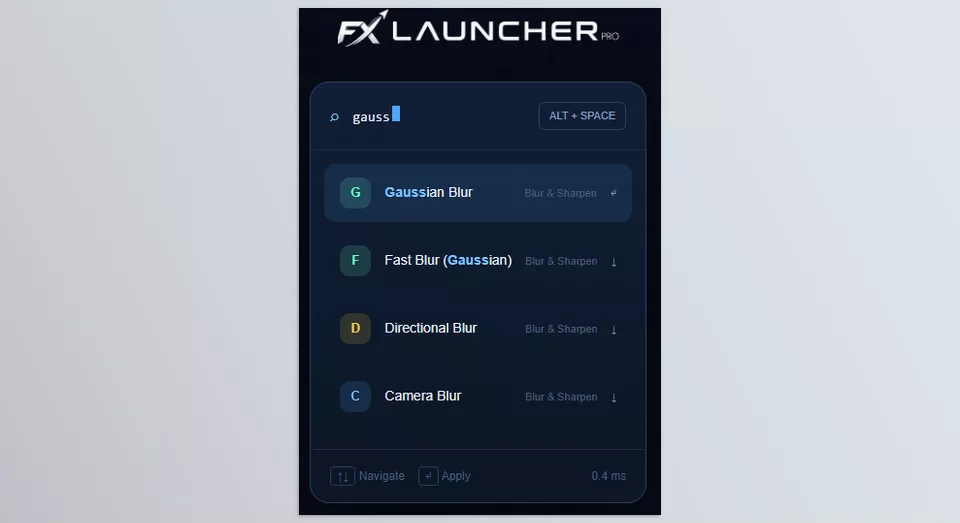
FX Launcher Pro is a tool for Adobe Premiere Pro designed to drastically shorten the path to effects, transitions, and commonly used tools. Instead of opening the Effects panel and navigating through long categories and lists, you simply press a shortcut — Alt + Space — and instantly open a fast search bar where you can type whatever you need.
In practice, this tool works like a smart Command Palette — a quick-access search window that’s always available and lets you reach what you want without leaving your editing workspace. As a result, your workflow remains uninterrupted, and your focus stays on editing rather than menu navigation.
⚙️ The Most Important Things FX Launcher Pro Does for You
🔍 Fast Effect Search
Instead of scrolling through hundreds of effects, you simply type the name, and it instantly appears. You don’t even need to know the exact name.
🧠 Smart Search (Fuzzy Search)
Even if you mistype something or only enter part of the name, it still predicts what you meant and shows the correct result.
⚡ Stay Inside Your Editing Flow
You no longer need to constantly open and close panels or leave your workspace. Everything happens instantly during the editing process.
🚀 Faster Overall Workflow
Because the time spent searching for effects is almost eliminated, your overall editing speed increases significantly — especially in heavy projects.
🎬 A Simple Example of Using It
Imagine you’re editing a commercial video and want to add a Blur effect.
Instead of doing this:
- Opening the Effects panel
- Finding the Blur & Sharpen category
- Scrolling through multiple similar options
You simply do this:
- Press Alt + Space
- Type:
blur - The results instantly appear
- Select the effect — done ✔️
💡 What’s the Result?
In practice, FX Launcher Pro doesn’t change Adobe Premiere Pro itself, but it dramatically shortens the distance between decision → execution. That means you spend less time searching for tools and more time focusing on editing and creativity.
🔚 Do You Really Need It?
FX Launcher Pro is not meant to completely reinvent video editing or add a revolutionary feature to Adobe Premiere Pro. What it does exceptionally well is reducing the gap between “wanting an effect” and “applying it.” On the surface, that may sound simple, but in real-world editing, it means fewer interruptions and less wasted focus.
When working on professional projects, even saving a few seconds each time you search for an effect eventually adds up to a significant amount of time saved. More importantly, you stay inside your creative zone instead of constantly breaking your concentration by navigating menus.
FX Launcher Pro is ideal for individuals who work heavily with Adobe Premiere Pro and require a smoother, more professional editing experience. For those who do not work extensively with Premiere Pro or have no issues with focus and editing projects, the built-in editing software is well-suited to meeting your editing needs.
If you’re also a DaVinci Resolve user and you’re looking for ways to make your editing workflow faster, smoother, and more professional, we strongly recommend checking out our detailed article on the best Premiere Pro tools and features you shouldn’t miss.