

Introduction
If you work with After Effects or Premiere Pro, you’ve probably heard of AtomX. It’s a very popular extension, especially because many AtomX products make working with transitions, effects, and various presets much easier.
But if the name is still new to you and you want to get more familiar with it first, you can check out our AtomX article where we fully explain what AtomX is and how it works.
What’s really interesting is that some products are specially made for AtomX. This means that in their folder, besides the usual files like .aep or footage, you’ll find a file with the .atom extension. This single file allows all the contents of that product to be neatly and ready-to-use displayed inside the AtomX panel, so you don’t have to open projects one by one.
In this article, I want to explain more precisely what a .atom file is, why its existence is so important, and what advantages it has for us editors, and then I’ll introduce some of the best AtomX products.
2. What is a .atom file?
A .atom file is actually a proprietary format designed specifically for AtomX. Simply put, this file acts like an all-in-one package for editing and effect products.
Its main role is that when you open it in the AtomX panel, all the contents of the product—like .aep projects, footage, transitions, and presets—load in one place. This means you no longer need to open each file individually and search for them.
The main advantages are clear:
- High speed: Everything is ready and quickly accessible.
- Complete organization: All files and presets are neatly visible in the AtomX panel.
- Time-saving: No need to manually open projects or import files separately.
With a .atom file, the entire experience of working with an editing product becomes both faster and more organized. That’s why many AtomX products now include this file as a standard feature.
Comparing products with and without a .atom file
When you have an editing product, having a .atom file completely changes your experience.
Without a .atom file, you usually have to open each .aep project, search for compositions and footage, and manually locate file paths each time. Even using a simple preset can take a lot of time, with the risk of missing files or making mistakes.
But when a .atom file comes with the product, everything is ready like magic! All projects, presets, and transitions appear neatly in the AtomX panel, and you just drag & drop whatever you want onto the timeline. No need to open files one by one, and no worries about missing paths. When working with AtomX products, this improvement is even more noticeable because everything is fully optimized for the extension. Your workflow becomes much faster and more organized, making the entire editing experience much more enjoyable.
Top products with a .atom file
Now that we understand how much a .atom file can make our work easier and faster, it’s time to introduce some real products that include this feature. These AtomX products not only include ready-made projects and various presets but are fully integrated with AtomX, providing a hassle-free editing experience. For each product, we’ll highlight its features and why the .atom file is important.
Instagram Stories Big Pack
Among the most popular AtomX products, Instagram Stories Big Pack stands out for its variety and ease of use. This pack, with beautiful design, smooth and varied animations, and lively elements, makes your editing faster and your stories more attractive.
The pack includes over 300 ready-made stories in three different sizes (vertical, portrait, and square), as well as 80 backgrounds and 200 text titles, so you can easily customize them to your taste. Most importantly, this pack is supported by AtomX, so all files and presets are integrated in the AtomX panel and ready to use with one click.
Key features:
- Over 300 Instagram stories
- Compatible with After Effects CC 2018 and above
- Full AtomX support and integrated access
- One-click editing workflow
- Built-in Customizer for easy changes
- Simple installation and free updates

Shape Elements Library
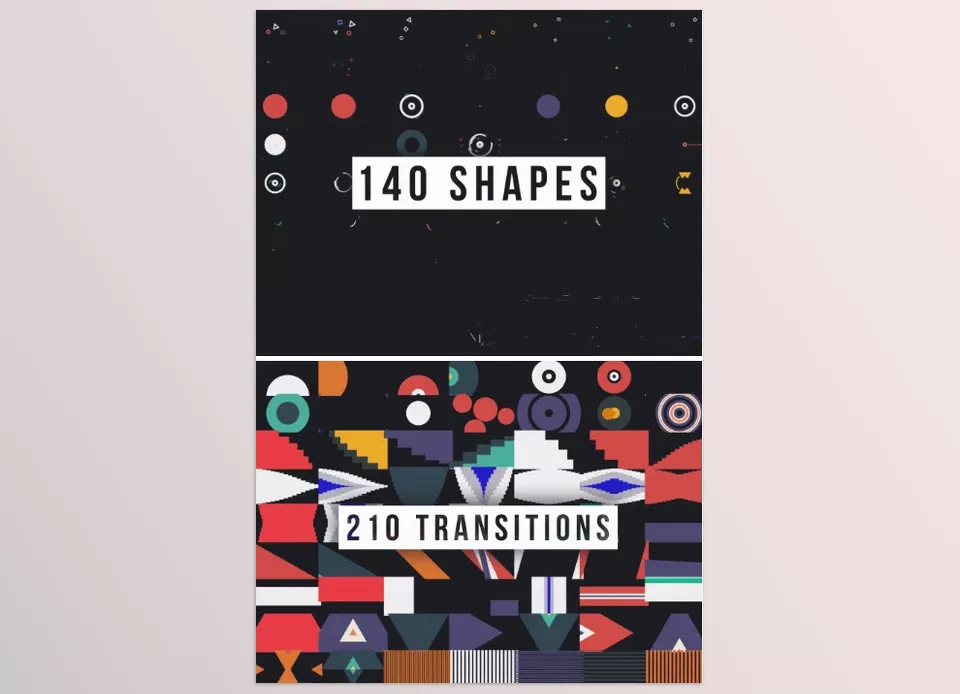
If you’re looking for a complete collection of shapes, transitions, and sound effects for After Effects and Premiere Pro, Shape Elements Library is exactly that. This pack includes 520 ready-made elements, consisting of 140 shapes, 210 transitions, and 170 sound effects, making your professional editing much faster.
A major advantage of this pack is AtomX support; all elements, transitions, and effects are fully integrated in the AtomX panel, and you can drag & drop anything you need onto the timeline with one click. All elements are resizable, you can easily adjust their duration, and even use them as Luma Matte.
Key features:
- 520 ready-made elements: 140 shapes, 210 transitions, 170 sound effects
- After Effects and Premiere Pro versions in one pack
- Full AtomX Extension support with live preview
- 100% resizable without quality loss (all vector elements)
- One-click duration control
- No additional plugins needed
- Full tutorials and documentation included
iBG | 300+ Loop Backgrounds
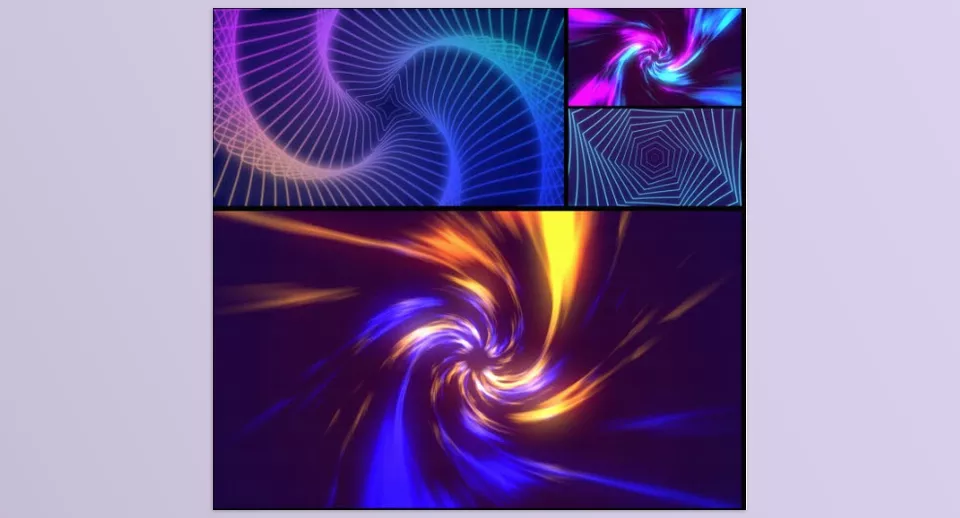
If you want AtomX products focused on diverse and professional backgrounds, iBG | 300+ Loop Backgrounds is an excellent choice. It includes backgrounds in categories like Abstract, Digital, Liquid Gradients, Particles, Plexus, Retro Wave, Neon, HUD, Glassmorphism, and many more, making your projects always attractive and eye-catching.
One of the key features of this pack is AtomX support. All backgrounds are accessible with one click in the AtomX panel, and you can easily adjust their length, speed, and resolution. Additionally, all backgrounds are loopable and usable at any resolution.
Key features:
- Complete background categories: Abstract, Digital, Liquid Gradients, Particles, Plexus, Gradients, Waves, Tunnels, Retro Wave, Flat, Neon, Kinetic, Liquid, HUD, Glassmorphism, Patterns, Dots
- Full AtomX Extension support and one-click use
- Compatible with Windows and MacOS
- Fast and easy installation
- Speed control for all backgrounds
- Loopable with unlimited length
- Quick editing with AtomX Customizer
- Free updates and 24/7 support
Titles and Lower Thirds Pack // 555+ Animations
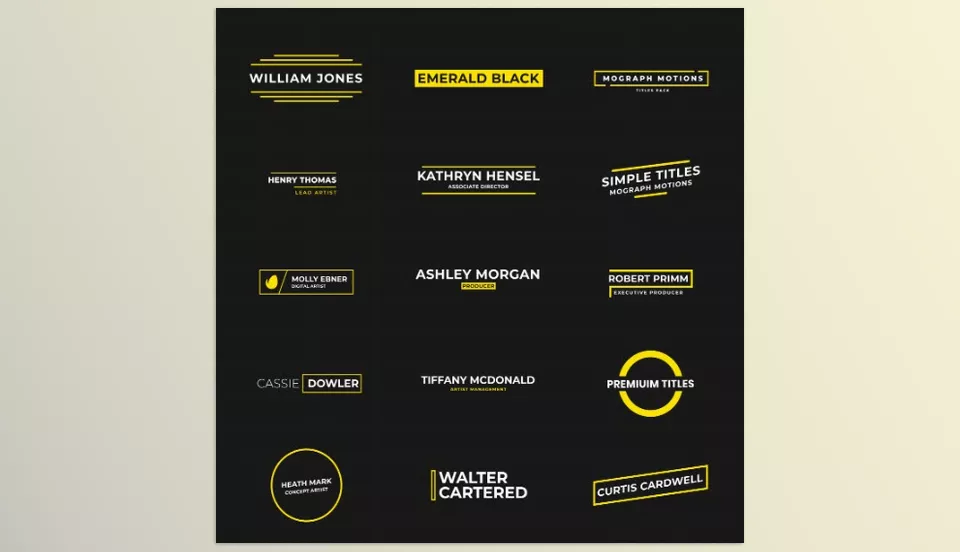
If you’re looking for a comprehensive and diverse collection of titles and lower thirds, 555+ Essential Titles & Lower Thirds Pack is exactly that. This pack includes over 555 ready-made titles in styles like Simple, Fashion, Urban, Minimal, Big, Wedding, Elegant, Corporate, and many more, making your projects professional and attractive.
All these titles are compatible with the AtomX Extension, so you can add animations with one click and control their in/out speed. Titles automatically adjust to the composition size and are suitable for Windows, MacOS, and After Effects and Premiere Pro 2018 and above.
Key features:
- Over 555 ready-made titles and lower thirds
- Full AtomX Extension support
- Quick installation (2–3 minutes)
- One-click animation addition
- Control in/out speed of elements
- Free updates and 24/7 support
- Compatible with Windows and MacOS
- Compatible with After Effects and Premiere Pro 2018 and above
- Auto-sized to fit composition
Whether it’s Instagram Big Pack, 520 Elements Pack, Ultimate Backgrounds Pack, or 555+ Essential Titles & Lower Thirds Pack, these AtomX products all have one thing in common: the .atom file, which makes using them incredibly easy and fast.
These products take your editing to the next level: all projects, presets, transitions, effects, backgrounds, and titles are neatly ready in the AtomX panel, and with one click, you can drag & drop whatever you need onto the timeline. No more searching for files, opening projects, or locating paths.
Final Summary
The .atom file is a small but powerful tool that significantly simplifies working with After Effects and Premiere Pro. This file incorporates all projects, presets, transitions, backgrounds, and titles, and is available directly in the AtomX panel, which means you no longer have to open files individually or hunt for elements.
As we’ve seen, various products, like Instagram story packs, graphic element collections, backgrounds, and titles, with .atom support, provide a fast, organized, and hassle-free professional editing experience. This means you can focus entirely on creativity and design, not file and project management.
Therefore, always search for a .atom file when sourcing professional packs and products. Not only will this file make your life easier, but it will also enhance your editing speed and efficiency exponentially.





