

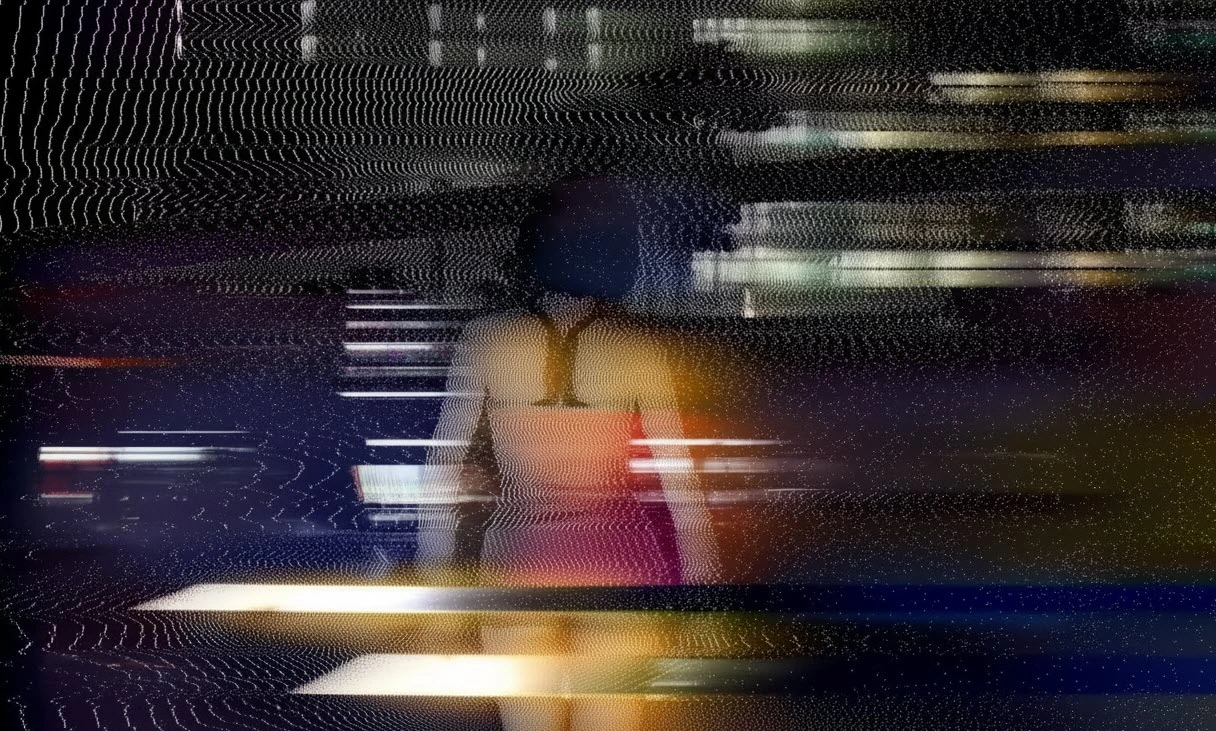
Waves That Bring Your Image to Life
Curious about what the Modulation plugin can really do? Imagine you’re working on a music video; a track that’s fast-paced and full of energy, where each note flows through the image like a wave. Now imagine if the image itself synced to that rhythm — it shakes, ripples, breathes.
It’s no longer just a flat picture, it’s a living entity moving with the music.
Those moments when lights scatter, image lines rise and fall like old TV waves, and colors start dancing — it gives the piece a unique feel… an analog, nostalgic yet modern vibe.
Many in motion graphics seek this charm — that the image doesn’t just “move,” but has a soul. Yet the reality is, manually creating these effects in software like After Effects is time-consuming and frustrating. You have to combine countless layers and effects just to get something resembling that old-school signal vibe.
This is where a good tool makes a real difference — one that understands what a “wave” truly is and can inject that living, physical feel into your image.

⚡ What Does Modulation Even Mean?
Let’s think for a moment about old radio or TV signals. Back then, audio and visuals were transmitted via electromagnetic waves. For example, when a scene was brighter, its wave oscillated faster; when darker, the wave slowed down. This means the image’s brightness affected the wave’s behavior — a process called modulation.
Simply put:
Modulation is when one property (like image brightness) causes another signal (like a wave or frequency) to change.
Now imagine bringing this real wave behavior into the digital world. Your image isn’t just ordinary pixels anymore — it’s processed like a living signal, rippling, oscillating, breathing.
Colors are no longer just colors; each one is a wave with its own frequency.
The result? An image that reacts rather than simply “moves.”
Bright areas rise like the sharp notes of a synthesizer, and dark areas drop like bass lines.
This is why when you apply modulation to a video, the output feels like a fusion of digital art, radio waves, and a scene from a dream.
Modulation is, in essence, a physical language for images — a way to give them rhythm, depth, and texture.
And this is exactly what makes the technique so special and inspiring in motion graphics and video art.
🛠 You Can Create It, But at What Cost?
With After Effects itself, you can create wave or image distortion effects. For example, with some well-known effects:
- Wave Warp for simple wave creation
- Turbulent Displace for twisting and warping the image
- Displacement Map to control deformation with a separate layer
- Combining Glow, Blur, and Noise for a more analog visual feel
With these tools, you can simulate wave appearance, shake colors, and even create visual vibrations that work well in music videos.
But what’s the problem? These effects only mimic the wave’s appearance, not its real behavior.
In reality, you’re using filters and distortions to pretend the image is passing through a signal — but the actual conversion of brightness into frequency and physical wave response isn’t happening here.
That’s why, on closer inspection, the effect feels somewhat artificial.
The image may “shake,” but the natural, rhythmic breathing feel you’re looking for is hard to achieve.
Moreover, to get a good result, you need to create multiple layers, write expressions, apply masks, and tweak parameters one by one. A simple project turns into a crowded, heavy timeline that’s frustrating to control. After half an hour of tweaking, you might just wish there was a button to do it automatically…
Well, that button is exactly what you’ll discover in the next section 😉
Modulation Plugin — The Magic of Analog Signals
Now we’ve reached the exciting part! 😎
If you’ve ever struggled with creating natural, living waves in your image, it’s time to have a professional, ready-made solution: the Modulation plugin.
This plugin does exactly what manually would take hours: it transforms your image into a living signal that reacts to light and color.
✨ Key Features
- Complete wave control:
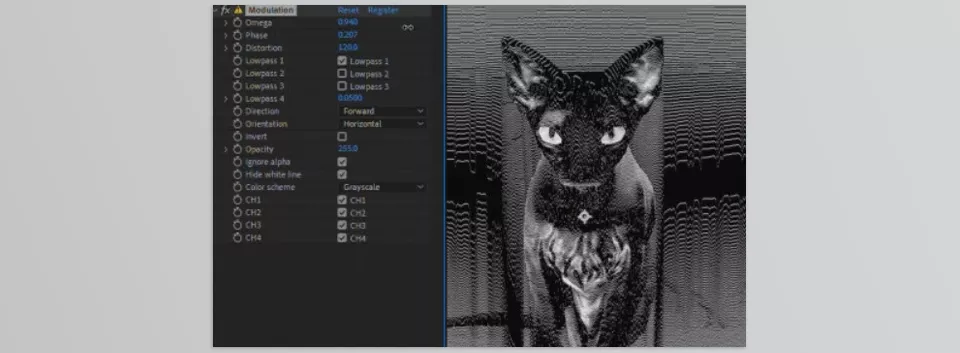
- Omega: Wave scale, determining the size and speed of wave oscillations.
- Phase: Determines how waves react to colors and brightness.
- Distortion: The number and complexity of waves for more image detail.
- Lowpass filters:
- Filters that soften waves and make them natural. Unlike standard blur, these filters simulate real analog wave behavior.
- Various color modes:
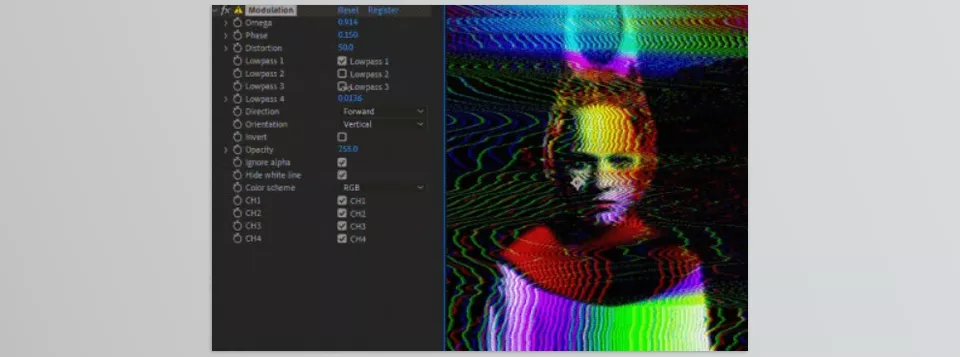
- RGB, CMY, CMYK, and HSV — control each color channel separately to create complex and interesting effects.
- Direction and movement:
- Waves can move horizontally, vertically, or even in reverse. Controlling this gives your image more rhythm and dynamics.
- Independent channels:
- Each color channel can be enabled or disabled for greater creative freedom.
- 🎬 Real-World Applications
- Music videos and VJing: The image syncs with the music rhythm and ripples live.
- Commercial teasers or digital art: The image takes on an analog signal and motion feel, both technological and artistic.
- Motion graphics and special scenes: Combining waves and colors produces results almost impossible to achieve traditionally.
With the Modulation plugin, you no longer need to spend hours juggling layers, expressions, and effects. A few sliders and parameter adjustments bring your image to life.
When applied to a video, your image doesn’t just move; it behaves live and reactively. Brightness and color in each part of the image stimulate waves, as if the image is “breathing” and living with its own rhythm. Lines and textures ripple naturally, and effects can range from subtle shakes to complex psychedelic wave patterns. The result is a visual output that’s both nostalgic and analog, yet modern and creative — a true “digital analog” feel that would take hours and countless layers to achieve manually, but with the Modulation plugin, it’s ready in just a few simple steps.
💡 Pro Techniques & Tips
- Playing with Lowpass Filter: Very low values (e.g., 0.004) make waves soft and natural. Combine with high Distortion to preserve wave detail at high quality.
- Adjusting Distortion and Phase: For complex, psychedelic waves, increase Distortion and change Phase so each color reacts differently.
- Choose the Right Color Mode: CMYK for precise Key color control and separate color blending, RGB for soft and transparent effects, HSV for a dynamic, vibrant color experience.
- Combine with Other Effects: Adding a bit of Glow, Chromatic Aberration, or Noise makes the image feel more real and analog.
- Wave Direction and Movement: Changing horizontal and vertical directions adds rhythm and depth, syncing with music beats.
- Channel Control: Turn individual color channels on or off for more creative, professional effects without complicating the project.
By following these tips, even a regular user can bring an image to life, surpassing the limitations of traditional methods.
🚀 Conclusion — When the Image Breathes
When working with images, we’re always chasing something special: movement, rhythm, life. An image without movement is like a still painting — beautiful but lacking real feeling. This is where the Modulation Plugin comes in, giving your work a real soul.
When you use the Modulation plugin, you are not stuck placing layers and effects and making various expression adjustments for hours on end. Instead, a few sliders make your image come to life; it becomes wavy and responsive, with true analog characteristics. Lines and textures move sensibly, colors begin to shift, and even static images take on a psychedelic, animated essence that would otherwise take years of experience and all day to accomplish.
Whether for music videos, video art, digital ads, or creative motion graphics, this tool makes your output more professional, engaging, and imaginative. Analog vibes and natural waves are transmitted to the viewer, delivering the exact experience you want — effortlessly and quickly.
Ultimately, Modulation is an easy but effective means of giving your image breath, a life of its own, a pulse to truly engage an audience. Any designer or motion artist trying to construct vibrant, wavy and visually appealing effects will certainly embrace this tool and elevate their work.
Modulation plugin is just one piece of the huge After Effects toolbox. For a thorough introduction to all kind of the tools, read our ultimate After Effects tools guide.



