


When You’re Searching for Ready-Made Content…
Have you had any experience using the Stock Search Pro? Whenever we’re creating a motion graphic or a video, we all face one big problem:
Finding the right video, image, or music always takes a lot of time! 😅
For example, in the middle of a project, you suddenly feel like a short clip or a specific image is precisely what you’re missing. That one particular scene, the perfect color palette, or a sound effect that could take your work to the next level.
But the real challenge is actually finding it…
Between different websites, long downloads, strange file formats, and varying quality levels, hours can slip by.
And worst of all, while you’re hopping between websites, your creative flow slowly starts to fall asleep. One moment, you realize you’ve opened five browser tabs and still haven’t found what you’re looking for — and you can literally feel time being wasted. 😬
Sometimes, after half an hour of searching, you finally realize that the video you liked either doesn’t allow commercial use or its quality is just too low!
In short, it’s a familiar feeling: right in the middle of the excitement of creating a project, you spend a considerable amount of time searching for stock content, and your creative energy slowly drains away.

Tools That Make Our Work Easier
Now imagine having a tool that lets you find all free stock content—images, videos, GIFs, icons, and even music—directly inside Adobe applications, without constantly switching between websites and your browser. 😎
For example, you’re working in After Effects and need a short background video for your project. With a simple search, you find exactly what you need and drop it straight into your project.
Your speed increases, and nothing interrupts your creative flow.
So Many Websites, Yet Nothing Gets Found!
The traditional approach to media resources is as follows:
- You visit sites like Pixabay, Unsplash, and Pexels, which have thousands of images and videos just waiting for you to find them. But finding a suitable clip takes at least half an hour and is a quality and resolution roll of the dice.
- After finding a file, download it and import it into your project. And sometimes the format isn’t even compatible with your software, forcing you to convert it. 😓
- The same story repeats for music and sound effects: different websites, different quality levels, and different licenses. Sometimes, after downloading several files, you realize you can’t use them commercially, or the length doesn’t match your project.
In short, the problem is clear:
The traditional workflow is slow and exhausting. A lot of time and energy is wasted, and your creative flow fades along the way. Even after all that effort, you might still not find exactly what you need. 😬
When a Professional Tool Steps In: Stock Search Pro
This is where Stock Search Pro comes in: it solves all those headaches we used to have when jumping between websites—all in one place. There’s no need to waste time downloading and converting formats anymore. 😎
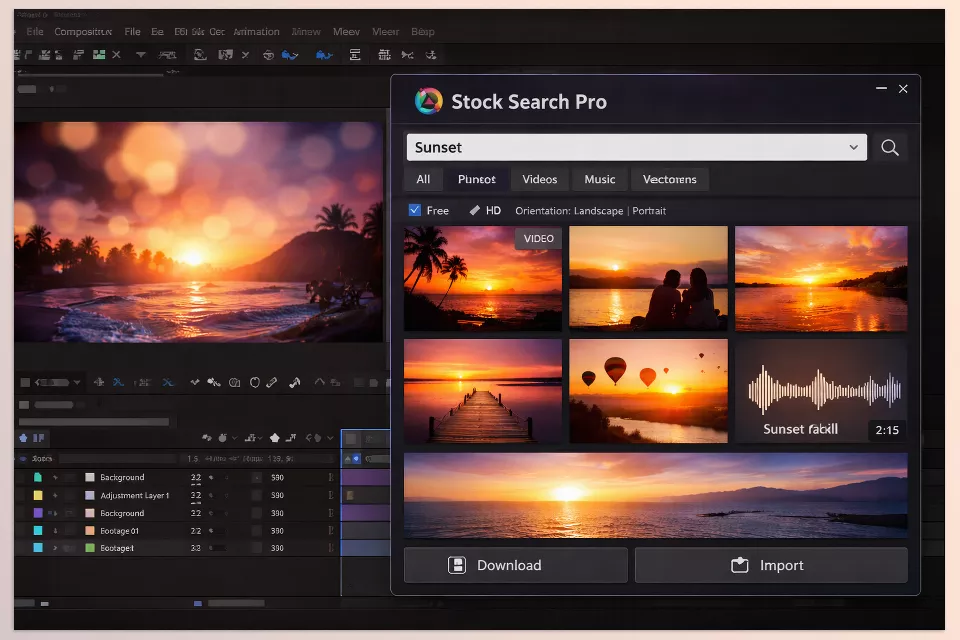
What Can You Do with It?
- Stock Videos
Any type of short or long video you need for your project—from nature and city scenes to promotional footage and flat motion—can be searched and imported directly into your project. - Images and Photos
High-quality images for backgrounds, project elements, or even design references. No more checking websites one by one. - GIFs and Short Animations
When you want to add movement and energy to your project or include small details like animated emojis and icons, everything is right at your fingertips. - Icons and Graphic Elements
Access ready-made icons and shapes directly inside your project without leaving the software. Perfect for UI design, motion graphics, and even presentations. - Music and Sound Effects
Find, download, and add music and sound effects directly. No more worrying about licenses—all content is free and cleared for commercial use.
Other Professional Features You Shouldn’t Miss
- Fast and Convenient Search
No more switching between multiple websites and browser tabs. Everything is available directly inside Adobe software. - Multiple Content Types at Once
Search and use videos, images, music, and GIFs simultaneously. - Advanced Search Filters
Filter by content type, resolution, video length and format, or image color and size. - Compatibility with All Adobe Apps
After Effects, Premiere Pro, Photoshop, Illustrator, and even InDesign. Everything in Creative Cloud is covered. - Regular Updates and New Content
The library is constantly updated, so new and free content is available whenever you need it. - Direct Import into Projects
No lost file paths and no need for additional format conversions. - Free and Legal
All available content is free and legally licensed, so you can create commercial projects without legal concerns.
With these features in mind, no matter what sort of project you’re working on, you can create much faster and focus your efforts on the parts of your video or animation that matter the most. No more worrying about file quality and licenses; with this tool you can create whatever you want without thinking about licenses or file formats. Only focus on creating, as using Stock Search Pro means the rest of your production process will be smooth.
Pro Tips for Better Results
If you want to get the most out of Stock Search Pro, following a few simple tips can make your workflow much smoother and more professional:
- Use Short and Precise Keywords
Instead of long, complex searches, use short, targeted keywords to get results faster. For example, instead of “beautiful nature video with sun and trees,” just type “sunset forest” or “mountain lake.” - Check GIF and Icon Size & Resolution
Before downloading, make sure the file size and resolution fit your project so the files don’t become too large or lose quality. - Verify “Royalty-Free” Music
Always check the Royalty-Free option to ensure you can use music and sound effects in commercial projects without future licensing issues. - Create a Central Project Folder
Keep all downloaded files—videos, images, GIFs, icons, and music—in one organized place. This makes them easy to find whenever you need them. - Focus on Creativity, Not Downloads
By following these tips, you won’t waste time searching through files and websites, and you can put all your energy into design and motion graphics.
By following these tips, you’ll be able to use Stock Search Pro more effectively without wasting time looking for files or wasting energy on design and motion graphics!
Why Is Stock Search Pro Worth It?
If you want to speed up your workflow, make your projects look more professional, and keep your creative energy high, this plugin is definitely worth trying!
With this tool, projects move faster, all files are organized and ready to use, and quality, format, or licensing issues never become a problem.
By using Stock Search Pro, you no longer need to struggle between websites and browser tabs or download and convert countless files.
Rather, you can get exactly what you need (videos, images, GIFs, icons, and music) right in front of you and stay focused on what really matters.
Even more importantly, you can select and use multiple content types (like video and music) at the same time while working on a motion graphic!
Looking for a way to make After Effects more fun, efficient, and powerful? Our in-depth AE guide explains all the essential plugins, scripts, and workflow enhancers in a friendly, easy-to-follow style.





