

Why Is Video Editing Still Exhausting for So Many People? 🎬
Have you ever tried working with Filmora? These days, almost everyone deals with video content in some way — from creating content for Instagram and YouTube to making educational videos, advertisements, or even personal projects. But despite how important video creation has become, editing is still difficult, time-consuming, and sometimes even frustrating for many people 😅
Sometimes, you just want to prepare a simple video, but suddenly you find yourself surrounded by countless panels, complicated settings, and confusing tools. And if you don’t have a powerful system or much experience, things get even harder.
The truth is, most users are not looking for ultra-professional cinematic software. Most of them simply want to get results faster without sacrificing quality. That exact need led to the rise of a new generation of video editing tools designed to make content creation simpler and smarter 🚀

What Exactly Is Smart Video Editing? 🤔
A few years ago, if you wanted to create a professional-looking video, you probably had to spend a lot of time learning specialized software. But now, the concept of “smart editing” has entered the scene, meaning that many tasks that used to be manual and time-consuming are now automated or significantly simplified.
For example, imagine wanting to add subtitles to a video. In the past, you had to manually type and sync every line of text. But now, some tools can recognize speech and automatically generate subtitles.
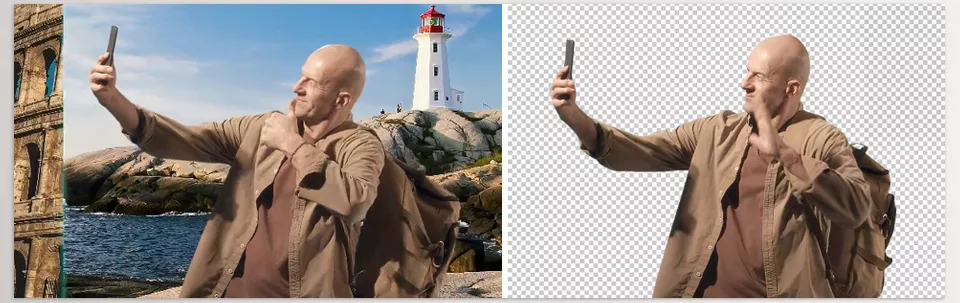
Or when it comes to removing backgrounds, you no longer always need a green screen. Some software can now handle it using AI.
These features have become especially important for content creators, YouTubers, and Instagram pages because they dramatically speed up video production. In a world where content needs to be published quickly, saving time has real value ⏱️
How Did Editors Work Before These Tools? 🛠️
Before simpler and AI-powered tools became popular, most editing work was done in software like Adobe Premiere Pro, Adobe After Effects, or DaVinci Resolve.
These programs are still incredibly powerful and widely used in professional film and advertising projects, but for many regular users, they’re simply too complex.
For example, if you wanted to remove a video background, you often had to use rotoscoping — a process that was both time-consuming and highly detail-oriented. Or if you wanted to create attractive motion graphics, you had to spend hours working with keyframes and advanced settings.
Even adding effects wasn’t always easy. Many editors had to install separate plugins just to achieve the look they wanted. On top of that, many of these programs require powerful hardware and don’t run smoothly on average laptops 💻
That’s why many users gradually moved toward tools that could balance “simplicity” with a “professional-looking result.”
What Does Filmora Actually Make Easier? ✨
Wondershare Filmora was designed to turn video editing from a complicated and lengthy process into something faster and easier to understand.
Instead of spending hours dealing with heavy software and complicated settings, you can focus more on the actual content creation process.
The reality is that Filmora is more than just a “video editor.” It’s more like an all-in-one content creation tool. From simple editing to effects, audio, text, and even AI-powered features, everything is built into a single platform.
A User Experience Simpler Than You Expect 😊
When you open Filmora, you quickly realize that everything is designed for convenience. There are no overwhelming panels or intimidating settings.
A typical workflow usually comes down to just a few simple steps:
- Importing files
- Arranging clips on the timeline
- Adding text, music, or effects
- Exporting the final video
This simplicity is exactly why many beginners can start using it without long training sessions.
Tools That Actually Speed Up Your Workflow ⚡
Filmora isn’t just simple — it also includes tools specifically designed to save time.
For example, you can easily:
- Change video speed
- Create slow-motion effects
- Use keyframes for smooth and professional movements
For color and lighting adjustments, it also provides ready-made tools to transform raw footage into cleaner, more polished footage.
Ready-Made Effects and Motion Assets — Without the Design Hassle 🎨
One of the reasons Filmora became so popular is that you don’t have to create everything from scratch. Many elements are already prepared and ready to use.
For example:
- Clip transitions
- Text animations
- Visual effects
- Ready-made filters
- Simple graphic elements
This means that even without much experience, your videos can quickly look far more professional.
AI Tools That Actually Help 🤖
This is where things get really interesting. Filmora’s AI tools are genuinely built to save time.
Some of the most useful ones include:
- Background removal without a green screen
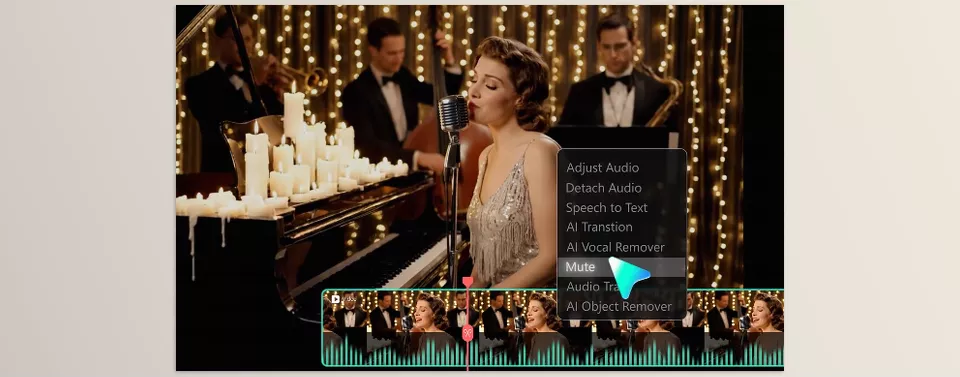
- Automatic subtitle generation
- Audio noise reduction
- Text-to-Speech conversion
- Speech-to-Text conversion
- AI-powered thumbnail creation
These tools allow tasks that once took hours to be completed in just minutes 🚀
Why Is It So Popular for Social Media? 📱
The main reason Filmora became so popular is that it aligns perfectly with the needs of modern content creators.
For example, when preparing videos for different platforms, you can quickly change aspect ratios and formats. Some tools even help keep the subject inside the frame automatically — especially useful for vertical videos.
Important Use Cases for Content Creation 📱
Wondershare Filmora is mostly used for fast, everyday content creation. For example, many users create Instagram Reels with it because editing is quick and it’s easy to add text, music, and attractive effects. It’s also a popular choice for YouTube creators — especially people producing tutorials, vlogs, or simpler content who don’t want to deal with the complexity of heavier editing software. The same goes for YouTube Shorts since converting videos into short vertical formats is very easy.
On the other hand, it’s also highly practical for educational videos, as users can manage visuals, audio, and subtitles all in one place to create clean, understandable content. Even many freelancers use Filmora for quick projects where delivery speed and acceptable quality matter most 🎥
This tool is primarily designed for people who want to edit faster, face fewer technical complications, and still achieve clean, professional-looking results. And that exact combination of simplicity, ready-made assets, and AI tools is what made it so popular among content creators ✨
A Few Tips That Make Your Videos Look More Professional 🎯
Even though Wondershare Filmora makes editing much easier, there are still a few important details that can dramatically improve the final quality of your videos.
These are the small details that separate average work from professional-looking content.
- Using too many effects and transitions usually makes the result worse. Simple, clean videos often look far more professional than overly flashy and crowded edits.
- When using text animations, it’s better to keep things balanced. Short, smooth, and minimal text animations usually work better than fast, bright, and distracting ones that steal the viewer’s attention.
- AI tools are meant to speed up the workflow, not replace creativity. The core idea remains the most important part of the project, and without a strong concept, even the best tools won’t produce exceptional results.
- Choosing the right music has a much bigger impact on a video’s mood than most people realize. Even a simple video can feel far more professional with the right soundtrack.
- Never underestimate editing rhythm. The timing of cuts and how long each shot stays on screen directly affects how engaging the video feels and whether viewers stay or leave 🎬
Ultimately, great editing depends less on complicated tools and more on how much attention you pay to detail and to the overall feel of the video.
When those things are combined with a simple and fast tool like Wondershare Filmora, the result can easily become much better than you initially expected.
The rest simply comes down to practice and gradually developing your own editing style — that’s when videos truly start to come alive ✨
Filmora: A Simple Choice for Professional Results ✨
The truth is, Wondershare Filmora is not meant to replace highly professional tools like Adobe Premiere Pro or DaVinci Resolve — and that’s not its goal at all. This software is designed for people who want to create clean and decent-looking videos quickly, without getting overwhelmed by complicated workflows.
Simply put, Filmora’s biggest advantage is that it greatly shortens the distance between an “idea” and the “final video.” Tasks like adding subtitles, removing backgrounds, adjusting colors, or preparing videos for social media can all be done much faster and more easily, helping you stay focused on the content itself rather than technical complications.
That’s why, for anyone who wants to get into content creation or simply speed up their workflow, Filmora is a completely reasonable choice. It helps you achieve results that work perfectly well for most everyday and content-related projects — without needing a steep learning curve ✨
Filmora is mainly focused on speed and simplicity, but for more professional projects such as commercial editing, documentaries, or cinematic productions, many editors still rely on Adobe Premiere Pro or After Effects. If you’d like to better understand the differences between these two tools, we recommend checking out our full article about Premiere Pro Tools and After Effects Tools as well.

