


🎬 When Layouts Become More Complicated Than They Should Be
Do you have any experience with the Grid Composer Plugin? If you’ve worked in After Effects before, you’ve likely worked with the Grid or Grid Layout at least once. It starts to seem simple when you first look at the Grid, but as you begin to explore the various elements of the Grid, you realize just how complicated some of the tasks are within the composition of a Grid.
Things get even harder when you want to make a small change midway through the process. For example, changing the number of columns or adjusting spacing usually doesn’t affect just one section — it forces you to redo several previous steps. That’s exactly where the workflow quickly stops feeling creative and turns into a repetitive and exhausting process 😵💫
While design should naturally feel fast, fluid, and full of creative experimentation, this part of the workflow is usually more technical and mechanical than the actual design. Instead of focusing on ideas, you end up spending most of your time organizing and aligning elements ⚙️

🧩 Why Are Grids So Important?
Grids are one of the foundations of design in motion graphics. Once you place your elements within a Grid, your composition immediately begins to look much cleaner and more professional. Even if your design elements are relatively simple, using a Grid will make your motion graphics project appear more finished and complete.
From showreels and portfolios to UI motion and social media posts 🎨, grids are used everywhere because they help keep everything organized, visually appealing, and manageable. But the interesting part is that achieving this seemingly simple level of order is usually not that easy, and it often takes a lot of time and energy to make everything sit perfectly in place.
⚙️ What Happens When You Try Doing This Without a Dedicated Tool?
Normally, and without using any plugins, After Effects already provides almost all the tools needed to create grids and layouts. You can combine different built-in tools and eventually get the result you want — the process is just much more manual, and you have to build and control everything yourself.
These methods usually include:
- Creating rectangles with Shape Layers
- Using the Align Panel to align layers
- Working with Guides and the Grid inside the composition
- Managing structure through Pre-compose
- Manually duplicating and repeating layers to create patterns
😵💫 So Where’s the Problem?
The problem is that even though all the tools exist, the entire workflow remains completely manual. That means even the smallest change can disrupt multiple sections of the project and force you to redo previous adjustments. This becomes especially frustrating in larger projects or more complex grids, where the workflow quickly loses its creative edge and becomes repetitive, time-consuming, and exhausting.
🚀 What Exactly Does Grid Composer Do?
This is where Grid Composer steps in, transforming the entire process of creating grids in After Effects from a manual, repetitive task into a fast, visual experience. Instead of constantly dealing with layers and technical adjustments, you work directly with the structure itself and instantly see the result in real time.
⚡ Main Features and Capabilities
🧩 Fully Visual Workflow
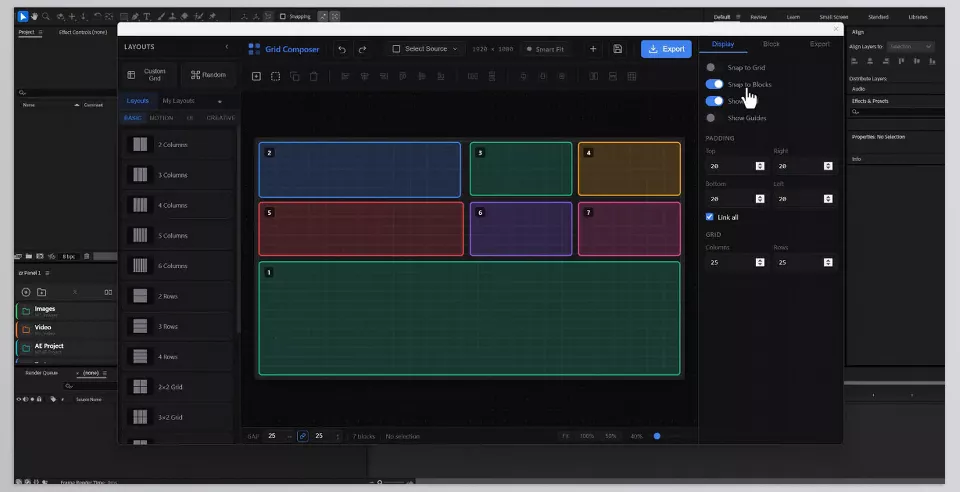
Instead of manually building layers, everything is designed in a graphical environment where you can see the result in real time. This gives you a much stronger sense of control over the entire composition without getting lost inside the timeline.
✨ Live Grid Editing
Any changes you make to columns, rows, gaps, or block sizes are instantly applied to the output. This allows you to quickly test multiple variations and choose the best one without having to rebuild everything from scratch.
🎲 Freedom to Create Different Layouts
From perfectly structured grids to random, hybrid, or even asymmetrical layouts, the tool gives you complete freedom. This is especially useful during the ideation stage, when you’re searching for a specific visual feeling rather than simply using a fixed layout.
✂️ Structure and Division Control
You can split any block horizontally or vertically and even create sub-grids without breaking the overall structure. This gives you much more flexibility for complex designs.
📐 Precision Tools for Cleaner Designs
Features like Gap, Padding, Snap to Blocks, and alignment guides help keep everything perfectly organized. That frustrating feeling of things becoming unintentionally messy becomes much less common here.
📦 Fast and Smart Block Management
The ability to duplicate elements in multiple directions (up, down, left, right, or relative to the center) helps structures come together much faster, especially in large projects.
📚 Presets and Quick Start
The plugin includes a library of ready-made presets organized into four different categories. You can either use them directly or save your own setups for future projects.
📤 Multiple Output Types for Different Projects
Depending on your needs, you can generate outputs as Shape Layers, Solids, Masks, nested Compositions, or even Comp + Alpha Matte setups. This flexibility makes the tool useful across many different project types.
🎞️ Built-in IN/OUT Animations
The plugin comes with ready-made animations for element entrances and exits, with adjustable order, speed, and easing. This means a large part of the motion work is already prepared for you.
🎛️ Full Grid Control with Dynamic Master
Using a Null Controller, you can control the entire grid, including resizing, modifying, or animating it live. This feature is especially useful for professional workflows and complex projects.
Overall, Grid Composer feels less like a simple grid-building tool and more like a true “design shortcut.” It helps shift your focus away from repetitive structural tasks and back toward actual design and creative thinking. The result is both faster workflows and better control over the final output.

🧠 A Few Tips for Better Results
When working with Grid Composer, it’s very easy to jump straight into building complex and crowded structures. But in reality, using it properly usually leads to much cleaner and more professional results. These tips can help you work faster while keeping everything under control.
🎯 Start with a Simple Structure
Don’t rush into complex grids right away. Starting with a simpler structure makes it much easier to test, modify, and refine your layout. In many cases, simplicity itself creates a more professional result.
🎨 Use Presets for a Faster Start
Presets are not just there for convenience 😄 — they’re mainly there to help you get started quickly. After that, you can customize and refine them to match your own style.
🎲 Take Random Layouts Seriously
Random Layout isn’t just for experimentation. Some of the best ideas can actually come from these unexpected structures. It’s especially useful when you’re stuck and don’t know how to start.
📐 Finalize the Structure Before Animating
Before moving into animation, make sure your grid is correct in spacing, alignment, and overall structure. Even small issues at this stage become much more noticeable later during animation.
⚙️ Don’t Be Afraid to Use the Simpler Features
You don’t need to make everything overly complicated from the beginning. Often, using only Gap, Padding, and Duplicate is enough to achieve a very clean result without delving into advanced settings.
Overall, this tool works best when you approach it step by step instead of rushing through the process. The cleaner your initial structure is, the more freedom you’ll have later for creativity 👍
✨ When Building Grids Stops Feeling Like a Chore
Grid Composer is more than just a simple plugin — it’s a tool that makes the design workflow inside After Effects significantly faster and smoother. Especially when working with complex layouts, multi-layered projects, or various layout systems, you start realizing how much time was previously wasted on repetitive and exhausting tasks.
What truly makes Grid Composer useful is how it shifts your focus away from technical adjustments and small repetitive tasks, allowing you to stay focused on design and creative thinking instead ✨. When building grids, adjusting spacing, creating divisions, and even handling part of the animations become this fast, your creative freedom naturally expands.
If you frequently work on showreels, UI motion, portfolios, or grid-based projects, Grid Composer quickly becomes one of those tools whose absence you genuinely start to feel 😄 — because besides speed, it also brings a much higher level of organization and control to the entire design process.
Tired of watching long tutorials that make simple things feel difficult? Our After Effects Tools guide focuses on practical tools and straightforward explanations that help you save time while editing. Visit the guide now and discover easier ways to improve your After Effects projects.



