

Artificial Intelligence and the New World of Video Editing
AI Video Editing transforms how professionals and amateurs alike will approach creative projects in the future. Artificial intelligence has transformed the landscape of video editing. What used to require painstaking hours—restoring old footage, reducing unwanted sound, and face swapping in a single video—is now done in minutes. Smart tools can accomplish these tasks with just a few clicks, producing results that previously only professional editors could achieve.
From easy format conversion and downloads to quality enhancement and upscaling without loss, or even creating creative videos with face swapping, AI software has made video work accessible to everyone. In the following article, we will introduce the best AI tools for video and explain exactly what each one is used for and which types of projects they are best suited for.
Now that we’ve seen the significant impact of AI on video editing, it’s time to get familiar with the software that is most widely used and can cover various needs.
Digiarty Winxvideo AI – An All-in-One Video Toolbox
Among the most practical AI Video Editing tools is Digiarty Winxvideo AI. Digiarty Winxvideo AI acts like a creative partner; AI software that does much more than a simple video converter. Let’s look at its applications:
- Video Quality Enhancement (AI Super Resolution)
- Can upgrade old or low-quality videos to 4K or even 8K.
- Uses smart models like Gen Detail v3, Real Smooth v3, Anime, and Zyxt to make images sharper, clearer, and details more natural.
- Processing speed is up to 80% faster than previous versions, with optimized GPU/CPU usage.
- Video Stabilization (Video Stabilization AI)
- Reduces shakiness in handheld or action videos, ideal for mobile or action footage.
- Offers different modes to balance quality and cropping according to your needs.
- Frame Rate Enhancement (Frame Interpolation AI)
- Allows you to increase a 24 or 30 fps video to 60, 120, or even 480 fps without quality loss.
- Makes motion smoother and adds a cinematic effect.
- Comprehensive Conversion and Processing
- From easy format conversion (video, audio, image) to compression, trimming, screen recording, and even simple editing—all in one place.
- Supports over 370 input formats and 420 output formats, including MP4, MKV, HEVC, and profiles for YouTube, Facebook, devices, etc.
- Smart Compression
- Reduces video file sizes by up to 90% without noticeable quality loss—perfect for fast sharing on messaging apps or websites.
- Easy Recording and Editing
- Allows screen or webcam recording with PIP (picture-in-picture) and green screen.
- Includes basic editing tools such as subtitles, watermarking, cropping, and effects.
Topaz Video AI Pro – Professional AI Video Enhancement Tool
Topaz Video AI Pro is one of the most advanced AI video editing tools, designed for professionals and content creation teams. Its applications include:
- Resolution and Image Clarity Enhancement (Upscaling up to 24K!)
- Can upscale low-quality videos to 4K, 8K, and even 24K without introducing noise or losing details.
- Powerful models like Starlight Mini (the first locally-run diffusion model for video restoration) enhance quality naturally.
- Noise Removal and Detail Refinement (Denoise & Sharpen)
- Trained on millions of frames, it can distinguish between noise and real details, improving video quality to cinematic levels.
- Stabilization
- Reduces camera shake in handheld or action footage without affecting edges or details.
- Frame Rate Enhancement and Smooth Motion (Frame Interpolation / Slow Motion)
- Converts frame rates and creates slow-motion using models like Chronos or Apollo, adding up to 16x more frames for ultra-smooth cinematic motion.
- Professional and Fast Workflow
- Pro version supports local processing without internet and multi-GPU use, boosting render speed up to 10x.
- Can run independently on Windows or Mac or as a plugin for DaVinci Resolve or After Effects for seamless integration into professional workflows.
- Professional Output with Wide Format Support
- Supports professional formats like ProRes, DNxHR, AV1, OpenEXR, and LOG files with LUT application.
- Outputs are high-quality with precise formats such as YUV 4:2:0/4:2:2/4:4:4 up to 16-bit per channel.
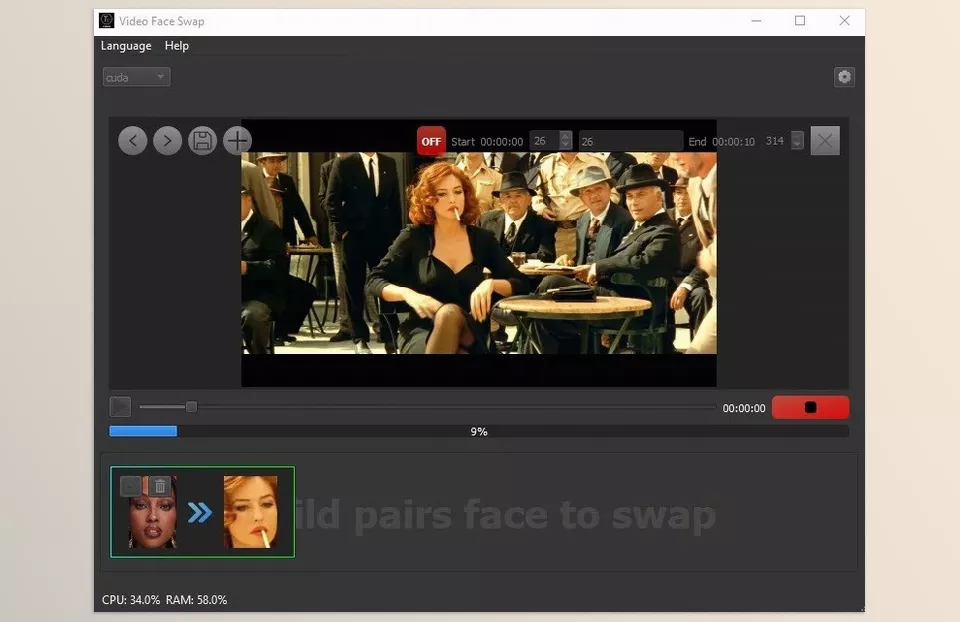
AI Video FaceSwap – Fun and Creative Face Swapping Tool
AI Video FaceSwap is an innovative AI Video Editing tool that uses AI to swap faces naturally and accurately. Its simple and user-friendly interface makes it suitable for both entertainment and more creative projects. Its applications include:
- Accurate Face Detection with AI
- Detects and maps faces even during movement or expressions, then replaces them with high-quality faces.
- Support for Multiple Video Formats
- Import and export videos in common formats such as MP4, AVI, or MOV.
- Simple and Intuitive Interface
- Easy to use even for beginners; just import the video, select the faces, and the software handles the rest.
- Live Preview Before Saving
- Allows previewing the result and making adjustments before finalizing.
- High-Quality, Watermark-Free Output
- Produces professional outputs without watermarks, ready for social media or projects.
- Offline Processing and Data Privacy
- All operations are performed locally, ensuring video security and privacy.
In general, AI has brought a major revolution to video editing, simplifying tasks like quality enhancement, stabilization, and creative effects. This technology allows even beginners to create professional and engaging videos without complex editing skills.
Quick Comparison of AI Video Tools
To make choosing easier, here is a compact table of key features, applications, and best-use cases for AI video editing tools:
| Feature | Digiarty Winxvideo AI | Topaz Video AI Pro | AI Video FaceSwap |
|---|---|---|---|
| Main Application | Download, format conversion, video enhancement | Resolution upscaling, noise removal, stabilization | Face swapping in videos |
| Quality / Resolution Enhancement | Up to 4K, detail enhancement | Up to 24K, cinematic quality | — |
| Noise Removal / Stabilization | Basic | Professional and precise | — |
| Frame Rate Enhancement / Slow Motion | Basic | Professional, smooth cinematic motion | — |
| Creative / Entertainment Use | Limited | Moderate | Excellent, for fun clips and creative projects |
| Ease of Use | Very simple and fast | Requires some experience | Simple and user-friendly |
| Format Support | Extensive | Professional and diverse | Common formats like MP4, AVI, MOV |
| Suitable For | Beginners and quick editing | Filmmakers and professional projects | Creative users and social media |
Conclusion and Tool Selection Guide
AI Video Editing has genuinely transformed the industry, making previously time-consuming tasks simple. From quality enhancement and noise removal to stabilization, frame rate improvement, and creative effects, AI enables everyone—beginners and professionals alike—to create attractive, high-quality videos.
Ultimately, the right tool depends on your goal:
- Topaz Video AI Pro: Best for enhancing video quality and resolution.
- Winxvideo AI: Ideal for downloading, format conversion, and quick, simple editing.
- AI Video FaceSwap: Perfect for creative, fun projects involving face swaps.
With these tools, anyone—from novice creators to professional teams—can produce videos that are visually impressive and of high quality. AI not only simplifies the editing process but also opens new creative and innovative opportunities for everyone.
To explore AI solutions for color grading in detail, make sure to read our article about AI Color Grading Tools.

