

Stress-Free Digital Art: Tools for Easy and Creative Creation
Maybe you’ve felt at some point that what you’re envisioning in your head isn’t coming across on your tablet screen, or you’ve spent hours on details and correcting adjustments only to find your final product isn’t what you hoped. Well, welcome to the club. Access to the right tools in digital art can be the make-or-break factor between frustration and enjoying the creative process. Brushes, as the heart of any digital design, play a vital role in this journey; they can simplify difficult and time-consuming work and quickly bring delicate details to life.
In this article, we’ll introduce five professional Photoshop brush sets, each with unique features and applications, that can solve your challenges in creating details, lighting, or textures. Whether you’re a beginner designer who needs simple, function-based tools or a veteran creator who requires a diverse array of options and more complicated details, this resource will help you shift your focus away from tools to ease of creation. Let’s make digital creation effortless and enjoyable and successful by equipping you with the right tools.
Photoshop Default Brushes: Capabilities and Limitations
Photoshop comes with a set of default brushes that serve as a good starting point for most users. These brushes include soft, hard, textured, and a few simple pencil or watercolor types, and they’re suitable for everyday tasks like quick sketches, color correction, or basic shading. While these default Photoshop Brushes are handy, they are often limited for professional work.
Advantages:
- Instant access: No need to install or download, they’re ready as soon as you open Photoshop.
- Simplicity and speed: Great for practice or simple projects, helping you work quickly.
- Lightweight and hassle-free: They don’t take up much space or slow down your system.
Disadvantages and Limitations:
- Limited variety: For advanced details like hair, skin texture, or special light effects, they fall short and often don’t look natural.
- Lack of customization: While you can adjust size, hardness, and opacity, creating fully custom brushes or complex effects isn’t possible.
- Time-consuming for professional detail: For complex portraits or landscapes, you’ll spend lots of time to achieve a realistic and appealing result.
In short, Photoshop’s default brushes are like a reliable base tool every digital artist needs. But when you want your work to be more realistic, faster, and professional, specialized third-party brushes come into play.
In the next section, we’ll review five professional brush sets and show how each can compensate for the limitations of default tools, making your work easier and more enjoyable.
Five Professional Brush Sets That Make Your Work Easier and More Enjoyable
After getting familiar with the limitations of default Photoshop brushes, you might feel stuck or unsure how to create professional, natural details. Don’t worry—this is exactly where professional photoshop brush sets can change your artistic life. Here we’ll introduce five brush sets that not only improve your speed and quality but also make digital creation more fun.
Gumrod – Basic Portrait Brush Set
Basic Portrait Brush Set is for those who want to create natural, professional digital portraits but are tired of time-consuming details. The main goal is to simplify the process of designing skin, hair, and shading without sacrificing quality.
- Skin Brushes: For smooth, natural skin, blending colors, and creating soft, realistic shadows.
- Shading & Highlight Brushes: To add depth and light to the face without complex layers.
- Hair Brushes: For soft, natural, detailed hair—long, short, wavy, or straight.
- Blending Brush: Helps blend colors and shadows seamlessly, avoiding harsh or artificial lines.
Uses:
- Creating natural, flawless skin in digital portraits
- Adding precise shading and highlights for facial depth
- Designing realistic strands or groups of hair
- Soft, professional blending of colors and edges
- Suitable for portraits, digital characters, and face studies
- Can be combined with professional or default Photoshop brushes.
Problem it solves:
If your portraits feel artificial or stiff, or if hair and skin take too long to design, this set acts like a professional assistant by your side. You focus on creativity and core details without worrying about complex tools or techniques.
Tamara Williams – Brush Bundle Photoshop
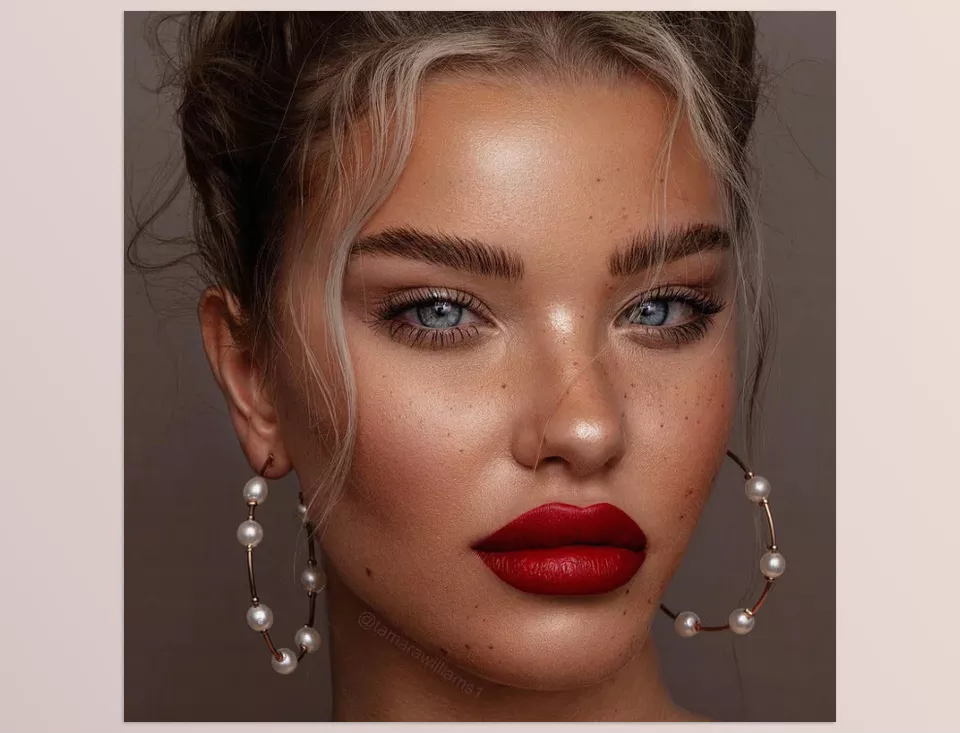
Designed for those who want to add fine details and natural effects without spending hours on complexity, Tamara Williams – Brush Bundle set makes photo editing and enhancement fast and easy—whether for portraits, fantasy, or conceptual images. These Photoshop Brushes make eye-catching details quick and simple.
- Catchlight: Adds natural sparkle to eyes for livelier portraits.
- Eyebrows & Eyeliner: For professional, precise eyebrow and eye-line design.
- Freckles: Creates natural freckles for realistic, attractive effects.
- Iris & Lashes: Enhances iris color and lash details without looking artificial.
Uses:
- Adding natural details to portraits without complex layering
- Enhancing features like eyes, brows, and skin
- Adding subtle but powerful touches that make portraits lively
- Perfect for photographers, graphic designers, and digital artists who want faster edits
Problem it solves:
If portrait editing feels time-consuming or unnatural, this set acts like a patient pro companion. It adds small but important details quickly and naturally, eliminating fatigue and confusion.
VisualsofJulius – The Complete Brush Bundle for Photoshop
VisualsofJulius – The Complete Brush Bundle is for artists who want to enrich their digital works with natural and artistic effects. If you’ve ever wished to easily add light, texture, or natural elements like water, fog, and clouds, this bundle makes it simple.
- Light & Particles: Scattered light, rays, atmospheric effects like fog or dust
- Water & Fire: Brushes for waterfalls, lightning, fantasy lights, fire
- Nature & Environment: Clouds, trees, birds, leaves, and other natural elements
- Small details: Particles, droplets, sparks, or tiny lights to bring scenes alive
Uses:
- Adding environmental and realistic lighting effects
- Creating landscapes and fantasy/natural scenes quickly
- Mixing fantasy and realistic elements without painting every detail
- Great for digital artists, game designers, or anyone wanting rich, eye-catching scenes
Problem it solves:
If adding natural or fantasy elements has ever looked fake or disappointing, this set is like a creative partner. You can add both major and subtle details quickly, avoiding frustration in scene creation.
Visuals of Julius – Brush Bundle V2
The second version of Julius’s brushes, Visuals of Julius – Brush Bundle V2, more powerful and diverse, designed to cover all your creative needs. If default or previous brushes felt limiting, this set is like a complete toolbox for stunning landscapes and scenes.
- Light & Atmospherics: Fog, scattered rays, aurora, rain, snow
- Nature & Environment: Trees, grass, plants, waterfalls, clouds, silhouettes
- Small & Fantasy details: Magical glows, fireflies, birds, hair, fur, complex textures
Uses:
- Building natural or fantasy scenes with rich detail, faster
- Adding realistic or magical effects without painting every element
- Perfect for digital artists, illustrators, game designers
Problem it solves:
If after hours of editing your image still lacks detail or life, this set helps you add professional effects quickly and with joy. It reduces fatigue and keeps focus on creativity.
Rossdraws’ Essentials Brush Pack (ABR)
Rossdraws’ Essentials Brush pack is like a loyal companion always by your side. A set of essential Photoshop Brushes that makes every project smoother. If starting a painting or finishing details often takes too much time, this pack keeps everything simple and smooth.
- Includes 9 core brushes and variations, total of 11 practical brushes
- Brushes suitable for skin, hair, shading, textures, and small details
- Comes with a usage guide explaining when and how to use each brush
Uses:
- Drawing portraits and characters with precise details
- Adding natural textures and shading easily
- Perfect for both beginners and pros wanting faster, higher-quality work
Problem it solves:
This pack eliminates the frustration of searching for the right tool and wasting time. You can focus on ideas and creation, working more calmly and enjoyably. No guessing or endless testing—the pack works like a professional assistant to help you get results faster.
Photoshop’s default brushes are good, but not always enough and can waste your time and energy. Professional sets like Gumrod, Tamara Williams, and Rossdraws’ Essentials exist precisely for this reason: to make work easier, save time, and free your creativity. These brushes are like professional companions, helping you bring ideas to life more quickly and effectively.
Which Brush Is for You? A Guide to Comparing and Choosing Photoshop Professional Tools
In this section, we’ll compare the five professional brush sets, looking at their uses, variety, ease of use, strengths, and limitations—so you can easily decide which suits your style and compensates for Photoshop defaults, making your work faster and more enjoyable. Comparing these Photoshop Brushes helps you choose the perfect tool for your style.
| Brush Set | Main Use | Variety & Count | Ease of Use | Strengths | Limitations |
|---|---|---|---|---|---|
| Gumrod – Basic Portrait Brush Set | Skin, face, hair | 15 brushes | Easy, good for quick work | Natural skin & shading, quick application | Limited for environments & special effects |
| Tamara Williams – Brush Bundle | Face, eyes, brows, fine details | Several specialized brushes | Medium, requires some learning | Fast, precise detail edits, perfect for portraits | Limited for environments & natural effects |
| VisualsofJulius – Complete Bundle | Light, particles, environments, effects | 60+ brushes | Medium to advanced | High variety, natural environments & effects | Beginners may need time to learn |
| VisualsofJulius – Bundle V2 | Light, effects, nature, hair, environment | 100+ brushes | Advanced, but includes training | Full coverage, unique works, ready-to-use tools | Large size may feel overwhelming |
| Rossdraws’ Essentials | Face, shading, base strokes | 11 brushes | Very easy & quick | Great for beginners & fast projects | Limited variety, needs complements for environments |
Each set has its own strengths and limits—none are “everything.” But together, they complement one another. These tools help you:
- Overcome Photoshop default limitations
- Increase speed and precision
- Make design more enjoyable and creative
The right choice depends on your style and needs, but the key point is: with the right tools, you can free your creativity and work with less fatigue.
End the confusion: find your perfect brush!
After reviewing and comparing five professional Photoshop brush sets, we can conclude each has unique strengths and uses. Depending on your needs, they can simplify and enrich your creative process.
- For natural skin & realistic portraits: Gumrod – Basic Portrait Brush Set saves you from time-consuming details.
- For fast, professional editing with eye & hair details: Tamara Williams – Brush Bundle lets you create realistic effects in one click.
- For environmental and natural elements like light, fog, and weather: VisualsofJulius Complete and V2 give you freedom and variety to make scenes lively.
- For a compact, practical everyday pack: Rossdraws’ Essentials Brush Pack is perfect to start or enhance your workflow.
Ultimately, these tools not only compensate for Photoshop’s defaults but also save time and deliver professional results, allowing creativity to flow freely toward valuable works instead of battling with software.
So, depending on your style, speed, and artistic goals, choose the best brush set and make your work easier, faster, and more delightful. With these carefully selected Photoshop Brushes, your digital art will reach its full potential.
If you want to level up your Photoshop skills, we recommend reading our complete guide on Photoshop tools.



