When Colors Gain Emotion
Have you ever checked out what the Analog Vision Studio can do? We all want our photos to convey a certain feeling—the same feeling we get when watching an old movie, as if time pauses for a moment. But achieving that same color, light, and depth in digital photography isn’t as easy as it seems. Have you ever wished your photos could look exactly like classic films, without spending hours struggling with color, light, and software sliders?
The problem is that even with the best cameras, capturing that authentic feeling is difficult. Working with software like Lightroom or Photoshop is a story of its own; adjusting color, contrast, and light sliders often results in images that are neither natural nor appealing. Shadow details and highlights are usually lost, and it consumes a lot of your time.
Now, imagine a simple way that, with just a few clicks, your digital photos could capture the exact mood and tone of classic films—natural, vibrant colors, rich tonality, and preserved shadow and highlight details. This is exactly what many photographers and designers are looking for, and it can elevate your photos from ordinary to professional.

Traditional Methods: When Everything is in Your Hands
Without a professional profile like Analog Vision Studio, you usually have to rely on traditional methods, some trial and error, and hands-on work with software.
Manual Editing in Lightroom or Photoshop
Most of us tweak color, contrast, and light sliders to achieve the desired look. But honestly, achieving that natural, cinematic feel is time-consuming, and without experience, the results are often mediocre.
Simple Ready-Made Presets
Presets can make the process easier, but results often look artificial. Sometimes, changes in lighting or camera settings can alter the colors, making the results inconsistent and less professional.
The Main Issue with These Methods
In short, without a professional profile, achieving that real, pleasing cinematic color and tonality takes hours. Even with effort, shadow and highlight details are often lost.
As the saying goes, traditional methods are a bit like painting with bare hands—it’s possible, but time-consuming, and the results rarely match what you want.
Product Introduction: Analog Vision Studio, the Color Wizard
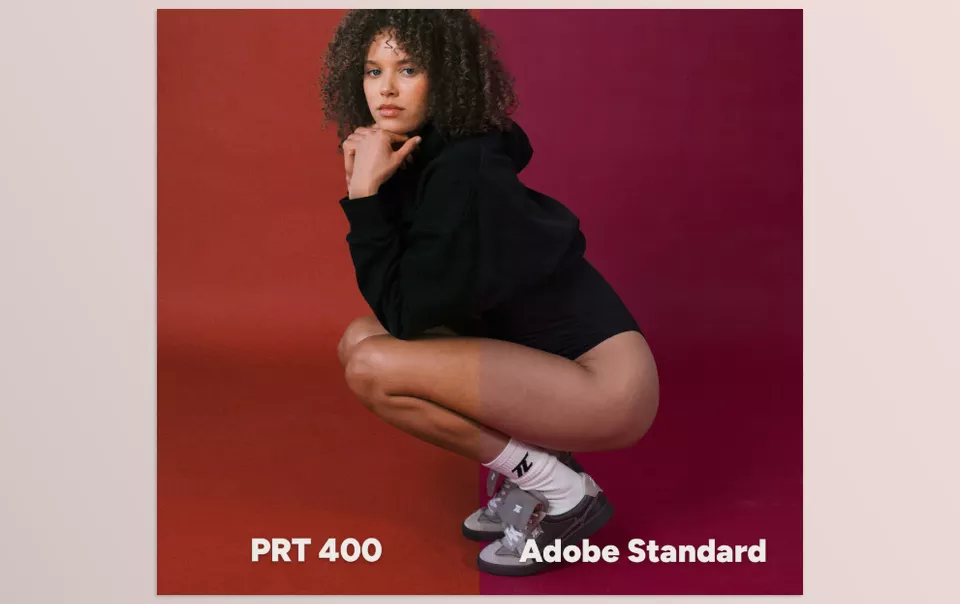
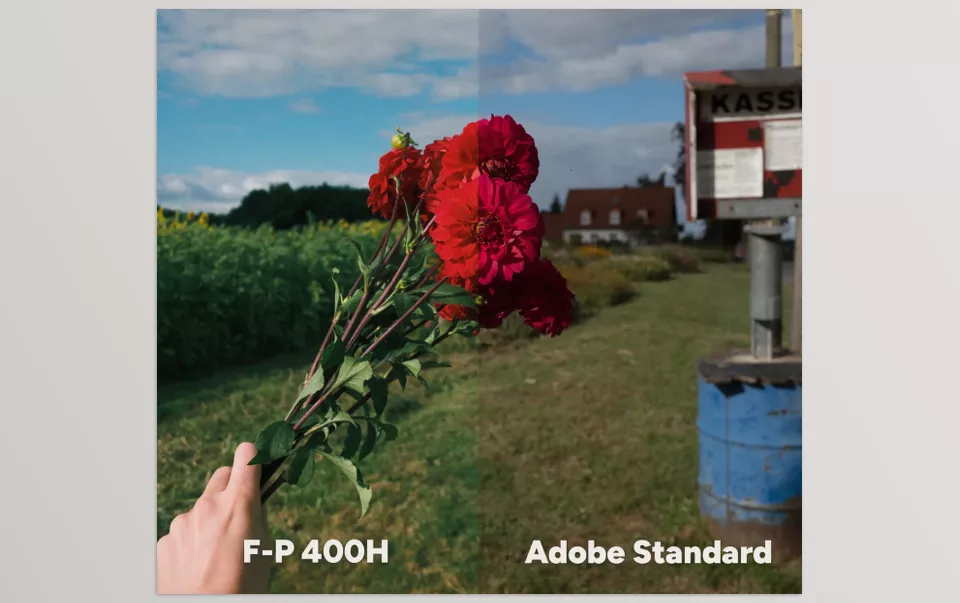
It’s time to meet a product that can transform your digital photos into images that look like they came straight from film! Analog Vision Studio is a set of professional profiles for Lightroom and Photoshop, created with high-precision LUTs derived from real 35mm film scans, reconstructing colors and tonality just like classic films.
Key Features and Highlights:
- 4 Popular Classic Films: Portra 400, Gold 200, Fuji Pro 400H, and Tri-X. Each film has 3 profiles, letting you choose your preferred style and control effect intensity.
- Professional RAW Editing: Profiles apply to RAW files, ensuring accurate and natural colors and tonality without compromising image quality.
- Workflow Tools Included: Tools for local adjustments and quick edits, allowing you to correct specific parts of your image easily and flexibly.
- Consistent Color Across Cameras and Lighting: Images look consistent and professional in any lighting condition or with any camera.
- LUT-Based Color Science: Profiles are built with LUT technology, recreating thousands of color points so tonality and color respond exactly like real film.
- Preservation of Shadow and Highlight Details: Unlike simple presets, details remain intact even in very bright or dark areas, keeping images natural.
- Non-Linear, Natural Color Adjustments: Colors and tonality behave exactly as they would in real film, not artificial or linear digital edits.
- Customizable Style: Adjust profile intensity or combine profiles to create your personal style.
- Time-Saving: No more hours spent on sliders and trial and error; your photos are ready in a few clicks.
- Suitable for Professional and Personal Projects: Whether street photography, portraits, landscapes, or commercial projects, profiles deliver a professional, nostalgic vibe.
A tangible example: apply the Gold 200 profile to a street photo. Result? Warm, pleasant light, natural colors, preserved shadow details, and the exact classic film mood. Without any artificial or unrealistic color appearance.
With Analog Vision Studio, digital photography is no longer cold and sterile. Photos gain the feel of real film, colors and tonality remain natural and pleasing, and you can easily create a professional and unique look that previously required experience and hours of editing.
Professional Techniques and Tips
When using Analog Vision Studio profiles, a few simple tips can make your photos even more natural and appealing:
- Don’t Forget Local Adjustments
Even when applying a profile, some areas like shadows, highlights, or skin tones may need refinement. With local adjustment tools in Lightroom or Photoshop, you can precisely tweak light, shadow, and saturation to achieve a natural and eye-catching result. - Combine Profiles and Adjust LUT Intensity
There’s no rule that says you must use only one profile! Combine multiple profiles or adjust LUT intensity to create your personal style. This ensures your images are both unique and visually appealing, never looking like a ready-made preset. - Always Work with RAW Files
RAW files contain complete color and light information. Applying profiles to RAW ensures the best results—more natural colors, richer tonality, and better preserved shadow and highlight details. - Small but Thoughtful Adjustments
Sometimes a minor change in LUT intensity or a local adjustment can transform an image from ordinary to professional. Apply changes gradually for the best effect. - Experiment and Be Creative
One of the best professional tips is to experiment! Combining profiles, adjusting color intensity, or applying multiple profiles to different areas can yield interesting and unexpected results, helping you develop your own unique style.
Following these tips makes images not only more natural and eye-catching but also adds a cinematic, professional feel that traditional methods cannot achieve.
Conclusion: Why It’s Worth It
In short, Analog Vision Studio makes your digital photos feel like real film with a pleasant nostalgic vibe, without hours of trial and error or professional experience.
With these profiles, your projects are ready faster, colors and tonality remain consistent and appealing, and images gain a professional, cohesive look. No more worrying about different lighting or cameras affecting results; everything stays accurate and natural.
If you’re after that classic, cinematic feel that elevates your photos from ordinary to stunning, trying these profiles is a truly exciting experience. Even a single use can instantly enhance your photo editing level and help you develop your unique personal style.
If you’re looking for a clear and complete explanation of color grading, we’ve assembled a detailed article that simplifies the entire workflow. I really recommend giving it a read—you’ll gain knowledge that makes a real difference.