


How to Quickly and Effortlessly Create a Realistic World
Are you someone who uses the Fractal Terrain Plugin? Have you ever wanted to create a realistic mountain range, the surface of the Moon, or a foggy valley, but felt that conventional tools or After Effects 3D layers just weren’t enough? Imagine wanting to create a dynamic, real-world environment: terrains that react to light and shadow, feature natural details, and even move—like ocean waves or drifting mist.
You have the concepts in your mind, but when you attempt to construct them digitatively, there are countless restrictions and difficulties: each hill and valley must be formed with displacement maps and noise, lights and cameras positioned for depth and perception, and once you add movement into the mix, it complicates things even further.
It’s as if you’re given a piece of paper and a pencil and told to create a stunning mountain range with moving lights. While the end product might be gorgeous, it’ll never truly have realistic integrity. Yet that’s essentially the battle almost all designers and motion graphic artists encounter.

Traditional Methods and Their Limitations
If you want to create a 3D terrain without any plugins, After Effects offers tools that can help, such as:
- Fractal Noise + Displacement Map: Use fractal noise to simulate height and bumps, and displacement maps to shift layers.
- CC Terrain or Gradient Maps: Simple tools for creating basic mountains, valleys, or slopes.
However, these methods have their limitations:
- Limited and artificial details: Even with precise adjustments, terrains often look flat or unnatural, failing to convey realism.
- Lighting and depth are difficult: Creating shadows and a real sense of distance between mountains and valleys, or dynamic lighting, is challenging without professional tools.
- Time-consuming and difficult for animation: If you want moving terrains (like waves or clouds over mountains), you must manually adjust each frame or parameter, which is extremely time-consuming and complex.
In short, traditional methods allow you to create terrain, but there’s always a “handmade” feel and technical limitations.
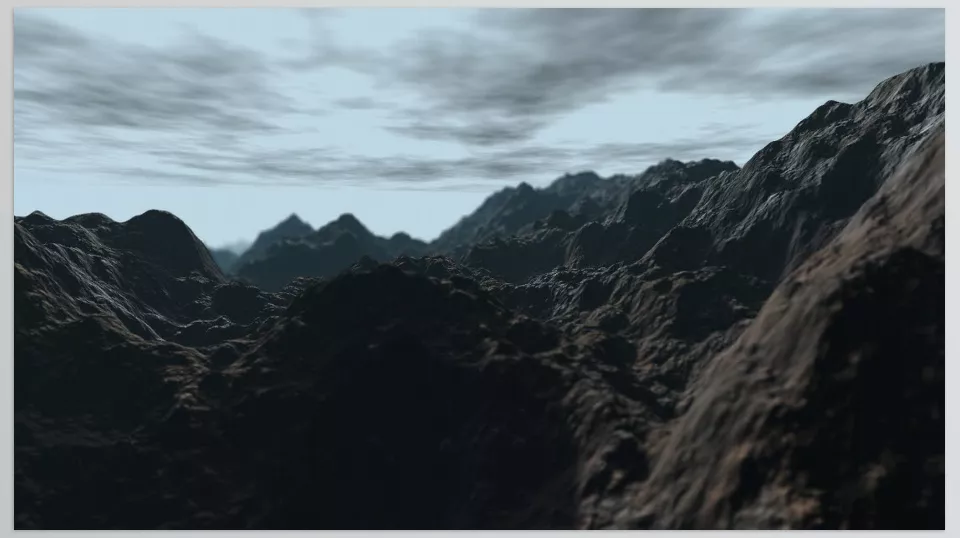
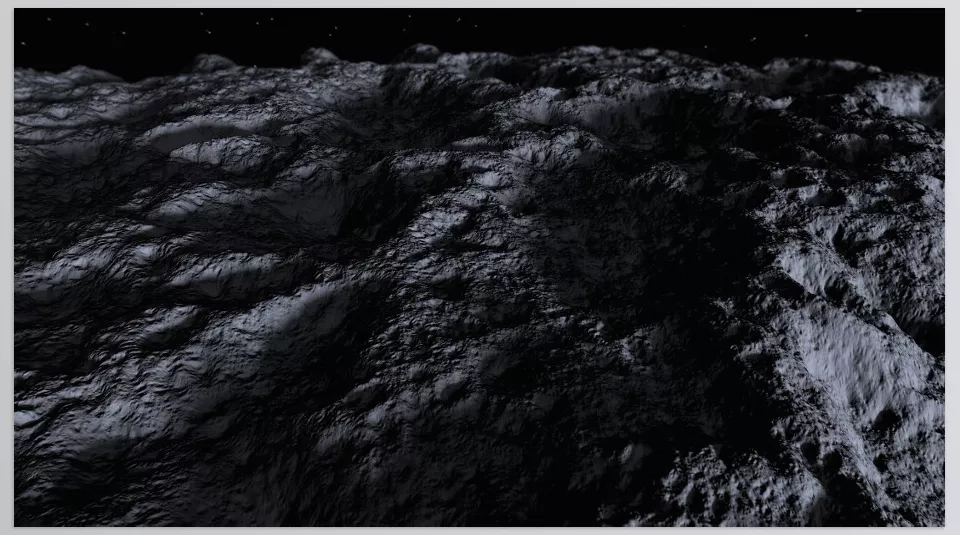
When Professional Tools Enter: Fractal Terrain
This is where Fractal Terrain Plugin truly makes a difference. This plugin allows designers and motion graphic artists to create incredibly realistic 3D terrains without complex modeling software. Everything is fast, flexible, and controllable.
Key Features and Applications
1. Generate Realistic 3D Terrain
- Uses advanced fractal algorithms and ray-casting to create heights, bumps, and depressions with natural details.
- Perfect for mountains, valleys, lunar surfaces, volcanic terrains, or even dynamic waves.
2. Flexible and Intuitive Controls
- Adjust height, slope, terrain type, and depressions with a few simple sliders.
- Choose terrain type: Mountain Range, Lava Field, Lunar Surface, Ripple Waves, etc.
- Create platforms and terraced surfaces with the Flatten Band parameter.
3. Dynamic Movement and Animation
- Animate terrains using Offset and Ripple Waves parameters.
- Ideal for waves, moving mist, river flow, or clouds drifting over mountains.
4. Realistic Lighting and Effects
- Supports AE cameras and lights.
- Add depth of field and volumetric effects for enhanced realism.
- Texture projection on 3D layers for added detail.
5. High Speed with GPU Optimization
- Optimized algorithms ensure fast performance even in complex scenes.
- Supports CUDA (NVIDIA), OpenCL, and Metal (Mac).
6. Seamless Integration with After Effects
- Works effortlessly with existing layers, effects, and projects.
- Adjust parameters in real-time and see results directly in the composition window.
7. Create Diverse and Inspiring Environments
- Real mountains and valleys for natural scenes.
- Volcanic terrains for fantasy or sci-fi projects.
- Moon or planetary surfaces for scientific or educational projects.
- Dynamic waves and water for cinematic or commercial scenes.
- Foggy valleys and volumetric atmospheres for dramatic visual effects.
Why These Features Matter
- Speed and convenience let projects be ready without hassle.
- Natural details and dynamic effects give a professional, realistic touch.
- Quick experimentation with parameters boosts creativity and reduces design time.
In simple terms, Fractal Terrain Plugin is not just a terrain creation tool—it’s a creative engine that adds depth, life, and realism to any motion graphics or video project.
Professional Tips for Using Fractal Terrain Plugin
To make your terrains look more realistic, engaging, and dynamic, consider these professional tips:
- Create Platforms and Terraces with Flatten Band
Use the Flatten Band parameter to flatten or terrace parts of the terrain.
Great for stepped valleys, volcanic surfaces, or mountain paths. - Add Depth with Fog and Atmosphere
Enable Fog or Atmosphere to give terrains a sense of depth and realistic layering.
Perfect for misty valleys or cinematic scenes. - Bring Terrains to Life with Offset and Ripple Waves
Animate Offset to create movement like slow river flows or drifting clouds.
Ripple Waves are ideal for dynamic water or terrain surface flows. - Combine Lighting and Texture for Realism
Use AE cameras, lights, and texture projection to make terrains look more natural.
Even small changes in light and viewpoint significantly enhance realism. - Quick Parameter Testing and Adjustment
One of Fractal Terrain Plugin’s biggest advantages is real-time parameter adjustment.
Pro tip: Create multiple terrain versions with different parameters and choose the best.
Following these tips ensures your 3D terrains not only look realistic and beautiful but also add flexibility and creativity to motion graphics and animation projects.
Why Fractal Terrain Is Worth Trying
Every designer and motion graphic artist knows how difficult it is to create realistic and dynamic terrains with conventional tools. It’s time-consuming, details often appear limited or artificial, and rapid idea changes are nearly impossible.
Fractal Terrain Plugin eliminates these limitations. With this tool, you can bring your ideas to life quickly and easily, without worrying about technical complexity. Terrains appear alive and realistic, movements are natural, and projects feel professional.
This plugin not only saves time but also makes the experience of creating 3D worlds enjoyable and exciting. Every time you experiment with parameters, your ideas take shape instantly, refreshing your creativity.
In short: if you want your motion graphics and animation projects to be more realistic, engaging, and fast to produce, Fractal Terrain Plugin is a tool you don’t want to miss.
Enhance your After Effects knowledge with our detailed guide to AE tools.



