


Control Colors More Precisely and Easily!
Are you familiar with the Color Llama Plugin? It often happens with video or motion graphics that color is a major consideration. Is this gray a bit too bright? Is that green in the back too saturated? All small things that can yield an unprofessional project, an unfinished look.
Using default tools to correct these details is usually time-consuming: multiple color adjustment layers, complex masks, or manual tweaks that sometimes fail to deliver clean and precise results. This becomes even more challenging if you want to apply color changes throughout the video.
Is there a way to easily and efficiently select colors without spending hours adjusting, rendering, and readjusting? Is there a way to select any color and render it into what it should be without turning the scene into a supernatural dystopia?

How Colors Were Changed Until Now
Before professional tools emerged, designers and animators had to rely on default software features to change or adjust colors. These methods worked to some extent but always came with limitations and hassles.
Change to Color and Hue/Saturation in After Effects:
These effects allow changing colors or adjusting their intensity and saturation. The main issue is the lack of precise control over color ranges. Changing one color often affects similar or nearby colors, potentially resulting in unnatural outcomes.
Keylight for Keying and Subject Isolation:
This tool is excellent for removing green or blue backgrounds, but making artistic or subtle color adjustments becomes a time-consuming and complex process. Masking, manual corrections, and multiple adjustment layers are often necessary to achieve accurate colors.
Common problems with traditional methods:
- Similar colors get distorted, and the natural look of the image is lost.
- Making small, precise color changes is tedious and time-consuming.
- Exporting LUTs for use in other software requires complicated, manual steps.
In short, default methods are usually sufficient, but when aiming for professional and precise results, their limitations become evident. This is where specialized tools come in to simplify and speed up the process.
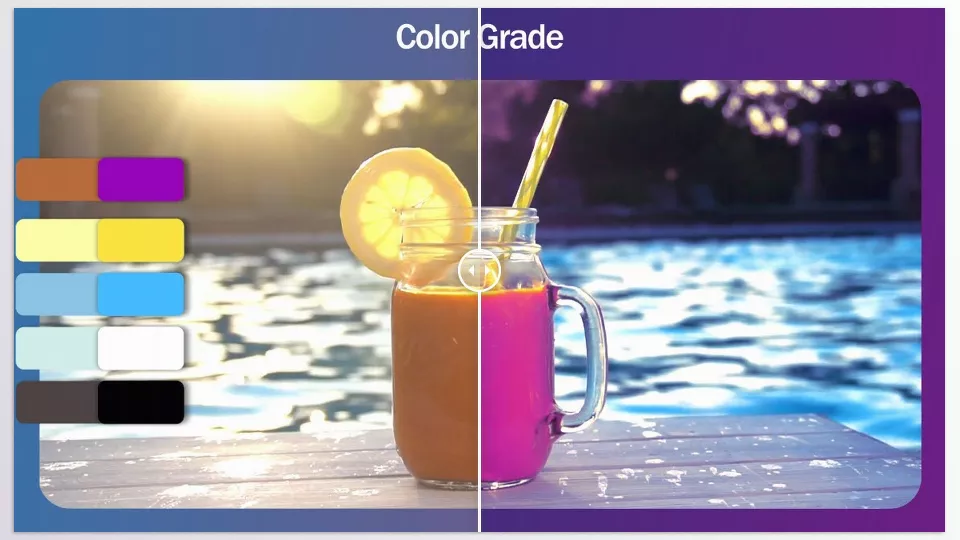
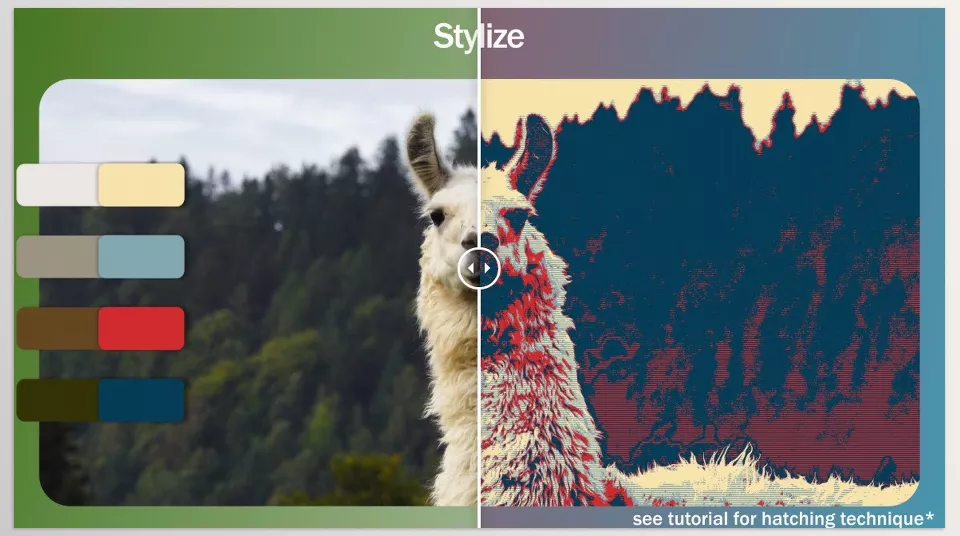
Color Llama: Control Colors at a Glance
Imagine being able to change any color in your video or motion graphics project exactly the way you want—without affecting adjacent colors or spending hours creating masks and adjustment layers. Color Llama Plugin provides exactly this: a professional plugin that makes color replacement simple, fast, and precise.
Key Features:
- Precise Color Replacement: Select any color and transform it into your target color without affecting nearby colors or image details. Perfect for correcting subject colors, matching scenes, or creating artistic effects.
- Color Blend Modes:
- Smooth: Gradual color transitions for natural and harmonious adjustments.
- Sharp: Clear-edged color changes, ideal for keying and subject isolation.
- Posterized: Sudden, stylized color shifts, perfect for artistic and posterized effects.
- Speed and Quality: Change colors without complex masks or multiple adjustment layers, saving time and producing professional results.
- 3D Cube LUT Export: Export all color changes as a LUT for use in other software, without losing color accuracy.
- Color Keyframing: Animate colors throughout your video, enabling dynamic color effects with full control.
Practical Examples:
- Brightening gray shadows in the background without affecting other colors.
- Changing the color of clothing or specific scene elements accurately and naturally.
- Creating posterized artistic effects or unique color styles with just a few clicks.
With the Color Llama Plugin, color control is no longer complicated or time-consuming—you can now color and style your projects with precision and freedom.
How to Use Color Llama More Professionally
Color Llama Plugin is powerful, but following a few simple techniques can help you achieve even more professional and natural results:
- Use Sharp Mode for Keying: When you need precise subject isolation, Sharp mode keeps edges clear and prevents color spill.
- LUT Softness for Similar Colors: If the scene contains similar colors or close shades, enabling LUT Softness ensures smooth, natural transitions without creating unnatural effects.
- Sort Colors by Luminance: Organize colors based on brightness for better management and harmonious color combinations throughout the scene.
- Keyframe Colors: Animate colors over time for dynamic effects, particularly useful in motion graphics or short videos.
- Tip: Before making major adjustments, enable “Show Original Colors” to preview how changes will affect the scene and ensure desired results.
By following these simple tips, color control becomes easier, more precise, and natural, giving your projects a professional finish.
Change Colors with Precision and Your Own Style
Stop wasting hours repairing colors and stop letting your details of imagery go to waste; with the Color Llama Plugin, all your visualizations are at the tip of your fingers within a few color adjustments. Quickly and accurately and creatively adjust for colors and you will notice an impact right away.
Whether you want to brighten gray shadows, change a piece of clothing, harmonize backgrounds, or create artistic posterized effects, Color Llama Plugin simplifies and enhances your workflow.
This plugin not only saves time and energy but also makes your projects more professional and visually appealing. Even small color changes can have a huge visual impact, adding a sense of harmony and unique style to your videos.
Ultimately, Color Llama Plugin frees you to play with colors, express your creativity, and bring any project as close as possible to the vision you imagine.
For anyone looking to explore After Effects in detail and learn how its companion tools can improve your workflow, our in-depth article about After Effects Tools is a must-read.



