

🌀 Goodbye, Tedious Repetitions!
Do you know much about the React 2 Plugin? If you’re into motion graphics or animation design, you’re probably familiar with those repetitive and exhausting moments — where you have to copy dozens of layers one by one, adjust their spacing, change their colors, and keyframe each of them just to create a simple effect.
That moment when you feel more like a robot performing repetitive tasks than a creative designer.
Creating regular motion patterns like a grid of circles, delayed text repetitions, or color combinations synchronized with music — all look amazing, but doing them manually in After Effects can be truly exhausting. Sometimes you just want to test an idea quickly, but in the middle of work, the sheer volume of settings and keyframes makes you feel like you’re drowning in layers.
Now imagine a simpler way: A way where you just select your layer, say “Repeat it,” and the software understands exactly what you mean. It arranges the layers automatically, controls the spacing, varies the colors, and even animates them following natural logic. No writing expressions, no keyframing — just a few clicks and everything starts moving by itself.

🎛️ Repetition; But Smart and Alive
Repetition in motion graphics isn’t just duplication; it’s a visual language for creating rhythm and harmony. Circles dancing to the beat of music or letters appearing with a delay — all result from repetition, but not just any repetition.
Simple repetition is just copying, but smart repetition means each element comes alive with its own logic; one is closer, one is brighter, one moves faster.
Instead of building everything manually, you define the rules, and the system does the rest.
Here, repetition becomes part of the design, not a tedious task — and the result is a dynamic and lively scene, not just a set of duplicated layers.
🧩 Manual Repetition and Expressions
Even in After Effects, you can achieve repetition — there’s no magic here. You just create a layer, duplicate it several times with Ctrl+D, carefully adjust their positions, keyframe each one, and tweak their color or size. Finally, with a few expressions like index * 100 or sin(time), you can create some automated motion.
So far, everything is doable… but there’s a major problem: zero flexibility. If halfway through you decide to have 20 layers instead of 10, or change the rotation angle, you have to go back and adjust everything from scratch. Every small change means several minutes or even hours of rework.
Now imagine controlling not just position but also color, opacity, and rotation over time — your timeline quickly fills with keyframes, and any change can break your entire project.
Yes, After Effects is an amazing tool, but its internal system isn’t designed for creating dynamic and repeatable patterns. With a bit of expression and patience, you can achieve results, but in reality, you’re manually doing what should be systemic.
In other words: With the traditional method, repetition exists… but intelligence and dynamism do not.
🚀 💥 React 2; Smart and Alive Repetition in After Effects
This is where React 2 Plugin steps in, taking After Effects to the next level. Imagine creating a complex motion graphics project: dozens of layers, simultaneous animations, colors, and movements that all need precise adjustments. With traditional methods, this means hours spent duplicating, keyframing, and manually tweaking. React 2 Plugin makes this process fully intelligent and automatic, without limiting your creativity.
This plugin combines two powerful tools:
Repeater
Repeater lets you automatically and systematically duplicate layers.
Its types include:
- Grid: Create regular grids, even with Honeycomb (hexagonal) patterns
- Radial: Circular arrangement with control over start and end points
- Linear: Linear repetition with adjustable spacing and direction
Just select the initial layer and choose the Repeater type — the rest is handled automatically!
Effector
Effector is like magic; it affects any keyframeable property and brings animations to life:
- Position: Move layers relatively, absolutely, or even attract/repel
- Rotation: Simple rotation or “Look At” for automatic orientation
- Color: From changing a single color to random or gradual transitions between multiple colors
- Scale & Opacity: Scale up or down, fade, or create combined effects
In short, anything that can be animated can be controlled by Effector.
✨ Key Features:
- 🎯 Smart Repetition:
Use the Refresh button to add, remove, or reorder layers without creating new expressions or breaking keyframes. - 🎨 Versatile Effectors:
Control all major properties — color, position, rotation, scale, opacity, and even text or shape attributes. - ⚡ Controllable Falloff:
Define the Effector’s influence range; circular, linear, or box-shaped — each layer receives only the desired amount of effect. - 🧠 Smart Modifiers:
Three types of intelligent modifiers:- Random: For natural and random variations
- Step: Sequential, orderly movements
- Sticky: Snap values to the nearest specified number or angle, perfect for geometric patterns
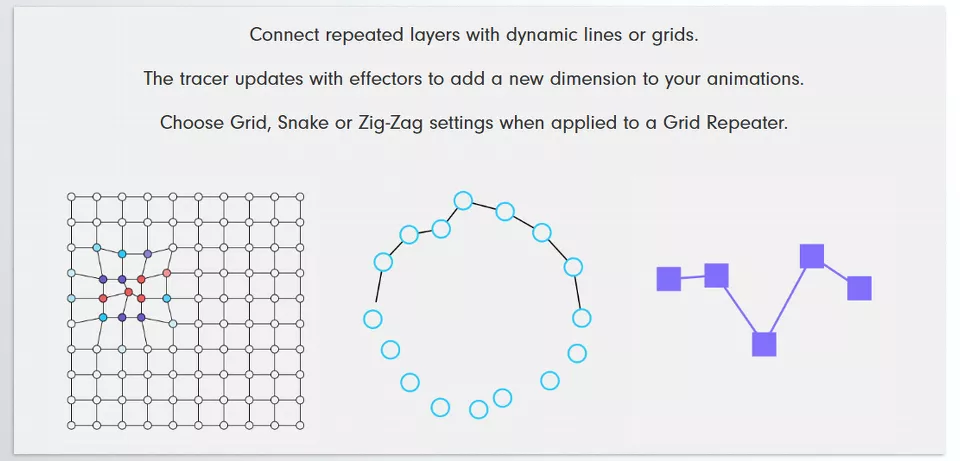
- 🔗 New Tracer:
Create dynamic lines between repeated layers like grids, spirals, or zig-zags. Even with Effectors applied, lines remain alive and animated. - 📝 Text Handling:
Automatically split text into letters, words, or lines. Each Effector applies to text as well, creating live and synchronized text animation exactly as it appears.
In short, the React 2 Plugin brings to After Effects what MoGraph brought to Cinema 4D. Repetitions, movements, colors, and effects move from manual, time-consuming tasks to an intelligent, dynamic, and fun system. With React 2 Plugin, you can focus on creativity, not hours of repetitive work.
🛠 Pro Tips for Intelligent Animation Control
- Step Modifier for Sequential Motion
If you want layers to move step by step, use the Step Modifier. Examples:- Create a ladder effect where layers appear one by one
- Wave motion adding rhythm and flow to the scene
With Step, a single Effector can animate multiple layers in a coordinated manner.
- Random Evolution for Natural, Loopable Animations
Sometimes you want random yet natural movement without breaking loops.
Random Evolution allows you to:- Create animations with a random appearance
- Ensure movements are fully loopable, perfect for repeating projects
- Control the intensity of changes, from subtle to dramatic
Ideal for organic motion or dynamic backgrounds.
- Attract / Repel Effector for Layer Interaction
This Effector creates magnetic or gravitational effects between elements:- Layers move toward a target (Attract)
- Layers move away (Repel)
- Can be applied on a specific axis (X or Y)
Great for clustering elements, cinematic explosions, or interactive animations.
- Combine Multiple Effectors for Cinematic Effects
One of React’s most powerful features is combining different Effectors:- Color + Rotation + PositionScale + Opacity + Random
Perfect for logo motion, dynamic typography, and professional visual effects. - Quick Tips for More Natural Results:
- Always use Falloff for gradual Effector influence
- Combine Random and Step for realistic, natural motion
- Use Sticky Modifier for geometric patterns or precise angles
- Try Effectors on text — letter or word movement creates captivating effects
🎯 When the Tool Thinks With You
The React 2 Plugin is not merely a plugin but a revolutionary way of thinking about the animation process. No more spending days on end recreating the same image on hundreds of layers/keyframes just to add something small later and jeopardize the entire project. The plugin works like a sophisticated intern to bring repetition, motion, rhythm, and breath to your scenes so you can spend time on the creative process and thematic ideas.
Whether you’re building a grid of elements, dynamic typography, or advanced color and motion effects, React 2 Plugin makes everything simple, fast, and flexible.
With this plugin, the limitations and exhaustion of repetitive work vanish, and your projects become alive and dynamic.
Ultimately, React 2 Plugin allows you not just to control the tool but to think with it — exactly what every professional motion designer seeks.
Step up your motion design game with our complete After Effects tools guide — the perfect resource for learning about plugins, presets, and extensions in one place.



