


When Your Images Start to Move!
Ever used the Vectory plugin? Picture this. You have an image and you want it animated—but not in the traditional, rigid style. Instead, it should be as if the image is breathing, that each line and color is a wave of natural motion. Every detail of the image, from the brightest highlights to the darkest shadows, can find its own path, connecting through thousands of small, dynamic points to create a fresh, living composition. What usually takes a long time with standard tools, requiring masks and complex adjustments, can now be executed automatically and beautifully.
Now picture these little particles moving as if they were thousands of little painters across your image, determining their route from the intensity of every pixel and trailing behind them in an artistic yet kinetic and fluid fashion. The final result is an image that not only resembles the original but now has a special spirit and energy, ready to be used for motion graphics, animation, or creative projects—effortlessly and without complexity. Just your image, and a dynamic, lively effect that captures any viewer’s attention.

When You Had to Build Everything Yourself
Before this particle system existed, creating a dynamic, living image usually required using traditional and somewhat complex tools. In After Effects or Premiere, you could use Particle Systems like CC Particle World or Trapcode Particular, or try to simulate particle movement with Echo and Trail Effects. Sometimes, you even had to create masks and manual expressions for particles to find their own paths.
But what were the problems? First, it was time-consuming. Every small change required re-adjustments and trial and error. Second, accurately reproducing the image and colors was nearly impossible. Standard particle paths always looked somewhat artificial, and the natural energy of the image was lost. And finally, achieving an artistic, alive result usually required significant experience and technical knowledge.
In short, traditional methods allowed for movement and interesting lines, but they were always time-consuming, complex, and a bit rigid, making it hard to convey the organic and natural feel of the image.
When Your Image Breathes!
With the Vectory plugin, every image becomes a tiny world full of dynamic particles, each following its own path. Thousands of particles move across the image, reading the brightness of each pixel and adjusting their trajectory accordingly. The result? Trails and lines that recreate your image, now infused with a lively, organic, and artistic feel. Not just a reconstruction, but an added flow and natural energy that can turn even the simplest photos into a piece of art.
Why Vectory is So Special
Instead of your image changing through simple, rigid filters, Vectory plugin’s particles bring it to life and give it movement. Every light and dark detail in the image shapes the particle paths, creating a real sense of natural motion. Even small changes in light and color are automatically followed by the particles, keeping the image’s flow alive.
Practical Applications
- Dynamic and artistic line work:
Your static image turns into a living painting; lines emerge from the image with a sense of motion. Perfect for digital artwork, logos, or even portraits. - Particle motion effects in motion graphics:
Video projects, animated logos, or product intros become more engaging with dynamic trails and particles. Particle flow can amplify the scene’s energy and captivate the viewer. - Organic textures and patterns:
Particles move across surfaces to create natural, soft, and organic textures. Ideal for scene design, game environments, or motion backgrounds, giving a handmade, artistic effect.
Important Note:
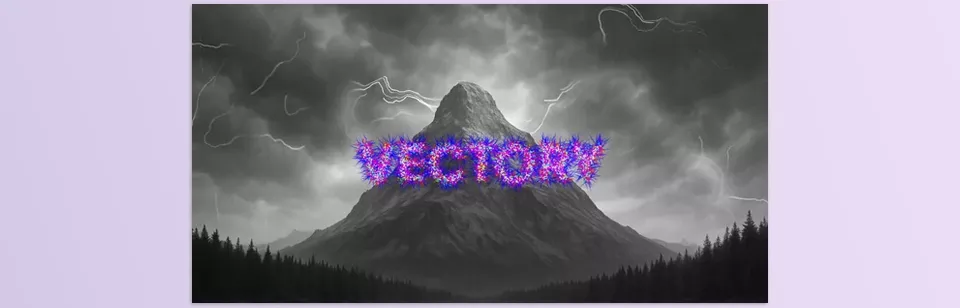
With the Vectory plugin, you have full control over particle movement, paths, and colors. You can adjust direction, path irregularity, particle lifespan and size, even gravity and repulsion forces, so the image flow matches your vision. Even the simplest images can become dynamic, captivating, and alive—something that would take hours with traditional tools and still not feel natural or artistic.

Pro Tips for Dynamic Particles
When professionals work with this particle system, they don’t just let particles move randomly—they control every detail of motion and image flow for a natural, appealing result. Some practical tips:
- Guiding Particles with Gravity Points
Gravity or repulsion forces allow particles to shape their paths. Professionals use this to create more natural or organized flows, or even special paths to guide the viewer’s eye. For example, you can attract particles toward a logo or a key point in the image to focus attention. - Combining Trails with Dynamic Colors
Using Trails with color variation along movement creates cinematic and attractive particle flows. The result resembles a moving artwork full of energy and visual appeal. Perfect for motion graphics, ads, and short videos. - Controlling Motion Energy with Fluctuation
Fluctuation determines particle randomness and shake. Increasing it creates busy, explosive movement; decreasing it makes paths soft and smooth. Professionals adjust image energy according to project needs. - Using Static Trails for Artistic Images
If you want a still image but with an artistic, beautiful result, Static Trails is ideal. The complete particle paths are recorded on the image, creating a dynamic digital painting. Great for art prints or digital backgrounds.
Friendly Tip:
With a little experimentation, you can create soft, calm effects or energetic particle explosions. Playing with particle and color settings makes projects truly lively and unique.
Art and Motion, Ready at a Glance!
With the Vectory plugin, your images are no longer simple or static—dynamic particles and lines turn any photo or logo into a living, artistic piece. The result is not only beautiful and eye-catching but also conveys natural flow and energy, making motion graphics or animation projects far more engaging.
Why apply such a style? Because it’s the transition from commonplace to artistic endeavors—still image projects transformed into storytelling via particle movement and flow. After some testing, you get a soft, tranquil look or explosive, powerful particles. In a word, the Vectory plugin makes your projects seem second nature, alive, artistic and wonderfully engaging.
Whether you’re a beginner or a seasoned motion designer, our comprehensive After Effects tools guide will help you master every plugin, script, and preset you’ll ever need.



