


When Shadows Make Everything Feel Real
Are you familiar with the Shadow Studio Plugin? There are times when a motion graphics scene looks great on the outside. It has the proper colors, the animations run well, and the composition is proper…but something’s still off. That little push of depth that transforms a piece from good to wow! Usually, that missing element is proper lighting and shadows—the very thing that can make a flat text or logo suddenly feel present, as if it truly exists in space.
A good shadow isn’t just darkness; it gives character, establishes distance, and ensures everything sits where it should. A soft shadow or a precise light can completely change the mood of a scene. But here’s the problem: creating professional shadows in After Effects is often tricky. You either have to stack multiple layers and effects, or spend hours tweaking tricks to get close—and even then, the result rarely matches the quality you have in mind.
After a few projects, you inevitably reach the point where you think: “All this trouble just for a shadow? There has to be a simpler, cleaner way!” That’s exactly when the need for a better tool becomes obvious—one that can add depth and realism to a scene effortlessly and efficiently.

Traditional Methods in After Effects – When Default Tools Fall Short
After Effects has shadow tools, but not enough to feel truly confident. There are a few effects and tricks to create shadows, but the results are usually limited and time-consuming.
What After Effects Gives You Without Plugins
These are the main tools most users rely on:
- Drop Shadow
- Radial Shadow
- Inner Shadow (layer trick)
- Light + 3D Layer for hard shadows
- Blur + Offset combination for a simple soft shadow
So far so good… but this is where problems start.
Common Issues That Quickly Appear
Shadows usually:
- Aren’t natural or physically accurate
- Don’t behave like real-world shadows on 2D layers
- Lack proper depth and texture
- Don’t account for things like GI, AO, or reflections
To reach an “acceptable” result, you have to stack multiple layers and effects. True extrusion and bevel? Almost impossible.
In short, the tools exist, but the result is “just as good as the tools.”
And the result?
After struggling with layers a few times, designers realize a simple shadow takes an enormous amount of time and energy. This is when you think:
“There has to be a simpler, more realistic way!”
And this need ultimately drives everyone toward a professional-grade tool.
Introducing Shadow Studio Plugin – When Shadows Truly Come Alive
Sometimes in motion graphics or 2D design, everything looks fine… But shadows and lights don’t deliver that “real” feeling. This is where Shadow Studio Plugin steps in—a professional plugin that brings depth, natural light, and realistic shadows to your 2D world with just a few sliders. No 3D hassle, no heavy rendering—but near-cinematic quality.
⭐ Real Raytraced Shadows
Shadows that behave exactly like the real world:
- Soft, natural, three-dimensional shadows
- Shadow intensity changes based on light distance
- Ability to create sharp, blurred, or volumetric shadows
- Full control for cinematic or cartoon-style scenes
⭐ Simulating Physical Phenomena (on simple 2D layers!)
Shadow Studio Plugin sets itself apart from ordinary tools. With this plugin, you can experience key 3D lighting techniques on 2D layers:
- Global Illumination (GI) – reflective lighting between objects
- Ambient Occlusion (AO) – subtle, realistic shadows in corners
- Subsurface Scattering – light passing through semi-transparent surfaces
- Glossy Reflections – shiny reflections with control over intensity and blurriness
All this without stepping into 3D space!
⭐ Full, Controllable Lighting
For creating believable scenes:
- Directional and Point lights
- Volumetric shadows with real depth
- Full control over Angle, Falloff, and Intensity
- Create dramatic, studio, or fantasy lighting
⭐ Built-in Extrusion and Bevel (No Real 3D!)
If you want:
- Text to pop
- Logos to gain volume
- Shapes to feel more real
You can achieve this entirely within the plugin—no 3D layers, Cinema 4D, or long renders needed.
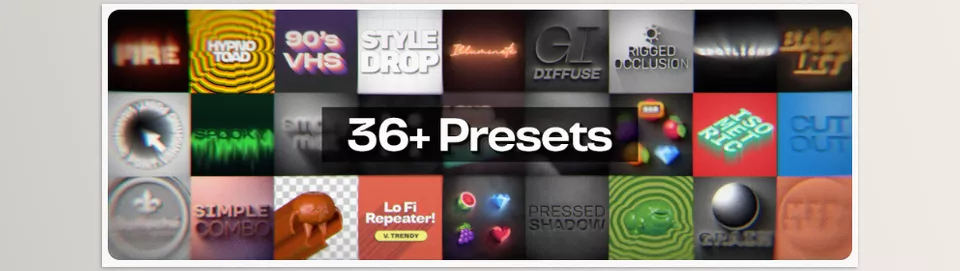
⭐ 36+ Ready-to-Use Presets
Presets cater to various styles and fast projects:
- Logo animations
- Promotional teasers
- Short animations
- Posters and social media designs
- Minimal or cinematic scenes
Just pick one and start playing with light.
⭐ Advanced Gradient Editor
For creating lively, dynamic gradients:
- Animatable gradients
- Seamless looping
- Offset for dynamic movement
- Option to remove interpolation for cartoon or cel-shaded styles
Perfect for colored lights, glows, auras, and dynamic backgrounds.
⭐ Professional Compositing Controls
A powerful compositing section can make outputs fully cinematic:
- 37 blending modes
- Precise Alpha Bias and Matte Gamma adjustments
- Full control to blend light and shadow with the original image
- Ideal for clean, transparent, professional outputs
In short, Shadow Studio Plugin is a complete lighting and shadow toolkit for motion graphics and 2D design. From real raytraced shadows to physical phenomenon simulation, precise lighting, presets, and a professional gradient editor—everything is designed to make your work faster, more realistic, and more engaging. With this plugin, you no longer need to struggle for hours with layers and heavy effects; you can focus directly on creativity and design and achieve results that are visually impressive and professionally tangible.
Pro Tips for Using the Shadow Studio Plugin
Using Shadow Studio Plugin is easy and fun, but with a few simple tips, you can achieve truly professional, eye-catching results without complicating your project:
- Two light sources = more depth
Never use just one light; adding a second can make shadows and volumes look more natural and enhance the 3D feel of the scene. - Keep AO low
Ambient Occlusion is great for realistic corners and collisions, but too much makes the scene dark and heavy. Just a little adds depth. - Light Bevel for texts and logos
Even a subtle bevel on texts or logos separates layers from the background, making them look more professional and shiny. - Gradient Editor = energetic colored lights
Use this tool to create animated, colorful effects like glow, aura, or color halos on texts and logos for a more vibrant scene. - No Interpolation for cartoon styles
For cartoon or cel-shaded projects, No Interpolation helps keep shadows and gradients flat and stylistically consistent.
Small, professional adjustments like these make your scenes look realistic and polished, while speeding up your workflow—without spending hours on layers and settings.
When a Plugin Can Elevate a Project
Shadow Studio Plugin is not just a shadow tool. It’s a transformative software that turns shadows from a “nice to have”, decorative element into a necessary, powerful feature that provides depth, volume, and realism. Even 2D layers will look as though they’re in a true 3D space with accurate lighting and believable shadows, all giving your work that much more of a professional finish.
With this plugin, you can make texts and logos pop and captivate without needing 3D models or long renders. Lights and shadows are fully controllable, letting you achieve exactly the result in your mind—whether for minimalistic, cartoon, or cinematic, realistic outputs.
The Shadow Studio Plugin also speeds up and simplifies your workflow. Instead of struggling with multiple complex layers and effects, you can focus directly on creativity and design, producing results that are both visually impressive and professionally tangible.
If shadows are more than just a simple effect for you, and form part of the visual identity of your project, this tool can elevate your work several levels, turning even the simplest scenes into a vivid, impressive, and eye-catching experience.
If you want to fully understand After Effects and explore every plugin, script, and preset that can expand your creative possibilities, our comprehensive guide about After Effects Tools is your perfect starting point.



