

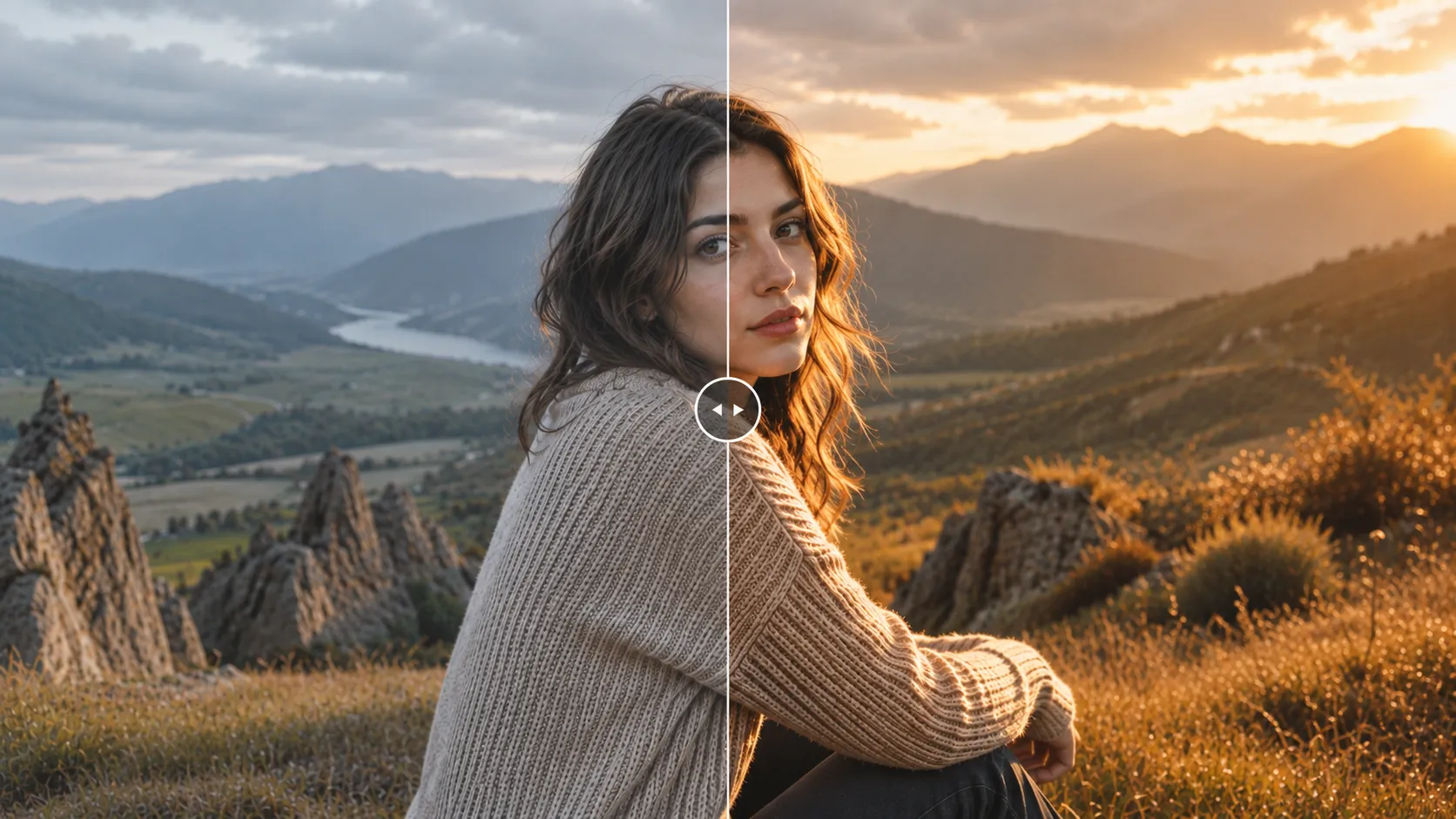
When Your Photos Need a Warm and Distinctive Feel 🎨
Do you know about the Warm and Organic Preset Collection by Pretty Presets? Have you ever had photos with great lighting and quality, but when you placed them side by side, they still lacked the consistent, professional look you were aiming for? Especially for travel, portrait, wedding, or even Instagram photos, simply having a good image is not enough. It’s the colors and overall mood that make a photo truly stand out.
Creating a warm, natural style in Lightroom is not always simple. You constantly have to adjust elements like skin tones, golden hues, shadows, contrast, and background colors to achieve the cinematic, organic look you often see in professional photography. And when you’re working with dozens or even hundreds of photos, the process can become incredibly time-consuming.
This is exactly where ready-made presets like Warm & Organic come in handy. Instead of building the color grading from scratch every time, you can create that same warm, natural, and professional feel with just a few clicks, then make a few small adjustments until the result looks exactly the way you want.

What Is a Lightroom Preset and How Does It Help with Photo Editing? ✨
If you’ve worked with Lightroom before, you probably know that achieving a specific color style isn’t something that happens with just a few simple adjustments. Presets are preconfigured settings that apply a complete set of adjustments—such as colors, contrast, shadows, highlights, and overall tone—to an image, allowing you to achieve a specific style much more quickly.
For example, imagine a wedding photographer who wants every photo from a ceremony to have the same warm, soft, and romantic feeling. Or imagine a content creator who wants all of their travel photos to share the same natural, golden atmosphere. Instead of spending hours adjusting every image individually, they can simply choose a suitable preset, apply it with a single click, and then make a few minor tweaks to match each specific photo.
Warm & Organic presets are designed around exactly this concept: creating warm colors, rich shadows, earthy tones, and a natural look that gives photos more personality. The result is that your images don’t simply become more colorful—they feel warmer, more professional, more cohesive, and more inviting.
Manual Methods for Creating Warm Colors in Lightroom 🖥️
Before presets made editing faster, most photographers created their signature color styles entirely by hand in Lightroom. Achieving a warm and natural appearance usually requires adjusting several different parts of an image individually.
- Temperature and Tint: Used to warm up the overall atmosphere of the photo and create richer golden lighting.
- Tone Curve: Used to control contrast while adding greater depth to shadows and highlights.
- HSL: Allows you to fine-tune individual colors such as green, blue, orange, and yellow to achieve the desired mood.
- Color Grading: Used to apply separate color tones to the highlights, shadows, and midtones of an image.
- Contrast and Exposure Adjustments: Help make the image appear sharper, deeper, and more professional.
By combining these tools, you can create a warm, cinematic, or organic appearance. For example, you can soften the greens, enhance the golden tones, and keep skin colors looking natural. However, achieving a truly polished result usually requires a solid understanding of color grading and editing experience.
Why Isn’t Creating This Style Manually Always Easy? 🤔
The biggest challenge is that creating professional color grading isn’t just about adjusting a few sliders once. Settings that work perfectly for one image may produce completely different results on the next because of differences in lighting, camera settings, or environmental colors, requiring further adjustments.
When you’re working with a large number of photos, keeping every image visually consistent can take a significant amount of time. On top of that, finding a balanced color combination that delivers a warm, appealing feel without compromising skin tones or image details usually requires considerable editing experience.
Warm and Organic Preset Collection: A Fast Way to Create Your Signature Color Style 🌿
Warm and Organic Preset Collection is a professional preset collection for Lightroom Desktop, Lightroom Classic, and Lightroom Mobile that helps you achieve a warm, natural, and visually appealing style without spending hours adjusting color settings.
The collection includes 9 ready-made presets, each offering a distinct visual mood—from rich, golden, warm tones to softer, more cinematic, slightly film-inspired looks. No matter what style you’re looking for, you can browse through the presets and choose the one that best matches your photo.
These presets are especially suitable for photography styles such as:
- Portraits
- Weddings
- Travel
- Lifestyle
- Food
- Nature
- Outdoor photography
In these types of photography, colors play a major role in conveying emotion and can transform an ordinary image into something far more engaging.
Colors That Don’t Just Change the Photo—They Change the Feeling 🎨
One of the most appealing aspects of the Warm and Organic Preset Collection is that it doesn’t simply change a few colors and stop there. The main goal of this collection is to give your images a warmer, more natural, and more professional feeling.
Instead of making photos look heavily edited or unrealistic, the colors are adjusted to add warmth and depth while preserving the subject’s natural appearance.
For example:
- Sunset and golden-hour photos can feature richer, warmer tones that better capture the peaceful atmosphere of the end of the day.
- Portraits can appear softer and more intimate without making skin tones look unnatural.
- Travel and nature photography can achieve a more earthy, cinematic, and adventurous appearance.
- Food and lifestyle photography can feel warmer and more professional while drawing greater attention from viewers.
Another important advantage of this preset is that it is designed to handle skin tones carefully, preventing faces from looking overly orange or artificial. It also does not directly alter your photo’s exposure or white balance, meaning you still retain full creative control and can fine-tune the final result to match your personal style.
When Every Photo Needs to Share the Same Style 📸
If you regularly work with large numbers of photos, you already know how important visual consistency can be. For example, a wedding photographer may need to edit hundreds of images from a single event while maintaining the same overall feeling throughout the entire gallery. Likewise, someone creating content for Instagram usually wants every image on their profile to have a cohesive and professional appearance.
This is where Warm and Organic Preset Collection can make a significant difference. Instead of editing every image from scratch, you can choose an appropriate preset, apply it across your photos, and then make only a few small adjustments.
As a result, not only do you reduce your editing time, but your images also develop a clear visual identity that looks far more professional.
Professional Editing on Both Desktop and Mobile 💻📱
One of the most practical features of Warm and Organic Preset Collection is its compatibility with multiple Lightroom versions. You can use the same presets in Lightroom Classic and Lightroom CC on your computer, as well as in Lightroom Mobile.
This is especially useful for photographers and content creators who are constantly on the move. You don’t have to sit in front of your computer to edit your photos—you can maintain the same color style directly on your phone and prepare your images wherever you are.
Compatible with Different Photo Types and Fully Customizable ✨
These presets are compatible with both RAW and JPEG images, making them suitable for a wide range of photography. As with any preset, the final result depends on factors such as lighting, camera settings, and shooting conditions. However, what makes Warm and Organic Preset Collection even more practical is its high level of customization.
After applying a preset, you can adjust the effect strength, modify the lighting and colors, and fine-tune the result until it perfectly matches your personal editing style.
Ultimately, Warm and Organic Preset Collection is more than just a collection of color adjustments. It’s a fast way to build a consistent visual style—especially for photographers and creators who want warm, natural, and professional-looking images without spending hours on manual color grading.
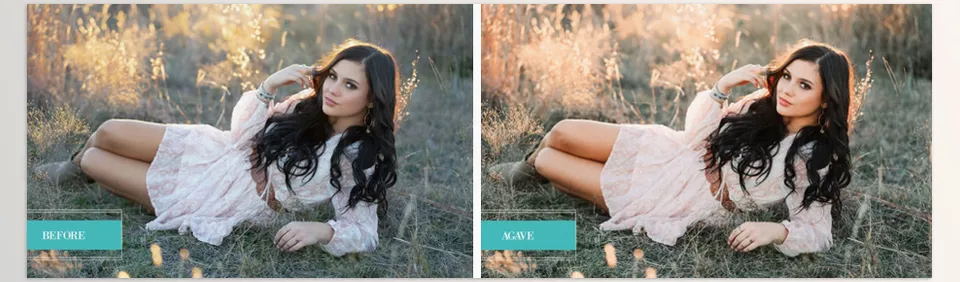
Tips for Getting the Best Results from Your Presets 💡
Presets can significantly speed up your editing workflow, but if you want your final images to look truly professional and natural, it’s worth going beyond a single click. A few simple tips can help you get the best possible results.
- Check Your Photo’s Lighting
Presets perform best on properly exposed images. Before applying a preset, it’s a good idea to adjust the exposure and white balance as much as possible so the colors appear more accurate and natural. - Adjust the Preset Strength
You don’t always have to use a preset at full intensity. Sometimes, reducing the strength of the effect produces a much more natural result while preserving the image’s authentic feel. - Choose the Right Preset for Each Photo
Every preset performs best under certain conditions. For example, a warm preset may work beautifully on sunset photography, while a photo taken under cooler lighting may require a few additional adjustments after applying the preset. - Pay Attention to Skin Details
When editing portraits, always make sure skin tones remain natural. Sometimes a small adjustment to the color settings—or simply reducing the preset intensity—can make the final result look much more professional.
Ultimately, you’ll achieve the best results when you treat a preset as a starting point rather than a fixed setting for every image. With just a few small adjustments, you can both speed up your editing process and develop a style that feels uniquely your own.
Making a Professional Color Style Easier to Achieve 🎯
Sometimes the difference between an ordinary photo and a truly eye-catching one isn’t the subject itself—it’s the colors and overall atmosphere that make an image stand out and remain memorable. A warm tone, a rich shadow, or a balanced color palette can completely transform a photo’s mood and give it far more personality.
While it’s certainly possible to create all of these adjustments manually in Lightroom, maintaining a consistent style becomes increasingly time-consuming as the number of photos grows. Warm and Organic Preset Collection shortens that process by providing a professional foundation that helps you achieve the warm, natural, and visually appealing style you’re looking for much more quickly.
Whether you are a professional photographer or an individual who just wants their personal photos to look more attractive, the Warm and Organic Preset Collection by Pretty Presets can be a great help to those looking to speed up their editing process in Lightroom. A few simple adjustments to the colors in their photos can make all the difference in the emotion communicated through their image.
If you enjoy the warm, natural look of Warm & Organic Presets but want to take your edits even further with an authentic film-inspired aesthetic, you may also like VGCO Fuji 400H. While Warm & Organic focuses on creating rich, earthy tones and a clean organic style, VGCO Fuji 400H recreates the signature color palette and soft character of the legendary Fujifilm Pro 400H film, making it an excellent choice for photographers who love timeless, analog-inspired edits.



