


Animation Without the Hassle? It’s Possible!
Have you ever had the chance to use the joysticks and Sliders Plugin? It would be like having to animate a cartoon character by redrawing the whole head every frame for every small movement of head tilt, eye squint, and mouth position. It’s annoying and costly. Then, having to redo the entire path each time someone wants to adjust a millimeter. It could take days.
Now, imagine being able to control all these movements with just a few simple clicks and a smart tool—no hassle, no countless keyframes, and with natural, smooth results. The character’s head moves up and down, the eyes follow the desired direction, the mouth moves in sync, and everything happens exactly the way you want it.
This concept is so simplistic yet effective in the world of animation, freeing up animators so they don’t have to worry about minutiae when it comes to keying but instead, focus on story. This is so true with modern animation capabilities like joysticks and Sliders Plugin, as it greatly enhances speed and efficiency.

The Old Way
Even without a plugin, you can still animate characters or objects—but everything has to be done manually and traditionally. For example, in After Effects, you can use basic tools like Puppet Pins, Transform, and simple sliders to control the head, eyes, or mouth movements of your character. Even in Premiere Pro, you can create simple effects and basic animations.
However, when it comes to details and complex movements, problems start to appear:
- Time-consuming and exhausting: Every small movement requires a separate keyframe, and if you want to make changes, you have to adjust all the frames again.
- Difficult to combine movements: Coordinating multiple simultaneous movements is challenging, often resulting in unnatural motion.
- Quick pose changes are almost impossible: If you want to change the angle or position of the mouth or eyes, you practically need to re-edit the entire project.
In other words, you can work without a plugin, but it’s hard, time-consuming, and limited. That’s where modern tools like joysticks and Sliders Plugin make animation much easier and faster.
Joysticks and Sliders: Your Magic Assistant
This is where professional tools come into play, turning the tedious and time-consuming animation process into a simple and enjoyable experience. With Joysticks ‘n Sliders Plugin, you can control character and object movements with just a few clicks and focus on creativity rather than boring frame details.
Controlling Character and Object Movements with a Joystick
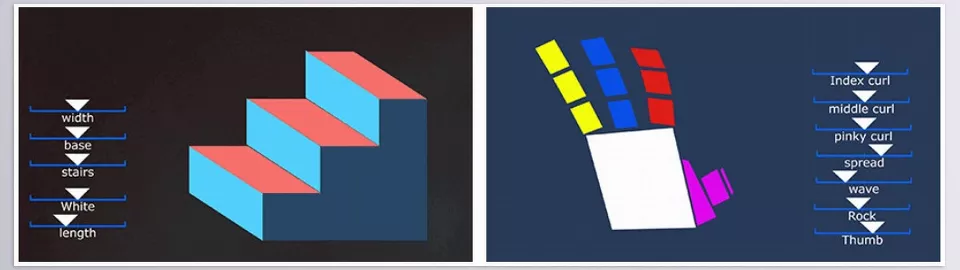
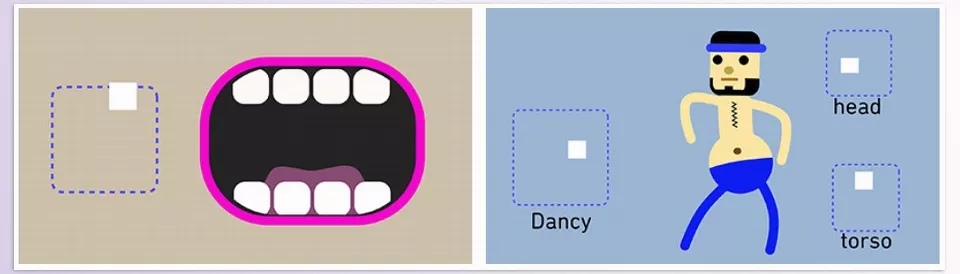
The joystick is one of the main features of this tool. You just define a few key poses (like right, left, up, down, and the default pose), and the joystick automatically and smoothly interpolates between them. For example, the character’s head moves left and right without countless keyframes, or the eyes easily follow a target point. This means you can create complex movements in seconds instead of hours.
More Flexibility with Sliders
Sliders take it a step further. With sliders, you can create multiple poses and combine them without any limitation on the number of states. This is incredibly useful for hand rigs, eyes, mouths, entire bodies, or abstract motion graphics. You can create simultaneous movements and achieve natural, smooth results that are nearly impossible without a plugin.
Managing States with Switch Templates
Sometimes, you have multiple states for a part of your character, like an open or closed mouth, or eyes at different angles. Switch Templates allow these states to change automatically based on the joystick or slider position. No more adjusting keyframes manually or wasting time switching between states.
Compatibility and Integration
One major advantage of this plugin is its compatibility with other popular tools and plugins like Limber, DUIK, and Rubber Hose. You can use them alongside joysticks and Sliders Plugin for a completely professional and integrated animation workflow.
The Final Result: Faster and More Natural Movements
With this tool, character movements become precise, smooth, and natural, significantly reducing design and animation time. Imagine a cartoon character with coordinated, expressive eyes and mouth—without drawing thousands of keyframes or creating a complex project. This tool acts like a magic assistant for animators, allowing you to focus on what really matters: creativity and storytelling.
💡 Friendly Tip: Even for small or abstract projects, using joysticks and Sliders Plugin can make a huge difference and simplify your workflow.
Natural Movements with a Few Simple Tricks
Creating natural movements starts with joysticks and Sliders Plugin, but a few professional tips make the process even easier:
- Combine Joystick and Slider: Use the joystick for overall body or head movement and the slider for details like eyes, hands, or mouth. This combination makes movements smooth and coordinated.
- Switch Template: If you have multiple states like mouth or eye positions, you can switch between them easily without extra keyframes.
- Organize Layers and Naming: Keep layers clear and organized. This speeds up finding poses and editing controllers.
- A Few Poses Are Enough: You don’t need hundreds of keyframes. A few key poses can achieve natural, professional results.
💡 Friendly Tip: Focus on key movements first, then add details. This saves time and ensures professional-quality results.
Animate, Fast and Easy!
Ultimately, joysticks and Sliders Plugin is the quickest and most intuitive way to render animation and motion graphics with realistic and enjoyable movement. A few poses combined with intelligent manipulators allow for synchronized, fluid movement of characters and graphical assets without the need for countless keyframed positioning hours on end.
Even for small or experimental projects, this tool is valuable because it lets you focus on creativity and storytelling instead of complex frame details.
Once you try this tool, you’ll see how easy and enjoyable it is to animate complex movements, simultaneous actions, and combined states. Just start, and you’ll realize how easily you can bring your characters or graphic elements to life and achieve professional results faster.
Don’t miss our all-inclusive guide on After Effects tools — the ultimate resource for anyone ready to unlock the software’s true creative potential.



