When Plugin Choice Determines the Fate of Your Edit
A few years ago, if you asked an editor what the most important part of their work was, they would probably say creativity. Today, the story is a little different. Creativity still matters, but what truly determines the speed and quality of the final output is the tool. Especially in a world where a new plugin is introduced every week, each one promising to make your work more professional, faster, and more engaging.
This is exactly where many people get confused. Because on the surface, all these tools look attractive; their trailers are impressive, their presets eye-catching, and their descriptions convincing. But the reality is that not every plugin is built for every type of content. One tool might be incredible for a music video but feel unnecessary — even distracting — in an educational project. Or a sales-focused package might look artificial and out of place in a narrative video.
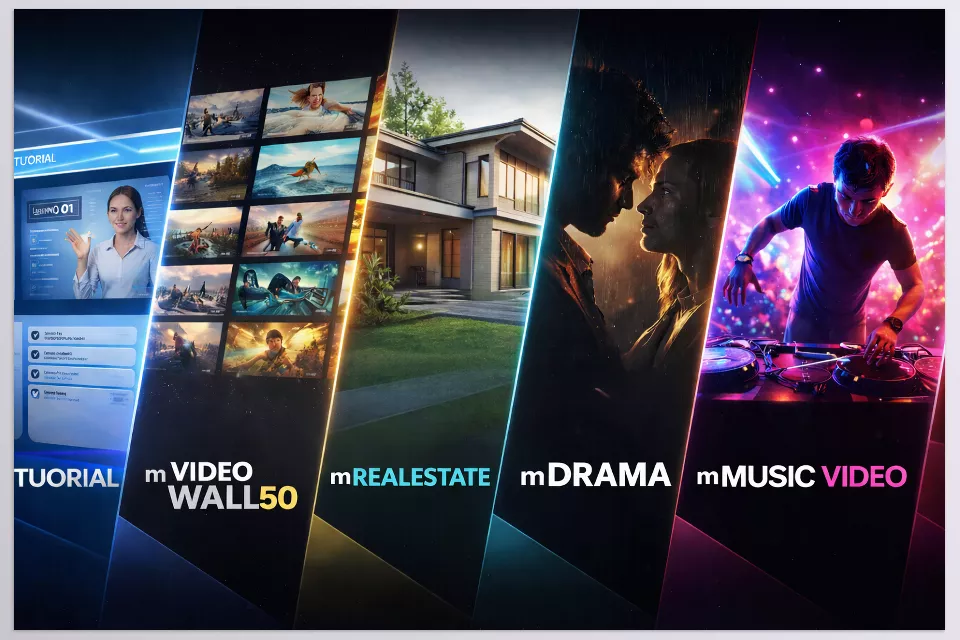
Here, we’re going to cover fiveMotionVFX Products for Different Types of Editing so you can see what scenario they were designed for and where they bring value.
But before we break down each tool and put them under the microscope, there’s an important point to clarify: choosing a plugin isn’t just about picking an effect or a preset. You’re actually choosing the identity of your video — educational and clear? Sales-driven and informative? Cinematic and intense? Or rhythmic and high-energy?
Now that the playing field is defined, let’s examine these five products one by one and see where they truly shine — and where they might not be the right choice.
What Exactly Is MotionVFX and Why MotionVFX Products Stand Out for Editors
If you’ve worked with Final Cut Pro or DaVinci Resolve, you’ve probably heard the name MotionVFX at least once. This brand has been specializing for years in motion graphics design, professional presets, and support tools for editors. Its focus is clear: building tools that elevate the visual quality of projects and speed up workflow — without requiring design from scratch.
An important point about MotionVFX is that it doesn’t just create decorative effects. Many of MotionVFX Products are designed for specific scenarios — meaning they are built with a particular use case in mind. For example: tools specifically for educational content, real estate presentations, music videos, or cinematic atmosphere building. Behind each plugin, there is a clear objective.
These MotionVFX Products are typically designed in a drag-and-drop format, with ready-made presets, Drop Zones, customizable settings, and full timeline integration. The result? Even editors who aren’t professional motion designers can achieve clean and consistent outputs. However, this ease of use comes with a challenge: if you choose the wrong tool for the wrong project, your work can quickly look artificial.
In this article, we’ve selected five products from this brand, each representing a different direction in content creation. Now it’s time to examine these five paths individually and see what type of project each one was built for.
From Selection Theory to Practical Tool Review
Now that we’ve discussed the importance of choosing the right tools, it’s time to move from theory to real examples. For this review, we selected five MotionVFX products that each represent a specific editing approach — not just five random plugins, but five different perspectives on content creation.
The important thing is that these tools are not direct competitors. We’re not here to declare one as “the best” and discard the others. Each is designed for a particular scenario, and when used in the right place, it delivers exactly what it promises. So instead of focusing on feature lists, we’ll look at the logic behind their design and the types of projects they were built for.
With that in mind, let’s start with the first tool and see where it truly shines.
mTutorial – When the Audience Shouldn’t Have to Guess
Among different MotionVFX Products, mTutorial focuses on clarity and educational workflows. Educational videos follow an unwritten rule: the audience shouldn’t struggle to understand — they should understand effortlessly. If viewers have to guess what you’re pointing at or which section matters, something isn’t working. mTutorial was built precisely to solve this problem.
This tool focuses on clarity, not spectacle. Ready-made highlights, controlled zooms, mouse and keyboard displays, explanatory boxes, and clean typography are all designed to guide the viewer’s attention. Instead of cluttering the frame, it increases focus.
If you’re a course instructor, educational YouTuber, or software tutorial creator, this tool significantly reduces editing time and improves clarity. But if you’re looking for excitement and style, this plugin isn’t meant to deliver that. Here, clarity comes first.
mVideoWall50 – When Multiple Images Need Order, Not Chaos
Some MotionVFX Products are built for structure and layout, and mVideoWall50 is a clear example of that approach. Displaying multiple videos at once is always tempting. But without proper composition, it quickly turns into a cluttered frame that destroys focus. mVideoWall50 is designed to control that potential chaos.
This plugin includes 50 pre-designed layouts. Frames are balanced, camera movement is calculated, and the overall space feels professional. You simply drop your content into the Drop Zone, and the composition takes shape.
Its primary use is in presentation-based projects: architectural showcases, portfolio displays, photo albums, corporate teasers, or even team introductions. This tool isn’t chasing excitement — it’s chasing visual order. If your project requires showing multiple angles or moments simultaneously, this is exactly where this plugin belongs.
mReal Estate – When the Visual Must Be Both Attractive and Precise
Within the range of MotionVFX Products, mReal Estate is specifically tailored for professional property presentations. The real estate market has one key rule: information must be clear. Price, size, number of bedrooms, amenities — these aren’t details you can gloss over with beautiful visuals alone. mReal Estate is built precisely to balance aesthetics and information.
It includes ready-made property detail titles, clean infographics, icons related to amenities, and transitions aligned with a luxury atmosphere. The result is a property showcase video that feels both professional and trustworthy.
This is a specialized tool. If you don’t work in real estate, many of its features may not be relevant. But if you do, it provides a consistent visual framework for your brand and significantly speeds up production.
mDrama – When Video Is Not Just Image — It’s Atmosphere
Some projects don’t need effects; they need feeling. Suspense, seriousness, weight, anticipation. mDrama is designed to create that atmosphere.
Dark cinematic effects, dramatic typography, intense transitions, and controlled camera movements work together to build an immersive mood. Rather than simply changing visuals, this tool changes the tone of your video.
If you create trailers, documentaries, or narrative projects, this plugin can add depth to your work. But for light, everyday content, it may feel too heavy. This tool is built for serious projects.
mMUSIC VIDEO – When the Image Has to Breathe With the Beat
Not all MotionVFX Products follow the same rhythm-driven logic, but mMUSIC VIDEO is built entirely around energy and musical sync. The image must sync with the beat, shift dynamically, and generate energy. mMUSIC VIDEO is built exactly for that.
Rhythmic effects, fast movements, stylized typography, ready-made LUTs for distinctive color grading, and transitions that sit perfectly with musical beats ensure that visuals don’t just accompany the track — they become part of the listening experience.
If you edit music videos or create musical clips for social media, this tool aligns perfectly with your workflow. But if your projects are educational or corporate, only parts of their features may be relevant.
If we place these five products side by side, one thing becomes very clear: these aren’t just five graphic plugins — they’re five different editing approaches. One focuses on clarity in education, one on order in multi-image displays, one on professional property sales, one on dramatic cinematic atmosphere, and one on synchronizing visuals with musical rhythm. Their difference isn’t just in effects or style — it’s in design intent and the type of project they were built for.
That’s why choosing between them is less about taste and more about strategy. You need to ask yourself what type of videos you primarily create and what your audience expects. When the tool aligns with the nature of your content, editing becomes smoother, and the output feels natural. But if you choose based solely on surface appeal, the plugin can easily turn into an artificial layer on your project.
These Five Plugins at a Glance
If you don’t feel like reading the full analysis or just want a fast overview of which tool fits your needs, this section is for you. Here’s a quick overview of these MotionVFX Products and what type of project they suit.
| Product | Best For | Main Strength | Most Logical For |
|---|---|---|---|
| mTutorial | Educational videos, screen recordings | Increased clarity and guided viewer focus | Instructors, educational YouTubers, course creators |
| mVideoWall50 | Project showcases, albums, corporate presentations | Organized multi-image display with professional layout | Brand and teaser creators |
| mReal Estate | Property and real estate showcases | Sales-focused property information display | Real estate agents and property pages |
| mDrama | Trailers, documentaries, narrative projects | Cinematic atmosphere and tension building | Story-driven editors and serious projects |
| mMUSIC VIDEO | Music videos and rhythmic clips | Beat-synced visuals with high energy | Music video editors and social media clip creators |
If you want to choose one right now, instead of asking “Which one is more professional?” ask yourself, “What type of videos do I mostly create?” The answer to that question will define your choice.
Advantages and Limitations | Neutral and Realistic
So far, we’ve focused mostly on use cases and strengths. But a professional review isn’t just about praise. Every powerful tool comes with limitations. Knowing those limitations helps you make a precise decision — not an emotional one.
One important thing about MotionVFX Products is compatibility. Not all versions offer identical features, and some products are more complete in Final Cut Pro. If you’re a DaVinci Resolve user, make sure to check the specific version for that software and understand exactly what you’re getting.
From a limitation standpoint, a few important points stand out:
- Some products are only available for FCP or have stronger versions in FCP.
- Certain packages are highly specialized (like mReal Estate) and don’t have broad use outside their niche.
- Tools like mDrama or mMUSIC VIDEO are heavily style-driven; if used in mismatched projects, the result can feel artificial.
- These plugins increase speed, but they don’t replace ideas or creativity.
On the other hand, there are shared advantages that shouldn’t be overlooked:
- Drag & Drop design and fast usability
- Ready-made and customizable presets
- Consistent visual identity across projects
- Significant time savings in editing
Ultimately, the issue isn’t whether these tools are good or bad — it’s whether they’re suitable for your project. When the tool aligns with the content’s objective, the result feels natural and professional. When it doesn’t, even the best effects won’t help.
The Tool You Choose Changes Everything
In the end, what makes these five MotionVFX Products valuable isn’t just the number of presets or their attractive appearance — it’s that each one solves a specific problem. One addresses clarity in education, one tackles multi-image presentation challenges, one focuses on emotional atmosphere building, and one ensures synchronization with music. When you approach tools from a problem-solving perspective, your choice becomes logical and intentional — not emotional.
More importantly, these plugins change the workflow more than the final output. They influence decision-making speed, visual consistency, and project standardization. If your content production is continuous (such as YouTube, online courses, or serial projects), that consistency becomes a competitive advantage. In reality, these tools are best suited for creators aiming for sustainable and professional production — not just a single video.
The most crucial question should not be which one is better, but which aligns more with your workflow. If you choose to create harmony between your project and the tool you choose, it will be an excellent enhancer of your production.
If you’re working in Final Cut Pro, understanding the right supporting tools can make a major difference in your workflow. You can explore a full breakdown of Final Cut Pro tools in our detailed guide.