


🎬 Why Does Making a Simple Slideshow Take So Long?
Are you experienced in using the Rapid Slideshow and Presentation Maker Plugin by aescripts? Have you ever tried to turn a few photos into an engaging video and thought it would be quick, only to realize halfway through that everything got complicated?
At first, you just have a few images and a piece of music. But once you open After Effects, suddenly you have to zoom every image, animate it, adjust timing, and finally sync everything with the audio. That “simple” project turns into a multi-hour task—most of it repetitive and exhausting.
The truth is, the problem isn’t you. Creating a professional slideshow is one of those tasks that looks simple on the surface but involves a lot of detailed work behind the scenes.

🧩 What Does a Professional Slideshow Actually Mean?
A good slideshow is more than just placing images next to each other. What makes it professional is the combination of several elements: camera movement, image arrangement, rhythm synced with music, and subtle effects that bring the visuals to life.
For example, imagine you’re creating a travel video or a wedding slideshow. If the images are completely static, the result quickly becomes boring. But when you add a smooth zoom or a gentle camera movement, those same images turn into a much more engaging experience.
This is where the importance of helpful tools becomes clear.
🛠️ When You Do Everything Manually…
If you want to create a slideshow in After Effects without any additional tools, you’ll need to rely on the basic features—like adjusting Position and Scale, adding keyframes, using Easy Ease, and working with the Graph Editor. For layout, you’ll need to manually arrange images or use precomps.
This approach is totally doable, but it comes with a few issues that show up quickly:
- It takes a lot of time, especially with many images
- The process becomes repetitive and tiring
- The timeline gets messy and hard to manage
- Making changes later requires redoing a lot of work
For small projects, this might be manageable. But once you’re dealing with 20 or 50 images, it becomes genuinely frustrating.
⚡ A Faster Way: Introducing Rapid Slideshow & Presentation Maker
This is exactly where tools like Rapid Slideshow and Presentation Maker (RSPM) come in and make a real difference.
At its core, it’s a script that runs inside After Effects with a clear goal:
to eliminate repetitive, time-consuming tasks and replace them with smart, ready-to-use tools.
The main difference is that instead of manually creating keyframes for every movement, this tool uses expressions to handle those tasks for you. That means you decide what you want, not how to build it.
For example, instead of adjusting Scale, Position, and the Graph Editor, you simply say:
“Zoom this image” or “Move it from this direction,”
and the tool generates a clean, editable animation automatically.
🎯 What Does This Tool Actually Make Easier?
In short, it simplifies almost every part of slideshow creation. Let’s break it down:
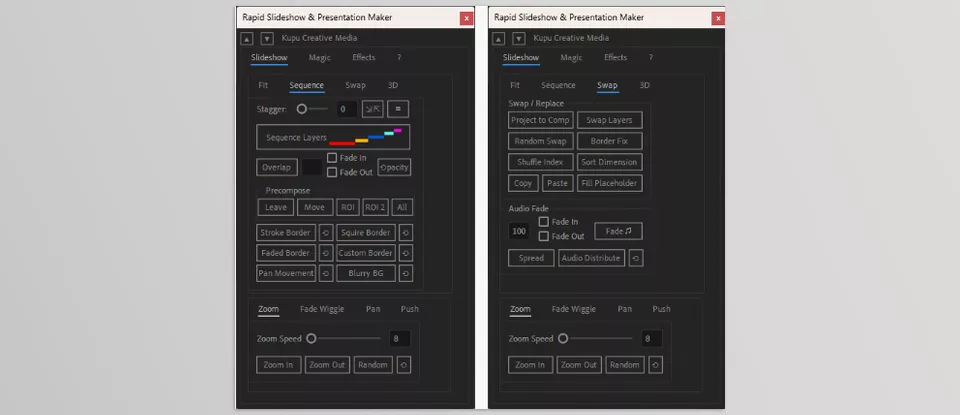
🎥 Creating Motion on Images (Without Keyframe Hassle)
One of the most time-consuming parts is adding motion. This is where Rapid Slideshow and Presentation Maker really shine.
You can easily apply:
- Zoom
- Pan
- Push (camera movement)
—all with just a few clicks.
These aren’t just static effects—they follow logic (like starting from one side, ending on another, or moving across both directions). More importantly, you can reset or adjust them anytime, making them fully flexible.
🧱 Fast and Clean Image Layouts
Arranging images—especially in large numbers—can be very frustrating. Tools like:
- Grid Maker
- Smart Shuffle
- Bento Layout
make this process much easier.
Instead of manually aligning and resizing everything, you just select your images, and the tool automatically creates a clean, structured layout. It even considers your selection order for more logical results.
Bento is especially useful if you’re going for a modern, Instagram-style layout—something closer to professional collage designs.
🎨 Quick Styling (Without Building From Scratch)
To go beyond a basic slideshow, the tool offers built-in styling options, such as:
- Adding different types of borders to images
- Creating blurry backgrounds to fill space and enhance the frame
- Motion effects like Swing (oscillation) or Flash for added energy
The best part is that everything is controllable from a central system—you don’t need to adjust each layer individually.
🎧 Effortless Audio Management
If you’ve ever arranged multiple music tracks in After Effects, you know how time-consuming it can be. This tool simplifies that process significantly.
You can:
- Automatically distribute music across the timeline
- Trim tracks from the middle (to avoid awkward starts)
- Apply fade in / fade out
- Create crossfades between tracks
In other words, it builds a clean, ready-to-use music base without manual setup.
🎬 Creating 3D Shots Without Complexity
One of the most exciting features is the 3D camera system.
Instead of dealing with complex Camera, Null, and Focus setups, the tool quickly:
- Creates cameras
- Focuses on selected layers
- Generates movement between shots
- Allows Shuffle or Refocus
All while keeping the project structure clean (usually one camera and one null per shot).
Perhaps the most important feature of Rapid Slideshow and Presentation Maker is that it relies heavily on expressions instead of heavy, manual keyframing. This keeps your timeline much cleaner and prevents your project from becoming cluttered or confusing.
Even more importantly, making changes becomes incredibly easy—you don’t need to dig through countless keyframes. Just adjust the settings, and the result updates instantly.
Your project never gets “locked” and always remains flexible.
In short, Rapid Slideshow and Presentation Maker doesn’t replace your creativity—it removes repetitive, time-consuming tasks so you can reach a professional result faster and more efficiently.

🎯 Tips to Make Your Work Look More Professional
To ensure your result isn’t just “good” but truly professional, keep these simple yet powerful tips in mind:
- Keep movements controlled
It’s tempting to exaggerate zooms and pans for excitement, but subtle, smooth motion always looks more professional. Too much movement can make the work feel amateurish instead of cinematic. - Match the rhythm with the music
One of the most important elements is syncing with audio. Try to align cuts and transitions with the beat—even small changes feel much more impactful when timed correctly. - Avoid monotony, but don’t overcomplicate
Layouts like Grid or Bento add variety, but overusing different styles can confuse the viewer. Balance is key. - Use a 3D camera for special moments
It’s powerful, but overusing it reduces its impact. Save it for moments you want to highlight. - Create clean starts and endings
The first and last shots matter a lot. A smooth fade or a well-designed motion at the beginning and end can elevate the entire piece. - Give breathing space between scenes (Spacing)
Not everything needs to be fast. Let some images stay longer so the viewer can absorb them. This improves rhythm. - Maintain consistency
Keep your overall style unified. If you use a certain border or motion style, stick with it throughout the project to create a cohesive, professional feel.
If you follow these simple tips, even basic tools can help you produce results that look polished and visually appealing 👌
🚀 Work Faster, Focus More on Creativity
In the end, what Rapid Slideshow and Presentation Maker change isn’t just your speed—it’s the nature of your workflow.
When you’re no longer stuck doing repetitive tasks like keyframing, adjusting motion, or manually arranging layers, your mind becomes freer. You can focus more on ideas, mood, and the visual quality of your work. That’s where ordinary projects turn into professional ones.
This doesn’t mean everything becomes automatic or that your creativity is removed. Quite the opposite—tools like Rapid Slideshow and Presentation Maker simply remove the tedious parts. You’re still the one deciding what works best, where emphasis is needed, and what the overall feel should be—you just get there faster.
If your work often involves photos, slideshows, or quick projects like reels and presentations, using a tool like this can genuinely transform your workflow. You’ll spend less time, get cleaner and more professional results, and avoid wasting energy on repetitive details.
If mastering After Effects at a more advanced level is your objective, our comprehensive After Effects Tools guide provides the clarity and direction you need.



