


When a Few Simple Photos Need to Become a Stunning Video…
Have you explored the Slideshow Maker Plugins for After Effects? Almost all of us have experienced this situation: you have a folder full of photos, and you need to turn them into an engaging video. Not a dry, boring video, but something with smooth motion, proper framing, a good rhythm, and a professional feel that can be confidently used on social media or in a serious project.
But as soon as you start working, you realize the story isn’t that simple. Every photo requires adjustments, every movement needs multiple keyframes, and even a small change means going back to layers and manipulating the timeline again. Before you even reach the creative part of the work, a lot of time and energy is spent on repetitive tasks.
Which brings us back to the question — do you need to do this every single time? Or is there an easier way that allows you to just make a nice, clean, beautiful video instead of fighting with the tools?

What is a Dynamic Slideshow and Where Is It Used?
In the world of motion graphics, a slideshow is no longer just placing a few photos one after another. Today’s slideshow is meant to bring photos out of their static and lifeless state and give them motion, rhythm, and personality. This means the proper use of camera movement, controlled zooms, smooth pans, and transitions that are noticeable but not jarring. This is why designers are always on the lookout for Slideshow Maker Plugins. But before we dive into plugins, let’s explore how to achieve it without any.
What Are the Features of a Modern Slideshow?
A modern slideshow primarily relies on smooth and purposeful movements—motion that doesn’t tire the eye and isn’t there just to be seen. Zooms and pans are used to guide the viewer’s eye within the frame rather than clutter or confuse it.
Photo arrangement also plays a key role: smart grids help everything look organized and professional, even when multiple images are on screen at the same time. On the other hand, transitions must be smooth and subtle so that the video doesn’t feel cut or disjointed. When all of this is synchronized with music rhythm, the result is a natural, well-paced, and fully professional slideshow.
Where Are These Videos Most Commonly Used?
Dynamic slideshows are useful almost everywhere, especially in situations where first impressions matter:
- Instagram reels and posts
- Wedding and event slideshows
- Project introductions and portfolios
- Corporate and visual presentations
When these elements are used together appropriately, the result is completely different. Even ordinary photos can feel professional, organized, and cinematic, keeping the audience engaged until the end of the video.
When You Only Have After Effects
After Effects gives you almost everything you need to create a professional slideshow without any Slideshow Maker Plugin, while keeping full control over motion, layout, and effects. You can:
- Animate Position and Scale for zooms and pans
- Add 3D motion with Camera and Null
- Use Masks, Shape Layers, or Precomps to arrange photos neatly
- Manually adjust audio with cuts, fades, and crossfades
But things get difficult when the number of photos is large, or the project is urgent.
Problems with the Traditional Method
When working traditionally, each photo requires a separate keyframe, which quickly clutters and complicates the timeline. If the client changes their mind or you want a small adjustment, you have to revisit many layers and keyframes and adjust everything again. This amount of repetitive work gradually drains your energy and creativity, turning an enjoyable task into a tedious process.
This method can work, and many have used it for years to complete their projects. But when there are many photos or a tight deadline, it usually consumes a lot of time and energy and increases the chance of mistakes. Therefore, having a faster, cleaner, and more editable method makes the After Effects experience much more enjoyable.
When a Professional Slideshow Maker Plugin Enters the Game
This is where Rapid Slideshow and Presentation Maker Plugin comes in—a professional After Effects script that tackles this old problem: quickly creating slideshows and reels without a cluttered, confusing timeline. This tool is designed for those who want their projects ready fast while keeping them clean, professional, and engaging.
This script works with an expression-based approach, meaning many tasks that used to take hours are reduced to a few simple clicks. Instead of manually keyframing each photo, you just import the image, select the type of movement and layout, and everything else happens automatically. The timeline stays clean, everything is editable, and you can change motions and effects effortlessly whenever you want.
Key Features and Practical Applications
- Pan, Zoom, and Push Movements: Bring images to life without heavy keyframing
- Smart Grids and Bento Layouts: Keep photo arrangements organized and attractive, even with many images
- Automatic Borders and Blurry Backgrounds: Professional framing and backgrounds suitable for social media
- Audio Distribution and Crossfade: Project audio is automatically cut, faded, and crossfaded—no manual adjustments needed
- 3D Camera Shots with a Null and Camera: Cinematic, professional motion without complexity
- Swing, Flash, and Keyframe Overshoot (KFO): Add energy and natural motion to animations for more engagement
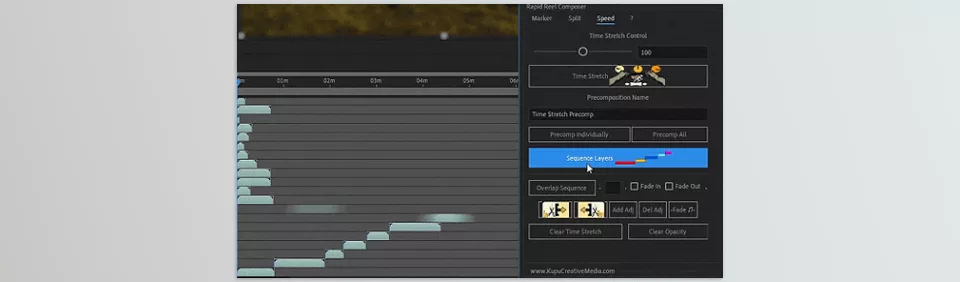
- Sequence Layers and Stagger Layers: Automatically or sequentially control image display to create rhythm and flow
- Fit to Comp, Flip, and Rotate: Quickly adjust image size, direction, and rotation before animation
- Grid Shuffle and Smart Shuffle: Randomize layout variations without breaking the grid structure
- Minimize/Maximize UI and Dockable Launcher: Keep the workspace clean and manageable
- KBar Support: Quickly access frequently used tools with a custom button
For example, if you want to create Pan and Zoom movements for 20 photos, with the Rapid Slideshow and Presentation Maker Plugin, you just select the type of motion. All images synchronize automatically, keyframes are generated automatically, and even audio and transitions are managed without effort. This allows you to focus on creativity and ideas rather than repetitive and exhausting tasks.
Tangible Use Cases in Projects
- Instagram Reels and Posts: Quickly grab attention with proper rhythm and motion
- Wedding and Event Slideshows: Professional and cinematic feel for memories
- Project Introductions and Portfolios: Present work attractively to clients
- Corporate and Visual Presentations: Impactful videos without complex editing
With this Slideshow Maker Plugin, even large, photo-heavy projects maintain speed, professional quality, and a tidy timeline—without spending hours keyframing or creating complex motion paths.
Tips for a More Professional Output
When using a Slideshow Maker Plugin like Rapid Slideshow and Presentation Maker, a few simple tips can help your results look more natural and visually striking:
- Less Motion, More Impact: Gentle zooms and movements always feel more professional, while rapid, extreme motion can tire or confuse the audience
- Use Grids and Layouts Intelligently: Grids and Bento Layouts aren’t just for filling space; they help tell a story, control the display order, and create rhythm and flow
- Don’t Underestimate Audio: Soft crossfades and proper fades create half of the professional feel. When audio and visuals are synchronized, the audience senses a well-crafted video
- Avoid Clutter: The tool speeds things up, but the choices are yours. Not every effect or feature needs to be applied to every photo
- Structure First, Effects Later: Always arrange and order photos first, then add motions and effects. This simple sequence keeps the project clean, professional, and editable
These tips are fully applicable even for beginners, helping them produce high-quality, attractive outputs without feeling that the project is complex or overwhelming.
Conclusion: The Tool Is Not a Replacement for Creativity
Firstly, understand that the Slideshow Maker Plugins aren’t there to steal your job away from you, but to eliminate redundancy and time-consuming effort so that you can concentrate on the ideas, narrative, and professional elements—without battling keyframes and layers.
If you use After Effects regularly to create slideshows and reels—or you’re fed up with the constant redundancy of keyframing—then this is a great tool to revitalize your process. A clean and adjustable timeline, movements added by default, and basic effects pre-set mean faster production for a professional finish.
In the end, using Rapid Slideshow and Presentation Maker Plugin (and other similar Slideshow Maker Plugins) actually frees up creative potential. You can concentrate on the narrative, the images, the pace of the music, and the visual nuances without having to worry about repetitive and frankly, annoying tasks that take up time. This means a faster workflow, better engagement, and a better experience overall in After Effects.
Ready to take your motion graphics game to the next level? Our After Effects Tools guide walks you through all the tools, scripts, and plugins that can make your projects truly shine.



