

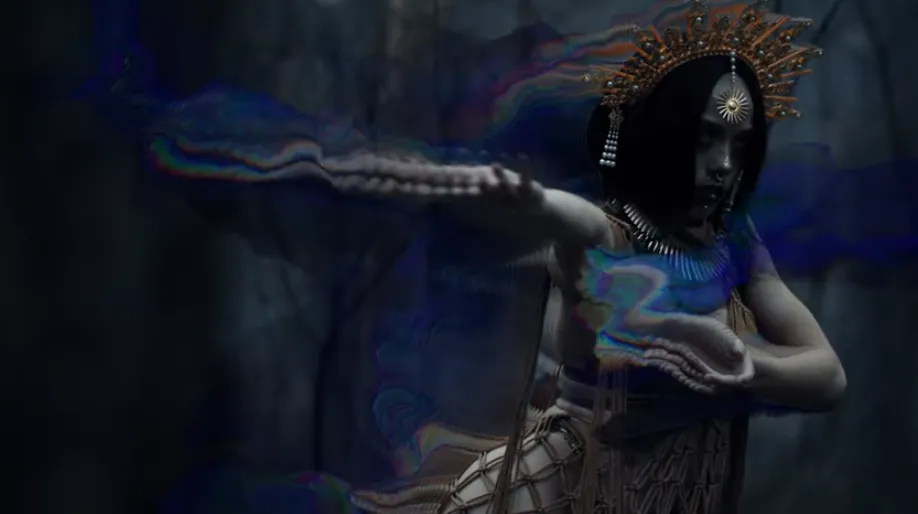
Why Have Liquid Effects Become So Popular?
Are you familiar with what the Dropletee Plugin by aescripts can do? Some effects don’t just change the appearance of an image; they completely transform the mood and feeling of a video. Liquid effects — those fluid, flowing visual styles — are exactly in that category. When colors move across the frame, edges begin to ripple, and everything feels like it’s floating inside an oily or watery surface, the video instantly becomes more cinematic and modern.
That’s why this style of effect is everywhere these days — from music videos and motion graphic titles to psychedelic visuals, fashion ads, and even digital art projects. But behind this attractive look, there’s usually an old challenge: creating these kinds of effects inside After Effects has never really been easy 😅
A lot of the time, achieving a natural-looking result means combining multiple effects together, tweaking endless settings, and testing the project over and over until the motion no longer feels artificial. That’s exactly where specialized Liquid Distortion tools can make the process much faster and more professional.

What Exactly Is a Liquid Distortion Effect? 🌊
Simply put, Liquid Distortion means deforming an image in a way that makes the pixels behave like liquid. Unlike regular distortions that simply stretch or wave the image, the movement here feels softer, more organic, and more alive.
For example, imagine a logo appearing on screen and then gradually dissolving into colorful waves, or a video background moving like an oily surface floating on water. That sense of fluidity instantly makes the image feel more visually engaging and professional.
These types of effects are commonly used in projects like:
- Music videos 🎵
- Cinematic titles 🎬
- Experimental visuals
- Modern motion graphics
- Technology and fashion advertisements
Because they add motion, depth, and energy to the image — without needing to dive into complex 3D simulations.
Can You Create These Effects Without Plugins? 🤔
Yes, to a large extent, you can. After Effects itself already includes tools capable of building parts of this look. Motion designers have been creating Liquid-style visuals for years by combining AE’s built-in effects.
Usually, effects like these are made using combinations of tools such as:
- Turbulent Displace
- Liquify
- Displacement Map
- Fractal Noise
- Echo
- CC Glass
- Glow
- Colorama
For example, Fractal Noise creates organic movement, Displacement Map adds wave-like deformation, and Echo preserves frame trails to create a sense of Flow and Accumulation. Once these are combined with Glow and Colorama, that oily, psychedelic look slowly starts to emerge.
But the reality is that this process isn’t always simple. To get a good result, you often need to stack multiple effects together, adjust a huge number of settings, and constantly test the outcome. And once the project becomes heavier, even getting a smooth preview can turn into a real battle with your system 😅
Another issue is that if these movements aren’t tuned properly, they can easily look artificial or overly chaotic. That’s why building a clean and professional Liquid Distortion effect inside AE is usually very time-consuming.
Dropletee — When Creating Liquid Effects Becomes Easier ✨
This is where Dropletee enters the scene. This plugin was designed for After Effects to make creating Liquid and Feedback effects faster, smoother, and more professional.
What’s interesting is that Dropletee isn’t just a simple distortion tool. The plugin combines liquid motion, frame accumulation, lighting, and iridescent colors together to make the image genuinely feel alive.
Instead of forcing the user to build multiple systems from scratch, everything is placed inside a ready-to-use workflow.
Some of the most important features of Dropletee include: 💧
Real Frame Accumulation
One of Dropletee’s most impressive features is its Accumulation system. This feature doesn’t simply distort the image — it allows motion trails to remain inside the frame and gradually build up over time. The result feels like energy waves, liquid flow, or cinematic feedback effects that create a continuous and living sense of motion.
This feature becomes especially eye-catching in projects like music videos or DJ visuals because it gives the image a flowing quality and prevents movements from feeling dry or mechanical. Even in transitions or Experimental scenes, it can be used to create smooth, fluid motion — movements that genuinely feel like the image is morphing inside a liquid material.
What makes this even more appealing is that everything can be controlled in real-time, meaning you don’t need to rebuild the entire system every time you make a small adjustment.
Oily and Iridescent Colors 🌈
One of the first things that grabs attention after seeing Dropletee’s output is its glossy, multi-toned colors. If you’ve ever looked closely at oil floating on water, gasoline reflections, or even soap bubbles, that same soft and shimmering color shift is exactly the feeling this plugin creates.
This style of color treatment instantly gives the image a modern and futuristic atmosphere. That’s why Dropletee is especially attractive for digital art projects, psychedelic visuals, music videos, and even fashion design.
The great thing is that these colors aren’t just simple overlays; motion and lighting affect the surface dynamically, making the image feel more alive and natural. These small details are exactly what make the final result feel more professional instead of looking like a generic preset effect.
Lighting and Image Depth
Many distortion effects simply move or warp the image, but Dropletee tries to add actual depth to the surface. The plugin uses Normal Maps and Lighting so different parts of the effect react to light.
In practice, this means the effects don’t feel purely two-dimensional. As light moves across the surface, the image gains texture and volume, making the result feel far more cinematic and realistic.
This feature becomes especially powerful when designing Abstract backgrounds or animated typography. Even simple movements look much more attractive with this kind of lighting, giving the project a more polished and professional feel.
Faster Processing with GPU ⚡
If you work with After Effects, you probably already know how heavy effects can slow everything down 😅 Especially when multiple Distortion, Blur, and Glow effects are stacked together, previewing can become a serious test of patience.
To solve this issue, Dropletee uses WebGPU so much of the processing happens directly on the graphics card. This makes working with effects much smoother and allows changes to appear more quickly.
As a result:
- Previews run faster
- Timeline interaction becomes smoother
- And the workflow feels far less exhausting
Especially when working on long projects or high resolutions, this difference becomes very noticeable.
Ready-Made Presets for Faster Starts 🎨
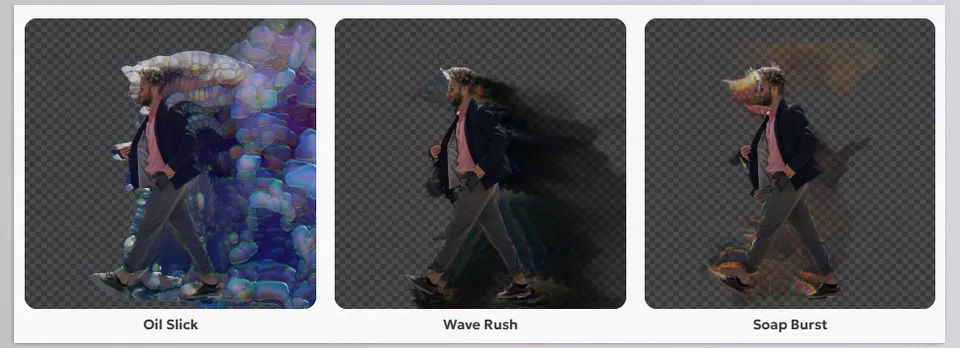
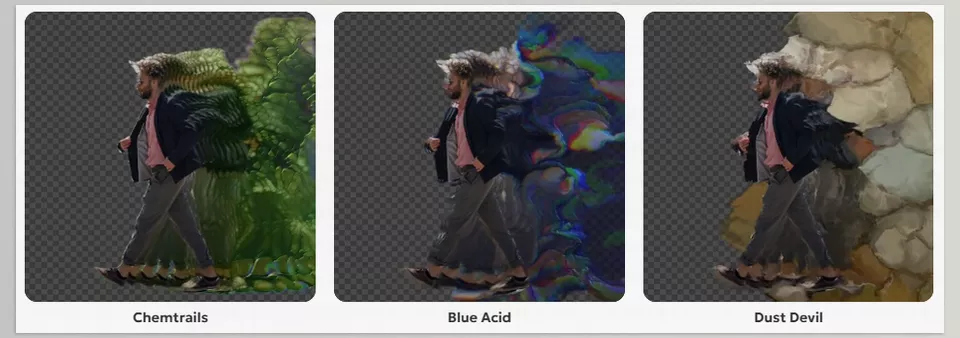
Another attractive part of Dropletee is the collection of built-in presets. Instead of designing everything from scratch every time, you can begin with a preset and gradually shape it into your own style.
For example, presets like:
- Oil Slick
- Blue Acid
- Soap Burst
- Wave Rush
- Dust Devil
Each one has its own unique mood and style. Some feel more oily and glossy, some create more energy and movement, and others are better suited for Experimental visuals.
Of course, the important thing is that these presets are only starting points. You’re not supposed to simply drop an effect onto the image and call it finished. You can easily modify parameters, customize colors, and even use each preset as the foundation for an entirely new style. This flexibility is what makes Dropletee appealing both for beginners and for motion designers who want to create completely personalized visuals.
Overall, Dropletee feels less like a simple After Effects effect plugin and more like a design environment for creating Liquid and Experimental visuals. It simplifies the difficult and time-consuming parts of building liquid effects so the user can focus more on creativity and design.
A Few Tips for More Professional Results 👀
If you want your Liquid effects to feel more natural, clean, and cinematic, these simple tips can help a lot:
- Soft movement usually gives better results.
If the distortion becomes too intense, the image quickly starts looking messy and artificial. Controlled motion and smooth flow usually feel far more professional. - Use Glow carefully.
Too much Glow can easily make a project look amateurish. But when it’s subtle and controlled, it can make the image feel much more cinematic and attractive ✨ - Simple typography is usually the better choice.
When the background is already full of movement, color, and detail, clean minimal fonts help keep the composition balanced and prevent visual clutter. - Control effects in layers.
It’s better to separate Distortion, Glow, Color, and Noise adjustments individually so you have more flexibility and easier control over the final look. - Don’t ignore subtle Noise.
A small amount of Grain or Noise can make digital effects feel more natural and cinematic, especially when the image looks overly clean and digital. - Keep colors limited.
Using a smaller palette of harmonious colors usually creates more professional results. If everything becomes too colorful, the effect quickly starts feeling chaotic. - Motion Blur can work wonders.
Adding soft Motion Blur makes movement feel smoother and more fluid, especially in fast scenes or transitions. - Treat presets as starting points only.
It’s better not to use presets exactly as they are. Small changes in color, distortion intensity, or lighting can make your final result feel much more personal and professional 🎨
In the end, what makes Liquid effects feel professional and visually stunning isn’t just stronger distortion or more visual chaos; it’s the balance between movement, lighting, color, and detail. The more controlled and intelligently these elements work together, the more natural, cinematic, and appealing the final result becomes 💧✨
Is Dropletee Actually Worth Using? 🚀
The truth is, many of the effects Dropletee creates can also be built directly inside After Effects. AE’s built-in tools are fully capable of creating Distortion, Feedback, and even Liquid-style visuals. But the real issue usually isn’t the effect itself — it’s the amount of time required to build, organize, and control all those systems. Where Dropletee really shows its value is in workflow, speed, and simplifying the overall design process.
Instead of spending hours building multiple pre-comps, tweaking Echo settings, combining different Noise systems, and controlling distortions manually, the plugin simplifies much of the process so the main focus stays on creativity. Especially if you frequently work on projects like music videos, modern motion graphics, visual art, or Experimental visuals, having a tool that gets you to compelling results faster can genuinely make the workflow smoother.
Perhaps the most important advantage of plugins like this is that they reduce the distance between idea and execution. Instead of getting stuck building complicated systems inside After Effects, you can turn the ideas in your head into visuals much faster. For many designers, speed and creative freedom are the real value of tools like this 💙
Want to learn how to use After Effects tools effectively to improve your skills without wasting your time on complicated tutorials? Check out our guide to the most useful After Effects tools to speed up your project and improve your workflow. Start creating faster and more efficiently today!



