

When Artificial Intelligence Enters the World of Motion Graphics 🎬
Are you aware of the AE GPT Plugin by aescripts? If you’ve ever worked with motion graphics software, you probably know that turning a great idea into a professional animation is not always easy. Often, creating just a few seconds of animation can take hours spent working through layers, keyframes, effects, and settings before you finally get close to the result you had in mind.
On top of that, a large part of motion graphics work involves repetitive, technical tasks — such as setting up expressions, creating simple animations, or finding the right effects. That’s why many designers have always looked for ways to spend less time on boring technical work and focus more on creativity and ideation. 🎨
Thanks to new AI tools, designers can save themselves from spending hours on these tasks. All they have to do is describe what they want for their projects, and the AI will do most of the work for them. Once a science fiction concept, this is now a reality in the motion graphics industry today. ✨

What Exactly Does AI Help With in Motion Graphics? 🤖
Artificial intelligence is all around us today. From one end of the world to the other, there is no part of the motion graphics industry that hasn’t been enhanced by AI. Whether it’s creating text, images, or animations for projects, AI tools have a way of assisting motion graphics designers with their projects.
In reality, these tools act like intelligent assistants. You no longer need to handle every technical step from scratch yourself. You simply explain your goal, and the system tries to manage much of the process for you.
For example, you can say:
- Create an animated neon text
- Add a rain effect
- Give the camera a cinematic shake
- Make the text bounce
- Design a cyberpunk atmosphere
And the AI starts creating layers, adding effects, writing expressions, and setting up animations automatically. 😄
For content creators, YouTubers, or even beginners entering the world of After Effects, this can save a huge amount of time and energy.
Before AI Tools, Everything Was Manual 🛠️
Before these tools entered the market, almost everything inside Adobe After Effects had to be done manually.
To create even a simple animation, you usually had to:
- Create layers
- Set keyframes
- Adjust the Graph Editor
- Write expressions
- Test effects
- Constantly preview the result
For example, if you wanted to create a natural camera shake, you would probably use the famous Wiggle expression. Or for text animation, you had to deal with Text Animator and Range Selector — things that can be really confusing for beginners at first. 😅
The main problem was that learning these tools took a lot of time, making the entry into motion graphics difficult for many people. On top of that, some parts were genuinely complex, and even simple tasks required several technical steps.
As a result, repetitive, routine tasks gradually became exhausting, and even professionals spent a significant amount of their time on non-creative tasks.
That’s why many designers were always searching for ways to speed up their workflow and spend less time dealing with technical details and repetitive tasks, so they could focus more on ideation and the creative side of projects.
Meet AE GPT — When After Effects Understands You ✨
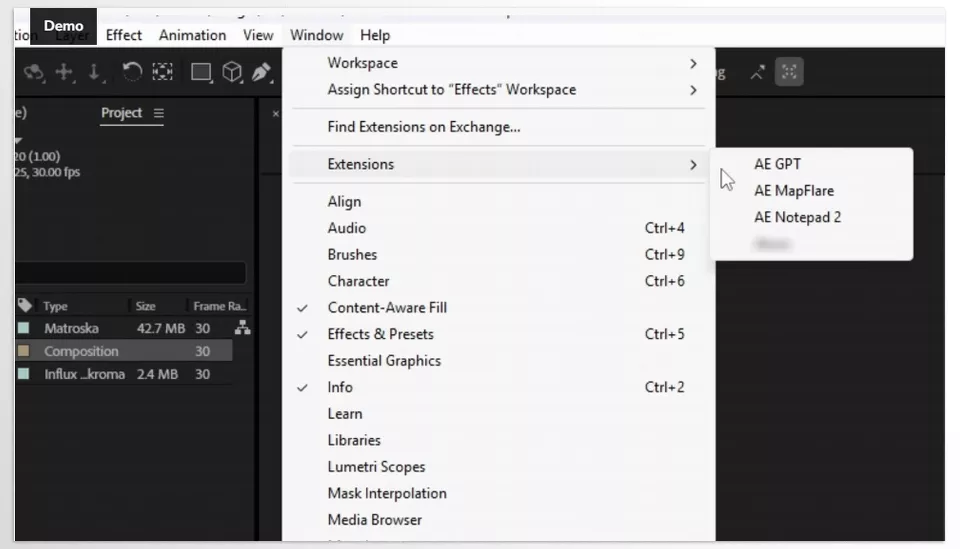
One of the tools that has gained a lot of attention recently is AE GPT — an AI-powered plugin for Adobe After Effects and Adobe Premiere Pro designed to simplify many technical and time-consuming tasks.
The most interesting part of this tool is something called Agent Mode. Unlike regular chatbots, it doesn’t just provide suggestions or code; it can directly make changes inside your project.
That means you simply describe what you want, and it can:
- Write scripts
- Execute them
- Create layers
- Add effects
- Build animations
- Automate certain tasks completely
In practice, it feels like having a motion design assistant sitting beside you and handling the technical work. 🎨
The Most Important Features of AE GPT 🚀
Automatic Scene and Effect Creation
One of AE GPT’s most exciting features is its ability to build an entire scene from just a simple description. You no longer need to manually arrange layers or add effects one by one.
For example, if you write: “Create a neon title with cinematic glow”
The tool automatically creates the text, adds the Glow effect, adjusts colors, animates the scene, and delivers a polished final result.
This feature is extremely useful for creating intros, teasers, reels, and YouTube videos because it dramatically increases production speed.
Writing Expressions Without Coding
Expressions are one of the most important parts of After Effects, but honestly, learning them can be difficult and time-consuming for many people.
This is where AE GPT becomes incredibly helpful because you no longer need to memorize code or watch complicated tutorials.
You simply describe what you want. For example:
- “Make the movement feel springy.”
- “Make the opacity blink.”
- “Make the text appear softly and smoothly.”
And the tool automatically generates the appropriate expression for you. 😎
Support for Multiple AI Models
This tool is not limited to a single AI model. It supports several AI services, including:
- OpenAI GPT
- Anthropic Claude
- Google Gemini
- Local models through Ollama
This means that, depending on your task — whether it’s ideation, coding, or fast execution — you can choose the most suitable model and get the best results.
Offline Usage and Privacy Protection 🔒
One of AE GPT’s most important capabilities is support for local AI models. If you use Ollama, some models can run completely offline.
That means:
- You can work without internet access
- Your project data never leaves your system
- Everything stays on your own computer
For many freelancers and professional teams, this is extremely valuable for security and privacy.
Overall, AE GPT can be considered an intelligent assistant within After Effects whose main purpose is to remove technical and time-consuming tasks from the user’s workflow, allowing more focus on ideas and creativity.
Of course, it still cannot fully replace actual skill and understanding of the software itself, but it can significantly increase workflow speed and make the motion graphics production process much smoother and easier.
How to Use It More Professionally? 🎯
Before you start using these tools, there are a few important things to keep in mind. If you follow them, your outputs will look much cleaner and more professional. These are mostly based on experience rather than theory, but they genuinely make a huge difference in the quality of your work 🎬
- Explain Things Clearly and Visually
The better you can describe what’s in your mind, the better the output will be. Instead of using generic prompts like “create some text,” say something like “a blue neon text with fog effects and subtle camera shake.” This helps the AI understand exactly what you’re looking for. - Build the Project Step by Step
Instead of asking for everything all at once, create the project piece by piece. Start with the background, then typography, then animation, and finally the effects. This gives you more control and also results in a cleaner final output. - Avoid Overcomplicated Requests
If you ask for five different things in a single prompt, the chances of getting messy or inaccurate results become much higher. Keep your requests simple and focused so the output stays more predictable and polished. - Test and Refine the Results
Anything generated by AI is not necessarily the final version. It’s always better to review each output and, if needed, refine it yourself or with the help of other tools. This process significantly improves the final quality. - Don’t Underestimate the Basics of After Effects
Even though AI has made many tasks easier, concepts like Layer, Keyframe, Timeline, Mask, and Composition remain essential. Once you understand what’s happening behind the scenes, managing and improving the final output becomes much easier 😄
Overall, these tools become truly valuable when combined with the right mindset and workflow. That’s when both your speed and the quality of your work improve dramatically 👌
When Your Ideas Go Directly from Your Mind to the Screen 🎬🚀
In the end, if you want to summarize the whole concept, tools like AE GPT are basically designed to do one very simple but important thing: reduce the distance between an “idea” and its actual execution. You no longer need to spend hours adjusting settings and going through endless trial and error inside Adobe After Effects for every tiny effect or animation. You just need to know what you want, and the tool makes the rest of the process much smoother.
That doesn’t mean skills are no longer necessary or that learning After Effects has become pointless. In fact, people who already understand the fundamentals can work several times faster and more professionally with these tools. AE GPT is more like a powerful assistant that handles repetitive and technical tasks so you can focus more on creativity, idea generation, and artistic details. 🎨
So if you’re involved in content creation, motion graphics, or even video editing, these tools are no longer just luxury options — they’re becoming part of the standard workflow. The sooner you get familiar with them, the faster you’ll be able to stay ahead of others while improving both your speed and the quality of your projects. 🚀
To gain a more systematic understanding of the broader ecosystem surrounding After Effects, explore our comprehensive After Effects Tools guide.



