

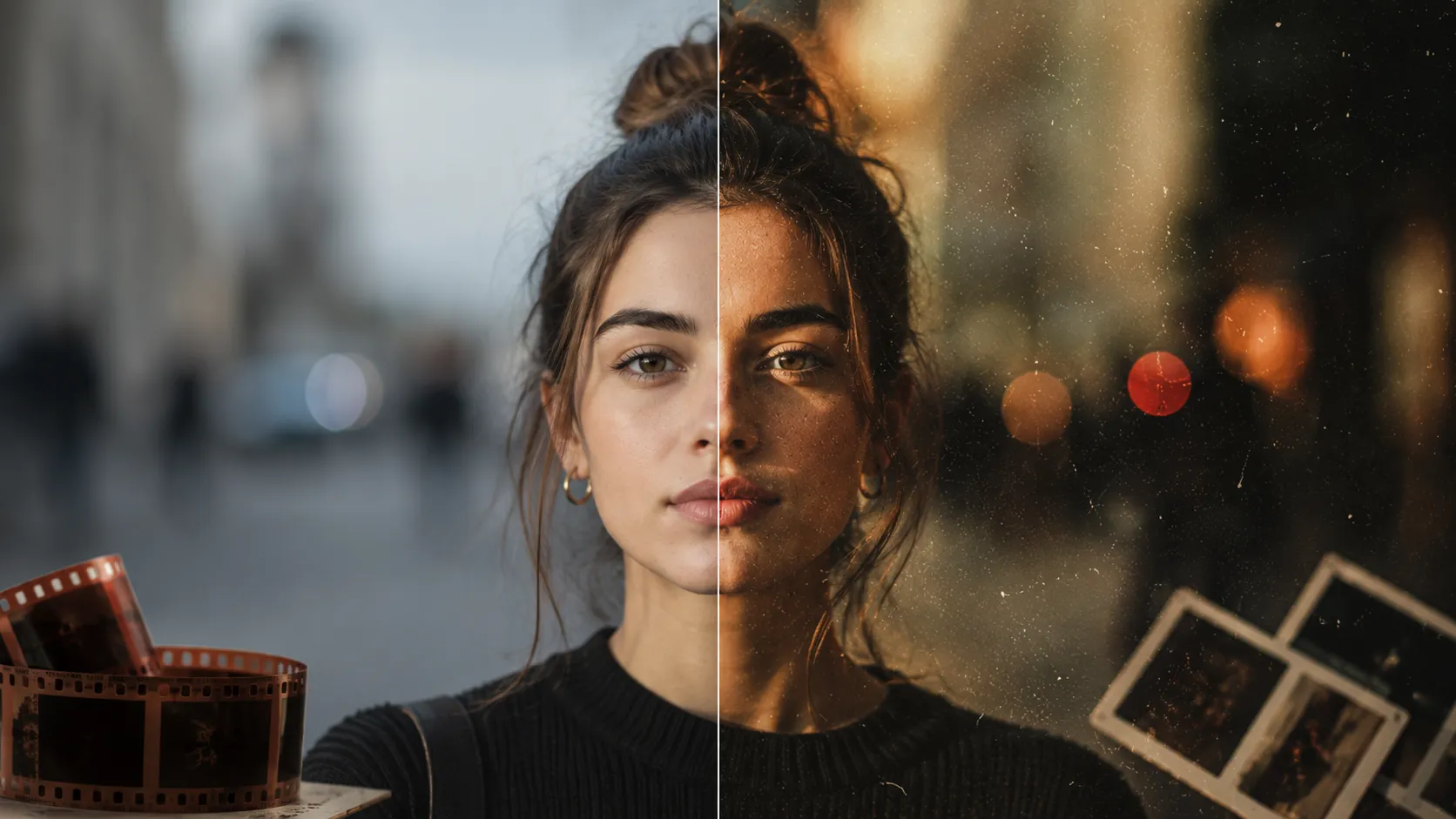
🎨 When All Your Photos Look Good, But They Don’t Look Like They Belong Together
Have you ever tried working with the Authentic Love Presets by AUTHENTICLOVEMAG? Sometimes you end up with a collection of great photos—good lighting, solid composition, and an interesting subject. But the moment you place them side by side, something feels off. It’s as if each photo were taken under different lighting conditions or edited with a completely different style. Even if every single image looks excellent on its own, they fail to create the visual consistency they should have when presented together, making the final result appear less professional.
When people view a collection of your photographs, they do not look at each individual photograph. They look at the collection as a whole. The human eye typically seeks visual consistency across a collection of photographs. If there is any lack of visual consistency in terms of colors, lighting, or composition, the viewer’s eyes will naturally land on this flaw in your photography work. In this case, the problem is not the individual beauty of the photographs, but the lack of a visual language that ties the collection together.
This is exactly where consistent editing and tools like presets become valuable. Instead of allowing every photo to follow a different editing path, presets help bring all images into the same visual and color environment. The result is a collection that feels as though it was created with a single clear vision and style from the very beginning, rather than a group of unrelated photos assembled by chance.

📸 What Exactly Do Presets Do?
In the simplest terms, presets are collections of pre-configured settings used in software like Lightroom and Adobe Camera Raw that are applied to photos to achieve a specific visual style.
Instead of manually adjusting exposure, colors, contrast, and tonal values from scratch every single time, a preset applies all of those changes to an image at once. This not only speeds up the editing process but, more importantly, helps produce consistent and repeatable results.
For example, if you’re working on a portrait project, a preset can help ensure that every photo shares the same color mood without requiring each image to be analyzed and edited individually. As a result, the final collection feels more like a thoughtfully crafted professional project rather than a series of unrelated photographs.
🧰 How Was This Done Before Presets?
Before presets became part of the workflow, photo editing was entirely a manual and time-consuming process. Editors had to work on each image individually, adjusting exposure, color, and contrast to achieve acceptable results. To speed things up slightly or to create more consistency, they often relied on built-in tools in the editing software.
Some of the most common methods included:
- Copying the settings from one photo and applying them to others
- Using Adjustment Layers to control overall color and lighting
- Manually adjusting Exposure, Contrast, and White Balance for each image
- Continuously comparing photos to bring their visual feel closer together
Although these methods seemed straightforward, they required significant attention to detail and considerable time. The process often felt more repetitive and detail-oriented than creative.
⚠️ Limitations and Challenges
Although these techniques were widely used in professional projects—and remain useful in certain situations—they always posed one major challenge: maintaining true consistency across a collection of images was difficult. Even if the exact same settings were copied, differences in ambient lighting, camera settings, or shooting angles often caused the final images to look slightly inconsistent. As a result, editors frequently had to go back and make small manual adjustments until everything reached an acceptable balance.
On top of that, when working with large numbers of photos—such as wedding, fashion, or commercial projects—the process became extremely time-consuming. A large portion of editing time was spent repeating the same adjustments rather than making creative decisions. As a result, both productivity and the ability to achieve a truly consistent final result depended more on the editor’s experience and patience than on a fast, reliable workflow.
💎 Introducing Authentic Love Presets – Timeless Preset Pack
At this stage, when editing workloads grow and maintaining consistency across photos becomes more difficult, using a ready-made preset collection like Authentic Love Presets can make the entire workflow much simpler and faster. This collection is designed for Adobe Lightroom and Adobe Camera Raw, with a focus on creating clean, natural, and timeless-looking images—not only beautiful today, but visually appealing for years to come.
🎯 What Does Authentic Love Presets Actually Do?
Authentic Love Presets is much more than a set of simple filters. It provides a complete system for creating a consistent visual identity across your images. In practice, it helps you achieve professional-looking results quickly without getting lost in complex editing adjustments.
The main benefits of this pack include:
- Creating consistent color grading across all photos
- Keeping skin tones natural without unrealistic changes or exaggeration
- Providing smooth and balanced control over lighting, contrast, and highlights
- Creating a cinematic yet realistic color atmosphere
- Maintaining a unified mood throughout an entire project
🎨 A Variety of Styles for Greater Flexibility
One of the strengths of Authentic Love Presets is that it doesn’t rely on a single editing style. Instead, it includes multiple presets designed for different lighting conditions and creative styles. Whether you’re shooting in natural light, in a studio, or in more challenging lighting conditions, you’ll always have an option that brings you closer to your desired result.
This variety lets you choose a preset based on your project’s mood, rather than forcing every photo to match a single, fixed setting.
⚫ Black & White Versions Plus Greater Control
In addition to its color presets, Authentic Love Presets also includes black-and-white versions. These are ideal whenever you want to create a more emotional or artistic atmosphere in your project.
Another advantage is that these presets remain fully adjustable after being applied. You can easily:
- Increase or decrease the effect intensity
- Adjust the exposure
- Fine-tune the overall color mood to match your personal style
📸 What’s the Final Result?
When using Authentic Love Presets, the outcome is much more than a group of edited photos. You end up with a cohesive, visually unified collection that feels as though it was intentionally designed with a single consistent style from the beginning. This consistency helps your projects appear more professional, whether you’re creating a portfolio, posting on Instagram, or delivering work to clients.
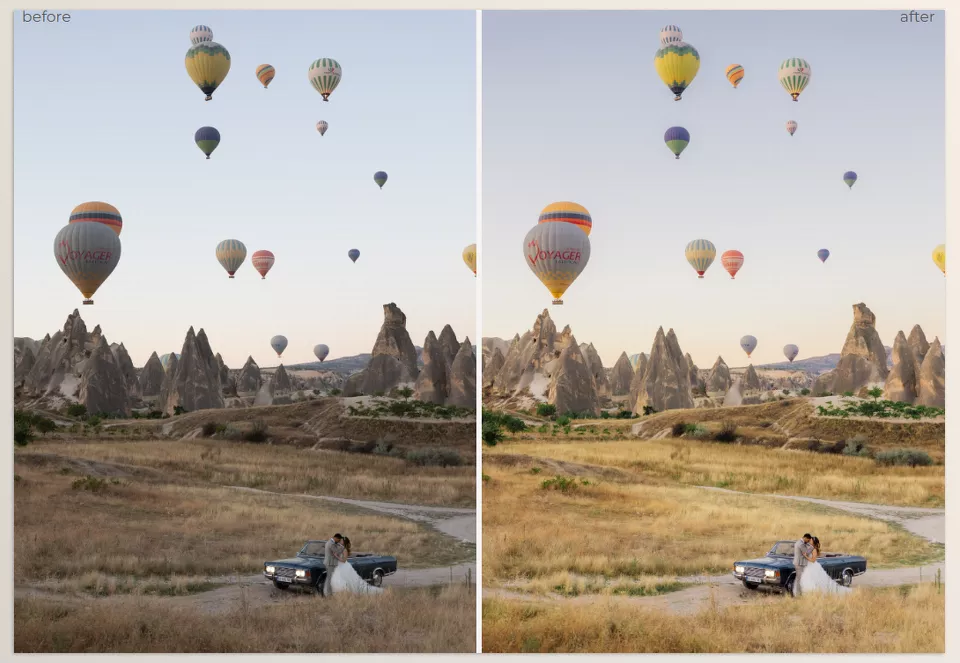
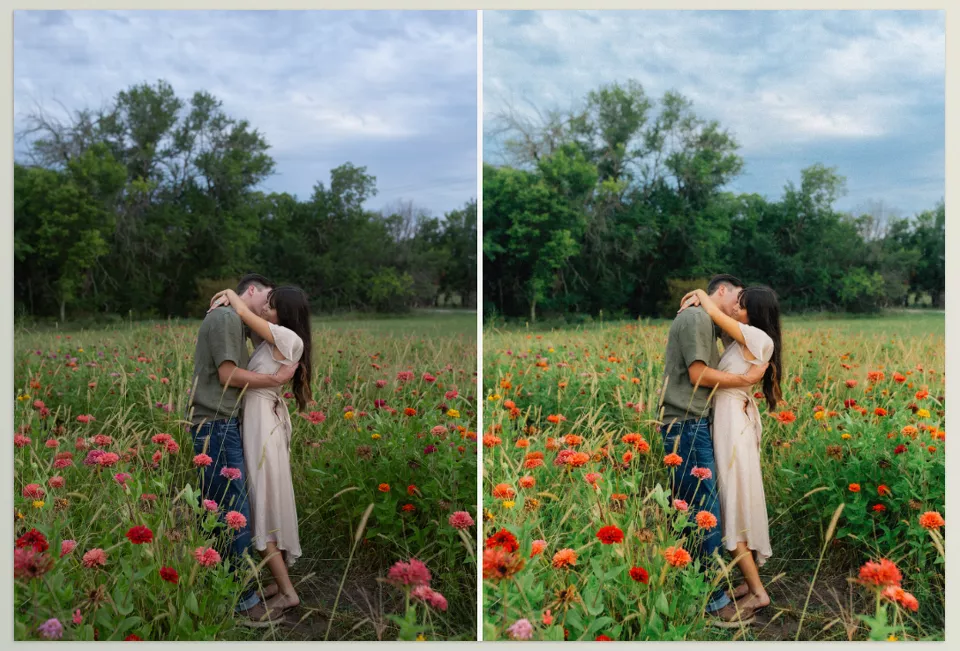
🧠 Tips for Getting the Best Results
To truly get the most out of presets, simply clicking on one isn’t enough. Presets perform best when your original image is properly prepared, and you have a clear vision of the mood you’re trying to achieve. With that approach, your results will look both more natural and more professional.
📷 Get the Exposure Right From the Start
If a photo is heavily underexposed or overexposed, even the best preset won’t produce ideal results—it will simply make the existing issues more noticeable.
🎞 Work With RAW Files
RAW files contain significantly more image data than JPEGs, giving you much greater control over colors, lighting, and image details during editing.
🎛 Fine-Tune the Settings After Applying the Preset
In most cases, you’ll still want to make small adjustments to Exposure, White Balance, or Contrast so the final result perfectly matches the mood of your project.
🎨 Every Project Has Its Own Mood
Avoid applying the same preset blindly to every project. Always choose—or adjust—a preset based on the atmosphere and creative direction of your work.
🧩 Treat the Preset as a Starting Point, Not the Final Result
The best results come when a preset serves as the foundation of your edit, allowing you to finish the image with your own creative adjustments.
Ultimately, what determines the quality of your final images isn’t just the preset itself, but how well you understand and use it throughout the editing process.
🌿 Building a Visual Identity Through Consistency
In the end, what truly makes a photo collection look professional and memorable isn’t just the quality of each individual shot—it’s the harmony between all of the images. When colors, lighting, and mood all follow the same visual direction, the final result transforms from a series of separate photos into a cohesive visual story—something your audience doesn’t simply see, but genuinely feels. That sense of unity is what separates an ordinary collection of images from a truly professional project.
This is exactly where presets like Authentic Love Presets make a difference. Instead of starting from scratch with exposure and color adjustments for every single image while trying to make everything match, you begin with a ready-made visual foundation that immediately places your photos into a consistent color environment. The result is a faster workflow, less mental effort, and images that feel much more visually consistent and reliable.
In practice, this means your time and energy are spent on creativity and important artistic decisions rather than repeating the same adjustments over and over. Whether you’re working on personal projects, client work, or building your portfolio, having a reliable editing foundation helps ensure that your final images always look clean, consistent, and professional—without unnecessary complexity or time-consuming workflows.
If you’re looking for another preset collection that focuses on cinematic color grading and authentic film-inspired aesthetics, DS Presets 02 by Dylan Spitz is well worth exploring. It offers a versatile set of Lightroom presets, Quick Actions, Film Grain effects, and sharpening tools that make it easier to create a consistent visual style across your projects while dramatically speeding up your editing workflow.



