

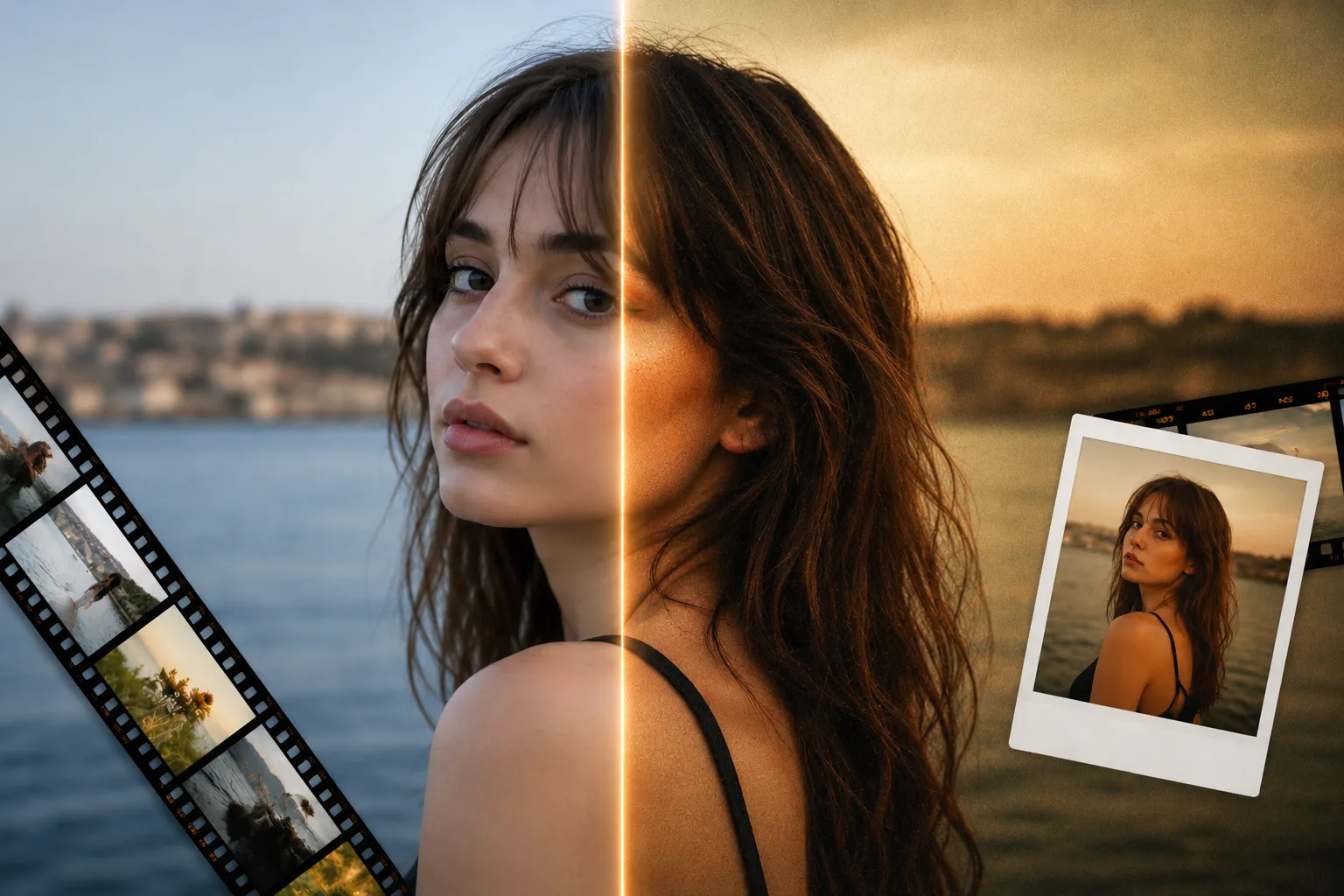
Why Do Some Photos Grab Your Attention Instantly? 🤔
Are you familiar with what the DS Presets 02 by Dylan Spitz can do? Have you ever been scrolling through Instagram or Pinterest, come across a photo, and thought, “How do the colors in this image look so amazing?!” Or maybe you’ve spent hours editing one of your own photos, only to realize that it still doesn’t have the cinematic, film-inspired, or professional look you had in mind.
The truth is, a huge part of a photo’s appeal comes from its final edit—especially its colors. However, creating a beautiful color style from scratch isn’t always easy. You have to tweak countless sliders, test different settings, and repeatedly adjust the results until you finally achieve the look you’re after.
This is why photographers of all levels turn to professional Lightroom presets to edit their photographs. Not only do these presets save editors time in the editing process, but they also ensure that all photos have the same visually appealing style to them.

What Exactly Is a Lightroom Preset and What Is It Used For? 📸
If you’re new to photo editing, you’ve probably heard the term ” preset ” quite often. A preset is essentially a collection of pre-configured editing settings that can be applied to a photo. Instead of manually adjusting exposure, contrast, colors, curves, and every other setting each time, you can apply a complete editing style with a single click.
But presets aren’t just about saving time. Many professional photographers use them to build a consistent visual identity. For example, when every photo on an Instagram page shares a similar aesthetic, viewers can instantly recognize that unique style.
Presets are useful in many different situations, including:
- Portrait and fashion photography
- Travel and landscape photography
- Creating content for Instagram and YouTube
- Wedding and event photo editing
- Achieving cinematic and film-inspired looks
Simply put, when you want to achieve a professional-looking result more quickly, presets can be one of your most valuable editing tools.
How Can You Achieve Similar Results Without Professional Presets? 🛠️
Fortunately, Lightroom itself includes incredibly powerful editing tools. Features such as:
- Tone Curve
- Color Mixer
- Color Grading
- Calibration
- Masking
- HSL
allow you to build virtually any color style completely from scratch.
However, there’s one major drawback—it takes a lot of time. This becomes especially noticeable when you’re editing a large number of photos or trying to maintain a consistent visual style across an entire project.
On top of that, creating advanced looks such as analog film aesthetics, classic negative-inspired colors, or cinematic color grading requires both experience and a solid understanding of color theory. That’s why many editors prefer to start with a professional preset and then customize the final result to match their own creative vision.
Meet DS Presets 02 — A Collection for Film Color Enthusiasts ✨
DS Presets 02 is a professional Lightroom preset collection created by Dylan Spitz. The collection focuses on producing cinematic, film-inspired, and natural-looking color styles—the kinds of aesthetics that have become increasingly popular across social media, lifestyle photography, and even commercial projects.
What’s particularly interesting is that this isn’t just a handful of ready-made presets. It’s more of a complete color-grading system designed to help you edit faster while maintaining a consistent, professional visual identity across projects.
🎨 A Variety of Styles for Different Lighting Conditions
The package includes 8 main presets and 1 experimental preset, each designed for different shooting scenarios and lighting conditions.
For example:
- Timeless creates a classic Kodak-inspired film look that’s perfect for portraits, street photography, and documentary work.
- Airy produces bright, soft Fuji-inspired colors, making it ideal for outdoor, travel, and lifestyle photography.
- Steel adds cool cinematic tones and works especially well for urban photography, dramatic portraits, and fashion projects.
- Gold delivers a warm vintage appearance that’s an excellent choice for portrait, wedding, and outdoor photography.
- Dreamy creates a soft, atmospheric mood that’s perfect for landscapes, lifestyle photography, and emotional imagery.
- Peachy is specifically designed for sunset photos, backlit subjects, and scenes where sunlight plays a major role.
- Smooth Detail B+W creates detailed black-and-white images with controlled contrast and excellent tonal balance.
This wide variety makes the collection suitable for almost every photography style, from portraits and travel to street, commercial, and content creation.
🌈 Smart Quick Actions for Faster Dynamic Range Control
One of the most practical parts of this collection is its Quick Actions.
The package includes six ready-to-use Dynamic Range actions that let you recover lost shadow and highlight details or adjust image contrast with a single click based on the lighting conditions.
These tools become especially useful when:
- A photo was taken under harsh lighting.
- Parts of the image are excessively dark or overly bright.
- You need to edit a large batch of photos quickly.
- You want to normalize exposure before applying color grading.
In practice, these tools significantly reduce the amount of time spent manually adjusting Lightroom sliders.
🎞️ Simulate Authentic Analog Film Grain
One of the standout features of DS Presets 02 is its Film Grain collection.
The package includes five different grain styles that transform perfectly clean digital images into photos with the authentic feel of analog film.
For example, you can:
- Recreate the look of vintage film negatives.
- Simulate classic film camera aesthetics.
- Add the distinctive texture of Large Format film.
- Reproduce the appearance of old and expired film stocks.
- Give digital images a more natural and organic character.
This feature is particularly valuable for photographers looking for nostalgic, cinematic, or editorial-style imagery.
🔍 Ready-to-Use Sharpening Settings for Different Outputs
Image sharpening is one of those editing steps that can easily ruin a photo if it’s not done properly.
DS Presets 02 includes three sharpening presets designed for different output scenarios. This allows you to achieve the right amount of sharpness much faster, whether you’re preparing images for social media, printing, or displaying them on large screens.
📱 Compatible with Lightroom Desktop and Mobile
Another major advantage of this collection is its full compatibility with both Lightroom Desktop and Lightroom Mobile.
Whether you edit on your computer or primarily work from your smartphone, you can use every preset included in the collection while maintaining a consistent visual style across all your devices.
📸 Designed for RAW Files from Multiple Camera Brands
These presets are specifically designed for RAW files and support cameras from brands including:
- Sony
- Canon
- Nikon
- Fuji
- Leica
- Panasonic
As a result, even if you shoot with multiple camera systems, you can still maintain a consistent color style throughout all your projects.
📚 Complete Learning Resources for a Faster Start
The collection also includes:
- A 38-minute video tutorial
- A complete user guide
- An explanation of every preset
- Installation guides for both Desktop and Mobile versions
This makes it easy, even for users with limited color-grading experience, to understand which preset works best in different situations and how to achieve the best possible results.
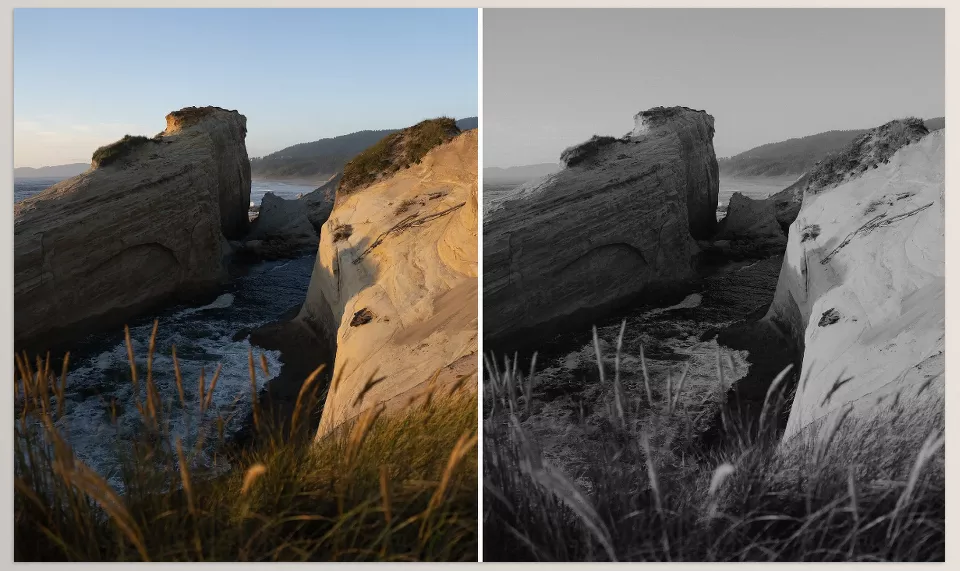
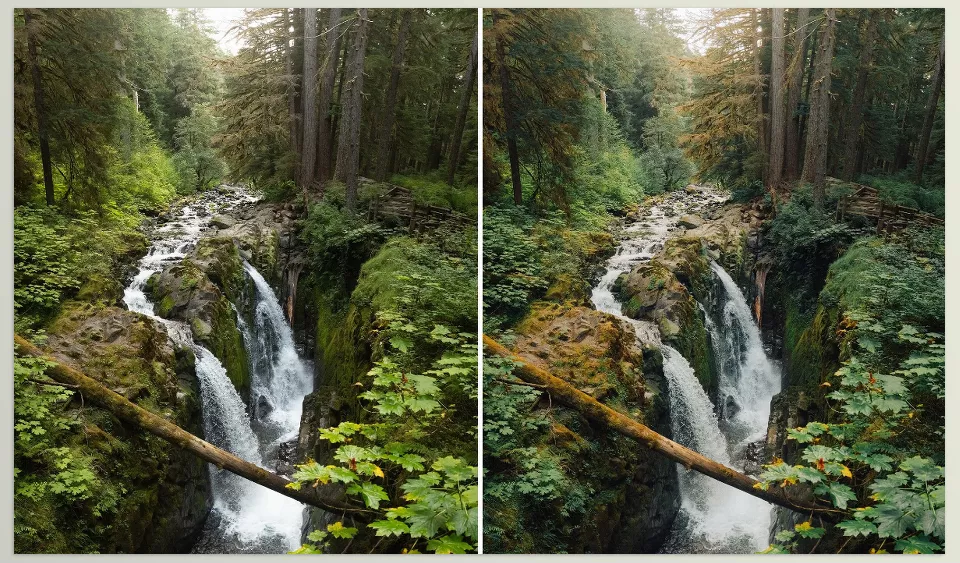
Tips for Getting the Best Results with DS Presets 02 💡
No matter how professional a preset collection is, a few simple techniques can make a huge difference in your final results. If you want to get the most out of DS Presets 02 and achieve results that look even closer to professional examples, keep these tips in mind:
- Edit using RAW files: These presets are specifically designed for RAW images and deliver their best flexibility and image quality in this format. Editing JPEG files may not produce the results you expect.
- Adjust the exposure after applying a preset: Presets provide an excellent starting point, but every photo has different lighting conditions. Sometimes, just a few small adjustments to Exposure or White Balance can dramatically improve the final image.
- Don’t use the same preset for every photo: Each preset is designed for specific lighting conditions and scenes. For example, a preset that looks amazing on sunset photos may not work as well on cloudy images. Always choose the style that best matches your photo.
- Don’t overuse Film Grain: A subtle amount of grain can create a beautiful film-like aesthetic, but adding too much can make the image look artificial or overly processed.
- Maintain a consistent visual identity: If you’re creating content for Instagram, your website, or your personal brand, try to stick with one or two primary styles. This helps your photos look more cohesive and makes your visual identity easier for your audience to recognize.
Ultimately, the best approach is to treat presets as a starting point rather than a final solution. With just a few personal adjustments, you can create a unique editing style that truly reflects your own creative vision. Those small refinements are often what separate an average edit from a genuinely professional result.
Professional Editing, Faster Than Ever 🚀
A significant portion of photo-editing time is often spent searching for the right colors and developing an appealing visual style. DS Presets 02 was created to solve exactly that problem by helping you achieve cinematic, film-inspired, and professional-looking results much more quickly.
What makes this collection even more compelling isn’t just its variety of presets, but the combination of presets, Quick Actions, Film Grain settings, and supporting tools that give you complete freedom to personalize your final results.
If a large part of your editing workflow is dedicated to building consistent color styles and matching the look of your photos, this collection can make the entire editing process faster, more organized, and far more enjoyable.
If you enjoy creating film-inspired edits, DS Presets 02 is the only approach to achieving that timeless look. If you’re interested in recreating the nostalgic feel of classic instant film, such as Polaroid and Instax, be sure to check out our complete guide to Instant Everyday Lightroom Desktop Presets. It explores another powerful workflow for adding authentic film colors, realistic grain, light leaks, and vintage frames to your digital photos while keeping the editing process fast and consistent.
You can also check out DS Presets 01 for another excellent collection of film-inspired Lightroom presets.



