

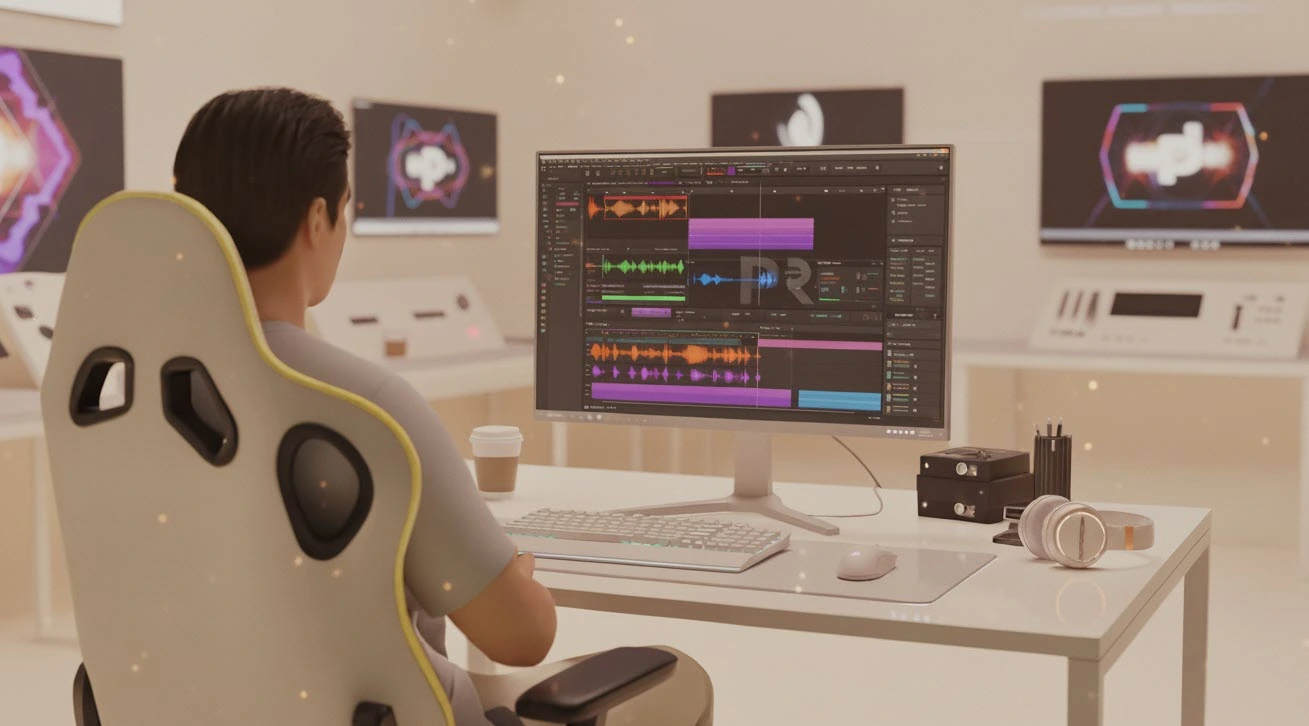
Why Has Rhythmic Video Editing Always Been Difficult?
Do you know what the BeatEdit Plugin can do for you? If you have to time your video to the beat of the music, everything, from the movement of the clips, transitions, and even visual effects, has to align so that the video looks seamless, engaging and professional. A single cut that is off beat and out of sync will throw off the entire mood and transition of the video.
Most standard tools or manual methods in video editing software make this process time-consuming and error-prone. You have to find each beat in the music, set markers, and then place clips and effects precisely on them. If the track has a fast tempo or complex patterns, even the most experienced editors can get confused and spend hours on the task.
In other words, rhythmic editing means managing music, visuals, and effects simultaneously without disrupting the natural flow of the video. This is exactly the challenge many editors and motion designers face: how can they sync videos perfectly to music without hassle and without losing creativity?
As a result, projects are often pushed back, final quality is reduced, and some creative concepts never see the light of day. The truth is, knowing tools and techniques with a basic operating understanding still isn’t enough to create a seamless, rhythmically consistent product without professional means.

How Hard It Was Without Professional Tools
Before professional tools existed, rhythmic video editing meant manual work and trial-and-error. In After Effects, you could use the Convert Audio to Keyframes effect to turn audio into numerical data. This tool would display volume or intensity on a graph, which could then be used to align elements with the music.
The problem was that this data only showed volume changes and didn’t detect precise beats. To find each beat, you had to analyze the graph carefully and manually select and mark each point. This process was not only time-consuming but also prone to errors and imperfect synchronization.
In Premiere Pro, you could add manual markers on the timeline, but all beats still had to be found by the user. Any small mistake in placing a marker could throw off the rhythm and make the video look less professional.
In summary, without professional tools:
- Accuracy was low, and mistakes were common.
- The process was extremely time-consuming and exhausting.
- Precise synchronization with music was almost a daily challenge for editors.
For this reason, many editors were always looking for ways to simplify and speed up rhythmic editing while preserving creativity and achieving a professional outcome.
BeatEdit: Effortless Rhythm Editing
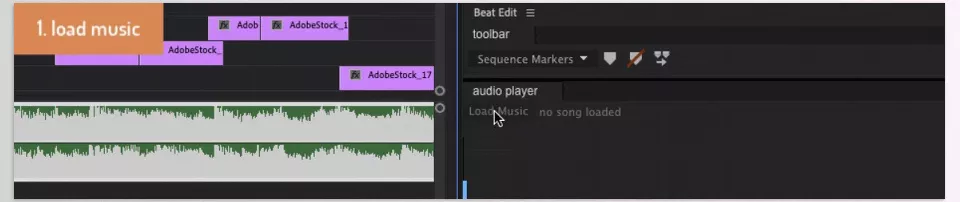
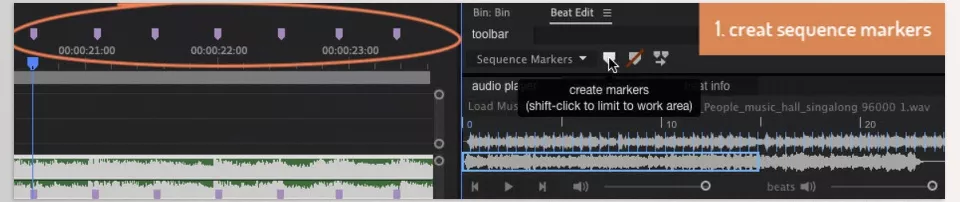
This is where BeatEdit Plugin comes in. This plugin is designed specifically for Premiere Pro to make rhythmic editing simple and precise. BeatEdit Plugin detects music beats and automatically places markers on the timeline and clips—without you spending hours finding each beat manually.
Using BeatEdit Plugin reduces rhythmic editing to a few simple clicks, allowing you to focus on creativity and visual effects instead of the time-consuming details of syncing to music.
Key Features:
- Accurate Beat Detection: Advanced algorithms identify even complex or fast beats reliably.
- Automatic Timeline & Clip Markers: No need to manually find and mark each beat.
- Manual or Automatic Editing: You can let BeatEdit handle everything automatically or retain manual control for precise results.
- Subdivide Beats for Faster Patterns: Divide beats and add extra markers to match fast music or complex rhythms.
- Compatibility with Automate to Sequence: Easily sync videos to music automatically using this feature.
The result is not only faster and more precise rhythmic editing but also a more enjoyable and less exhausting workflow. You can focus on your creativity, execute your visual ideas better, and achieve a professional, music-synced result.
Tips for More Professional Rhythm Editing
To get the most out of BeatEdit Plugin and make your rhythmic videos appear more natural and professional, here are some practical tips:
- Import Audio Separately: Before starting, import your music as a separate WAV file into BeatEdit. This ensures the beat detection algorithm is most accurate and markers are placed precisely on the actual music beats.
- Use Subdivide Beats: For fast music or projects requiring complex rhythms, use the Subdivide Beats feature. It divides beats, allowing faster and more natural patterns without manual adjustments.
- Add Non-Beat Markers: Sometimes parts of the music feel rhythmic without having a clear beat. You can add markers at these points to make the video feel more natural, varied, and fully in sync with the music.
- Use Markers as Guides for Effects and Transitions: BeatEdit markers can guide not just cuts and clip placement but also effects, transitions, and visual elements. This ensures effects are perfectly synced with the rhythm, making your video look more professional.
- Experiment with Different Patterns: Each project and track has unique characteristics. Experiment with different beat divisions and patterns to find the best synchronization between music and video.
Following these simple tips will make your rhythmic edits more natural, engaging, and professional—without spending hours manually finding and syncing beats.
Rhythmic Editing, Now Easier Than Ever
With BeatEdit Plugin, rhythmic edits are no longer a time-consuming and exhausting process. The tool automatically detects and marks music beats, placing everything on the timeline in the right spot.
The result: Faster, more precise, and professional edits without stress or fatigue.
Not only does it save time, but the final output looks more appealing and natural. For large projects or short videos, BeatEdit Plugin lets you focus on creativity, effects, and visual composition without worrying about music synchronization.
With the BeatEdit Plugin, every cut, transition, and visual effect is rhythmically aligned with the music. This means videos that captivate viewers, feel energetic, and look professional. Simply put, BeatEdit is not just a tool—it’s a companion for creating rhythmic and creative edits that make video editing more enjoyable.
For anyone looking to explore After Effects in detail and learn how AE auxiliary tools can improve your workflow, our in-depth article is a must-read.



