


When Baking Textures Takes Longer Than the Project Itself…
Do you have any hands-on experience with the Bake Wrangler Addon for Blender? If you’ve worked with Blender for a while, you’ve probably reached that point where everything seems to be going smoothly… you’ve modeled, assigned materials, everything looks fine. But the moment you want to export texture maps (that is, bake), it suddenly feels complicated and confusing. It’s like you’ve moved from a simple, creative phase into a technical one where it’s not very clear what’s going on.
Usually, you have to tweak several different settings, add nodes, choose the bake type, and repeat this process separately for each type of texture. For example, if you want to bake a Normal or AO map, each one has its own settings. For a simple task, it might be fine, but as the number of outputs increases, it quickly becomes tedious and time-consuming.
Worst of all, if you realize midway that you made a small mistake, you have to go back and redo a large part of the process. This is where many people—especially beginners—feel that baking in Blender isn’t as simple as it should be, and that a more streamlined tool could really help.

🔥 What Exactly Is Texture Baking and Why Is It Important?
Texture Baking means converting certain elements that are calculated in a 3D scene into an image (texture), so they don’t need to be recalculated every time. These “elements” are the things that define the appearance of a model—such as lighting and shadows, surface details like bumps and dents, or material properties like roughness and glossiness. Instead of recalculating them every time, you bake them once and store the result as an image.
For example, imagine you have a highly detailed model with lots of scratches or surface irregularities. These details might either be part of the geometry (with a high polygon count) or created through nodes and materials. By baking, you can store these details in a texture (like a Normal Map) and apply that texture to a lighter model—without needing all that real geometry. Or you can bake lighting and shadows into an image to make the scene run faster.
That’s why Texture Baking is so important, especially in real-world projects like game development or heavy scenes. It helps reduce complexity, improves render or runtime performance, and keeps your work looking professional and realistic. Simply put: you calculate once, and reuse the result forever.
🧱 How Is This Done Without Add-ons?
Blender has its own baking tools, and you can definitely get results without any add-ons—but the process isn’t very smooth or straightforward, especially for beginners or more advanced workflows. Typically, you need to go into the Shader Editor, create an Image Texture Node (to store the output), choose the bake type (like Normal or AO), and manually configure the settings each time.
Here’s an important note: when we say “map,” we mean the images produced from baking. For example:
- Normal Map → shows surface details and depth
- Roughness Map → defines how rough or glossy a surface is
- AO (Ambient Occlusion) Map → creates soft shadowing between surfaces
So instead of these properties being calculated live in the material or model, they are stored as images.
The problem starts when the number of maps increases or when you need multiple outputs. In that case, you have to constantly adjust settings, define new maps, and bake again. Managing multiple outputs becomes difficult, batch baking is mostly manual and time-consuming, and if you want to combine multiple data types into a single texture (Channel Packing), things get even more complicated.
In the end, while everything is possible and Blender provides the tools, as projects grow larger or more professional, this method quickly turns into a repetitive, time-consuming, and error-prone process.
🚀 Bake Wrangler; When Baking Finally Makes Sense
Bake Wrangler essentially transforms Blender’s baking workflow from a messy, manual process into a structured and controllable system. Instead of redoing everything each time, you create a setup once and reuse it as needed.
🧠 Node-Based System; Everything Clear and Understandable
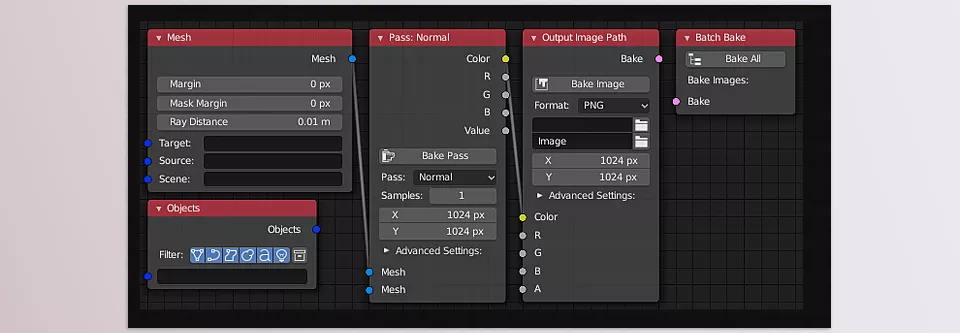
The most important feature of Bake Wrangler add-on is that it represents the entire baking process in a node-based system—just like materials. Instead of scattered settings, everything is visible inside a single Node Tree.
Each node can represent a specific bake type (like Normal or AO), making it easy to understand where each output comes from. This means:
- You won’t get lost in different settings
- You can make changes easily without breaking everything
- You can save setups and reuse them in future projects
⚡ Batch Baking; All Outputs with One Click
In standard Blender, each map must be baked separately. But here, you can set everything up once and bake all outputs with a single click.
That means:
- Normal
- AO
- Roughness
- Metallic
All get baked automatically, one after another.
Even better, this process runs in the background, so you can keep working at the same time ⏱
🎯 Channel Packing; Professional and Efficient
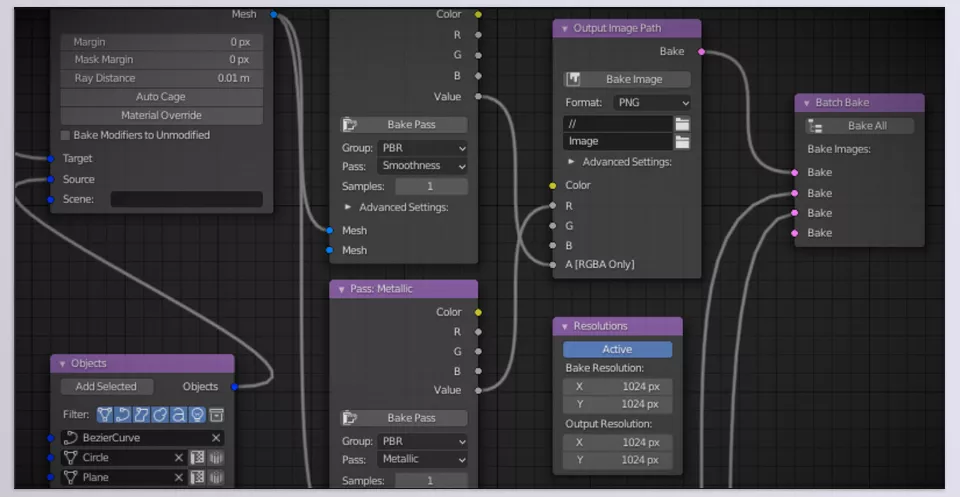
One of the most useful features of Bake Wrangler add-on is Channel Packing. It allows you to store multiple types of data inside a single texture.
For example:
- Red Channel → Roughness
- Green Channel → Metallic
- Blue Channel → AO
- Alpha → Mask
This reduces the number of textures and makes your project lighter—especially important in game development 🎮
🎛 More Control Over Outputs
With Bake Wrangler, you have much more precise control over your outputs. You can define:
- Which image each bake is saved into
- The resolution of each output
- Which maps are baked together or separately
And most importantly, if you need to make a change midway, you don’t have to start over—you just adjust that specific part.
🔄 Suitable for Any Workflow
No matter what kind of project you’re working on, this tool adapts to your workflow:
- Game asset creation
- PBR material design
- Complex projects with multiple outputs
Everything can be managed within a clean, organized system.
💡 A Simple Example
Imagine you want to bake several maps from a model.
Normally, you’d configure and bake each one separately.
But here:
👉 You set everything up once in nodes
👉 Click once
👉 All outputs are ready 😎
Overall, Bake Wrangler doesn’t introduce new functionality—it simply makes what you already do easier, faster, and more controllable. And that makes a huge difference in real-world projects.
🧠 Tips for Better Use; Small but Powerful ✨
To get the most out of Bake Wrangler, keep these simple but important tips in mind:
💾 Save Your Good Setups
If you create a clean and useful node setup, make sure to save it. This way, you won’t need to start from scratch every time and can quickly reuse your structure.
🎯 Use Channel Packing Smartly
From the start, think about which data types can be combined into a single texture (like Roughness, Metallic, AO). This makes your project lighter and file management easier.
🗂 Organize Your Bakes
Keep your outputs organized. For example, separate material maps from lighting maps. This helps you quickly understand what each file is for later.
⚡ Test Before Final Output
Bake at a lower resolution first to make sure everything is correct. This prevents wasting time on heavy outputs.
🔁 Re-bake Only What’s Needed
If you make a small change, you don’t need to rerun the entire process. Just bake the specific map or section again to save time and keep your workflow efficient.
In the end, it’s these small habits that turn an average workflow into a clean and professional one. Once you get used to them, you’ll notice how much faster and smoother everything becomes 🚀
💬 A Small Change, A Big Impact
The truth is, baking is always part of the workflow—it never goes away. But what makes the difference is how much time and energy this step consumes. If you rely on manual methods every time, it quickly becomes a tedious and time-consuming process that pulls your focus away from what really matters—design and creativity.
Tools like Bake Wrangler are built exactly for this reason: to turn a scattered, confusing process into a clear, fast, and controllable workflow.
The important thing is that the impact of Bake Wrangler tool might not seem huge at first—but it becomes obvious in real use. When you can bake multiple maps with a single click or make changes without hassle, you gradually realize how much time you’ve saved. That means faster projects, fewer errors, and most importantly, using your energy where it matters most.
If you’re serious about working with Blender—whether for practice or real projects—this is one of those tools you’ll truly miss if you don’t have it. You might get by without it for now, but once you experience a clean and efficient workflow, it’s hard to go back. I recommend trying it at least once—there’s a good chance it will quickly become one of your essential tools 🚀
If you really want to understand Blender tools from the ground up and actually know how to use them in your own projects, make sure you don’t miss our full Blender Tools article—we’ve explained everything step by step in a super clear way.



