
✨ When Photo Editing Takes Too Much of Your Time
Do you know how the REFINED AI Tool Box Plugin works? Have you ever had a great photo, but when you got to editing it, realized that you were spending more time drawing masks and separating different parts of the image than you did on the actual photography? 😅 For example, maybe you want to make only the face a little brighter, give the sky a more cinematic mood, or make the background slightly more blurred, but every time you get stuck between precise selections and repetitive adjustments. Little by little, you realize that instead of being creative, you’re caught up in a series of technical and repetitive tasks that you have to redo from scratch for every photo.
The truth is that editing in Lightroom often turns from a creative and enjoyable experience into a long and tiring process. Especially when you have a lot of photos or want to apply a consistent style across several images, these tiny details can take up a lot of time and energy.
This is exactly where the need for smart tools becomes clear: tools that help reduce repetitive tasks so you can focus more on the final mood and feeling of the image, rather than struggling with time-consuming selections and mask creation.

🧠 What Exactly Is AI Masking in Lightroom?
Before anything else, let’s start with Lightroom itself.
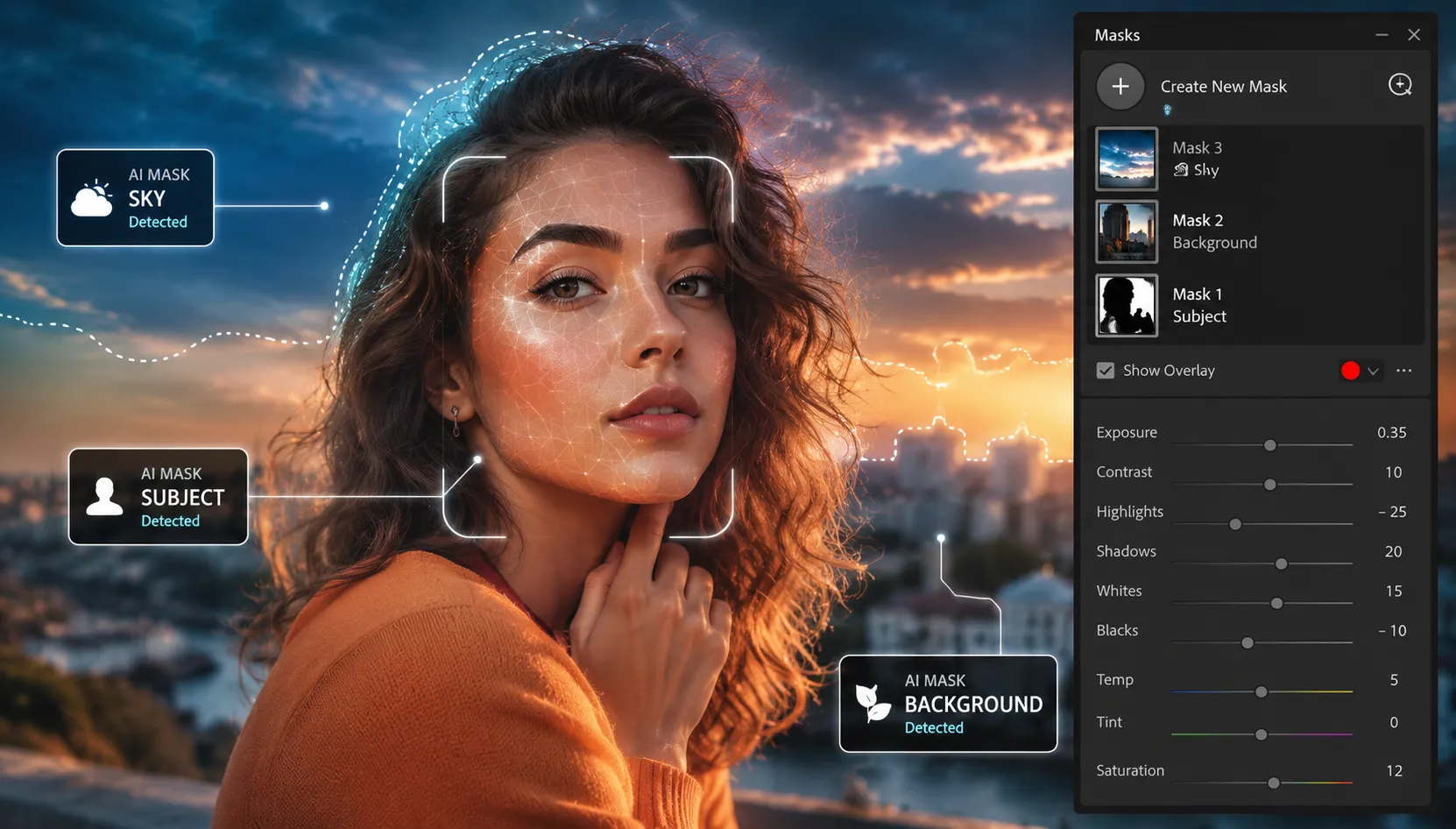
Adobe has added a feature called AI Masking to Lightroom and Camera Raw that can understand what’s what in your photo 👇
This means that without you manually selecting anything, it can largely detect and separate the important parts of the image on its own:
- 👤 It separates the subject
- 🌤 It detects the sky
- 🌄 It separates the background from the rest of the image
What does that mean in practice?
It means you no longer have to draw around the subject with the Brush like before, or create complex manual masks for every section. Lightroom itself uses AI to detect where each part is and gets it ready for editing.
For example:
- You make only the face brighter and cleaner without affecting the background
- You make the sky more dramatic and cinematic without changing the rest of the image
- You make the background softer and more subtle, so the full focus goes to the main subject
⚙️ What Would Happen If These Tools Didn’t Exist?
Now imagine this AI didn’t exist. You would have to manually go through everything and create masks step by step:
- Select the Subject or Sky mask yourself
- Carefully and precisely clean around the subject with the Brush
- Create a separate adjustment for each section, such as light, color, contrast, and so on
- Keep going back and testing the settings until you reach the result you want
In practice, it becomes a completely manual, step-by-step task that you have to redo from scratch for every photo.
😓 Problems With These Methods
The problem is that, although this process is precise and gives you control, it quickly becomes a tiring, time-consuming task. Especially when you have a large number of photos or want to apply the same style across several images, you have to keep repeating the same steps. The result is that instead of focusing on creativity and the photo’s final feeling, you become more involved in technical, repetitive details, and your workflow slows significantly.
📦 What Tools Are Included in the REFINED AI Tool Box?
REFINED AI Tool Box includes 50 smart tools divided into 5 main categories:
👤 Portrait AI Tools — 18 Portrait Tools
The largest part of the collection concerns portrait editing. These tools are designed to improve facial and skin appearance and can quickly enhance the parts of a photo that most attract the viewer’s attention.
Use cases:
- Improving and evening out the skin
- Brightening the face
- Increasing the clarity and appeal of the eyes
- Improving skin tone
- Correcting light on the subject
- Creating a more professional feel in portrait photos
🧑 Subject AI Tools — 9 Subject Tools
This section focuses on the main subject of the photo and draws more of the viewer’s attention to it without affecting other parts of the image.
Use cases:
- Increasing subject brightness
- Improving subject contrast
- Increasing details and clarity
- Separating the subject better from the surrounding environment
- Putting more emphasis on the main focal point of the image
🌤 Sky & Land AI Tools — 9 Sky and Landscape Tools
These tools are designed for nature, landscape, and outdoor photos, and they can make the sky and surroundings look more attractive without requiring manual masking.
Use cases:
- Recovering sky details
- Controlling overly bright highlights
- Increasing the depth and color of the sky
- Making nature colors warmer
- Improving greens and vegetation colors
- Creating a more dramatic feel in the landscape
🌄 Background AI Tools — 6 Background Tools
Sometimes the main problem in a photo is not the subject itself; it’s a background that draws too much attention. This category of tools is designed for smart background control.
Use cases:
- Reducing distractions in the background
- Darkening or softening the background
- Reducing visual clutter in the image
- Guiding the viewer’s eye toward the main subject
🎨 Creative AI Tools — 9 Creative Tools
This category is for when you’re not just looking to correct a photo, but want to give it a specific style.
Use cases:
- Creating a cinematic mood
- Applying creative color effects
- Creating a film look
- Increasing the feeling and atmosphere of the image
- Creating different styles for social media and artistic projects
🎯 The Important Feature That Makes REFINED AI Tool Box Different
The biggest advantage of the REFINED AI Tool Box is that all these tools are designed as One-Click tools. This means you don’t have to select the Subject first, create a mask, and then apply the settings. Each tool identifies the part of the photo it needs to work on and applies the appropriate edit at that moment.
On the other hand, all the tools have an Intensity Slider, meaning that if the result is too strong or too subtle for your photo, you can easily adjust the amount of the effect.
🎯 A Simple Example of How It Works
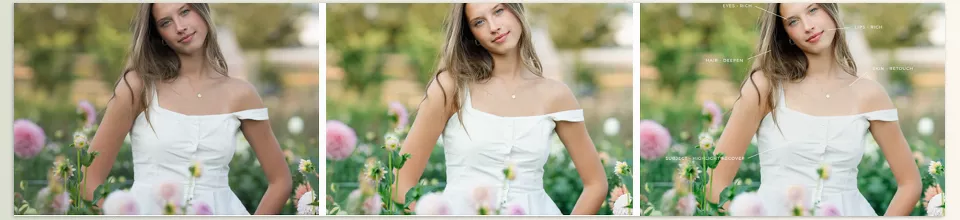
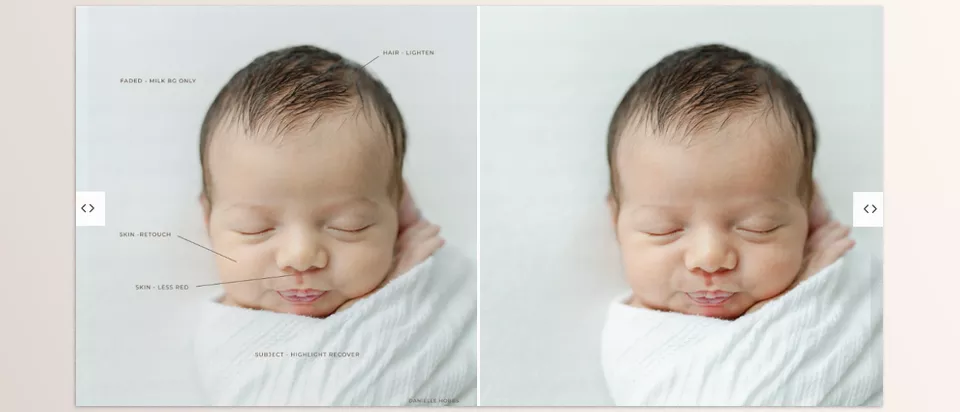
Imagine you have a portrait photo. Instead of spending several minutes selecting the subject, adjusting the face light, retouching the skin, and controlling the background, you simply run one of the Portrait Tools. The tool automatically detects the face and subject, creates the required mask, and applies the proper settings. Then, using just the intensity slider, you adjust the result to your taste.
🧩 What’s the Difference Between This and Lightroom Itself?
| Regular Lightroom | REFINED AI Tool Box |
|---|---|
| You have to choose the right AI Mask tool | It runs the required mask itself |
| You apply the settings manually | Professional settings are already prepared |
| The steps have to be repeated for every photo | The editing process becomes much faster |
| It requires more experience | It is useful for both beginner and professional users |
| It only gives you the masking tool | It provides the mask + ready-made edit at the same time |
🎨 A Few Tips to Make Your Results More Professional
No matter how good smart tools are, the way you use them still has a major impact on the final result. By following a few simple tips, you can achieve more natural and professional-looking edits.
Start Subtle, Then Increase the Intensity
It’s better to start with the effect intensity at a lower level and gradually increase it if needed. This helps the result look more natural and prevents the photo from appearing overly edited.
Combine Multiple Tools
You don’t have to limit yourself to a single tool. In many cases, combining several different AI Tools can create a more attractive and balanced result than relying on a single effect.
Complete Your Basic Adjustments First
Before moving on to the AI Tools, it’s a good idea to adjust the photo’s exposure, overall contrast, and white balance. This gives the tools a solid, well-balanced foundation to work from, resulting in better outcomes.
Experiment With Different Types of Photos
Each tool can behave differently depending on the type of image. Spend some time testing them on a variety of photos so you can better understand which tools work best under different conditions.
In the end, remember that these tools are not meant to replace your taste and creativity; they simply help you reach the result you already have in mind more quickly. 😉
🚀 When Speed and Quality Come Together
Some tools improve editing quality, while others simply speed up the workflow. REFINED AI Tool Box aims to do both simultaneously. By combining AI Masking with ready-made presets, the REFINED AI Tool Box allows many tasks that would normally require manual work to be completed with just a few clicks. As a result, instead of spending your time creating masks and repeating adjustments, you can focus on the final look of the image and your own editing style.
The main strength of this tool is that it leverages Lightroom’s built-in intelligent features to streamline the workflow. Whether you are editing a portrait, trying to make the colors in a landscape more vibrant, or directing more attention to the subject, the REFINED AI Tool Box helps you achieve your desired result more quickly without getting bogged down in technical steps.
If Lightroom is an important part of your daily workflow, you will probably realize over time that the real value of REFINED AI Tool Box is not just in its effects or ready-made presets—it’s in the time it saves. Because the less time you spend on repetitive tasks, the more time you have to focus on creativity, developing ideas, and creating images that truly look impressive and professional. ✨
REFINED AI Tool Box focuses more on speeding up the editing process and refining details, but a good project doesn’t end with just masking and lighting. The more important part is where color comes into play and shapes the image’s overall mood—where an ordinary shot can, with a few simple adjustments, become a fully cinematic or commercial-style result. If you want to handle this stage faster and more professionally as well, in our 5000+ Professional LUTs Bundle article, we’ve covered the world of LUTs and how you can easily give any project a ready-made, professional color style 🎬✨