


From Frame to Motion: Secrets of Professional Video Editing
Have you ever found yourself wishing to narrow the focus of a video to a specific point, but found the camera maneuvers and zooms to be challenging? Or wanted to fit several videos and images side by side and make the composition neat and aesthetically pleasing at the same time?
In these situations, by mastering Video Motion and Composition and controlling camera movements, zooms, split screens, and element repetition, you can:
- Increase viewers’ focus on important details and key subjects.
- Showcase multiple contents simultaneously and professionally, without clutter or confusion.
- Create smooth motion effects and transitions that make videos modern and dynamic.
- Prepare social media or promotional videos faster and more creatively.
In fact, these techniques make video editing simpler, faster, and more creative, allowing anyone—even without extensive experience—to produce professional-looking effects.
Professional Editing with Final Cut Pro: A Challenging but Possible Path
If you want to zoom on subjects, create smooth camera pans, or display multiple videos and images within a single frame, Video Motion and Composition tools in Final Cut Pro naturally provide solutions for this. You can use keyframes, Scale, and Position for zooms and movements, or Track and Crop to split frames.
However, all of this can be time-consuming and complex:
- Precisely adjusting keyframes for zooms and pans can take hours, especially for smooth, natural movements.
- Splitting the screen and coordinating multiple videos within a frame, without ready-made presets, can be confusing and lead to visual errors.
- Creating repetitive effects or appealing transitions between frames requires patience and advanced skill.
- Editing vertical or social media videos makes alignment and precision even more challenging.
As a result, even experienced Final Cut Pro users can find achieving professional results without shortcuts time-consuming and exhausting.
Fortunately, there’s a simple and fast solution that turns this process into a few clicks, addressing all these challenges.
Simple and Professional Solution for Zoom, Motion, and Split Screens
As mentioned, performing Video Motion and Composition tasks in Final Cut Pro can be complex and time-consuming. Fortunately, some plugins make all these steps quick, easy, and professional:
LenoFX – Split Screen FX 2
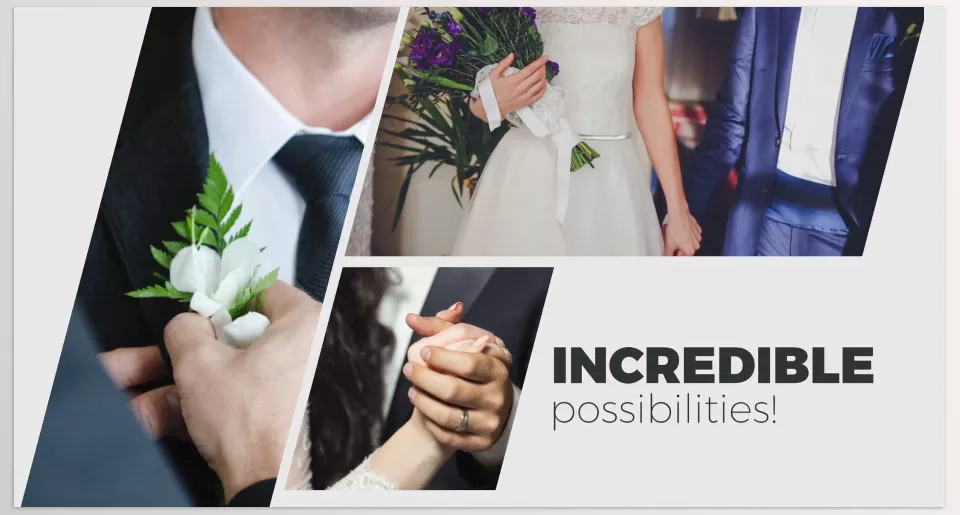
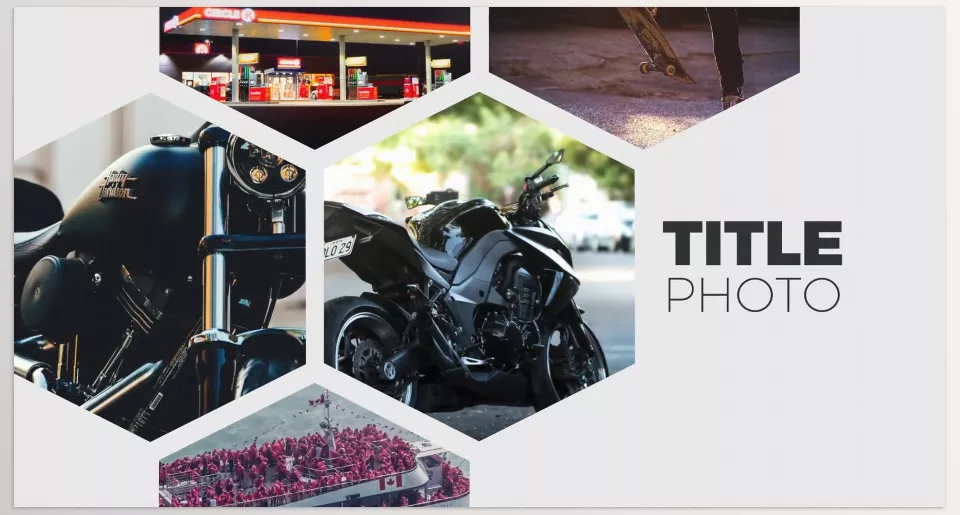
Split Screen FX 2 allows you to display multiple videos or images simultaneously in a single frame, without the scene appearing cluttered or disorganized
Features & Applications:
- Professional Split Screen:
- Divide the frame into multiple sections and assign each section to a video or image.
- Perfect for showcasing multiple angles of a scene or simultaneous content comparison.
- Smooth and Dynamic Motion (Zoom & Pan):
- Each section can move individually. Zoom in or pan smoothly.
- Creates cinematic and engaging video effects.
- Adjustable Drop Zones:
- Each small frame (Drop Zone) can be activated or deactivated.
- Offers flexibility to create different compositions for each scene or leave space for titles, logos, or other effects.
- Compatibility with Various Projects:
- Suitable for music videos, promotional content, social media, or presentations.
- Features a simple, modern interface for fast, hassle-free editing.
Key Advantage over Manual FCP Methods:
- No need to create multiple layers, keyframes, or complex settings to build a professional multi-video frame.
- Everything is ready-to-use and controllable, greatly speeding up workflow and reducing human error.
Gumroad – Pro Zooms
Pro Zoom focuses on zoom and smooth camera movements, allowing precise subject emphasis without the complexity of keyframe.
Features & Applications:
- Quick and Precise Zoom (Pro Zoom):
- Zoom in on a subject in 0–2 seconds.
- Ideal for key moments and emphasizing details.
- Smooth Frame Movement (Pro Pan):
- Enables smooth horizontal or vertical video movement.
- Complements zooms and adds dynamism to the story.
- Easy Multi-Pan Movements (Pro Multi Pan):
- Create multiple pans simply and efficiently.
- Great for busy scenes or combining multiple subjects.
- Unlimited Zoom Effects (Pro Burns):
- Generate infinite zoom effects with Stop Points and Rotation.
- Combining these with Pan creates highly professional-looking videos.
- Quality Optimization & Advanced Control:
- Scale Lock: Prevents excessive zoom, maintaining image quality.
- Onion Skinning: Align frames precisely and correct easily.
- Smart Sharpening: Automatically enhances sharpness during zooms.
- On-Screen Control (OSC): Easily adjust speed, zoom, and movement.
Key Advantage over Manual FCP Methods:
- Build smooth, precise subject movements without adjusting multiple keyframes.
- Ideal for vertical and square videos, perfect for TikTok or Instagram.
- Speeds up workflow and reduces human error, especially for fast or complex scenes.
Gumroad – Smart Split Screen
Smart Split Screen is designed for professional transitions and frame division, allowing multiple videos or images to appear simultaneously and neatly.
Features & Applications:
- Smart Split Screen:
- Divide frames into two or three sections and assign each to a video or image.
- Ensures scenes appear organized and professional without confusion.
- Smooth and Professional Transitions:
- Create appealing motion between sections.
- Suitable for music videos, promotional content, and social media.
- Ready-Made Presets (35 Presets):
- 35 pre-built frame compositions and motion effects for faster editing.
- Even beginners can create professional-looking scenes without extensive experience.
- On-Screen Control (Smart OSC):
- Quickly change frames, positions, and motions visually and easily.
- Fully adjustable, even for UltraHD videos.
- Compatibility and Easy Installation:
- No additional plugins required; installation is simple.
- Use presets and ready settings to accelerate project workflow.
Key Advantage over Manual FCP Methods:
- Create split screens and transitions in minutes without multiple layers or complex settings.
- Speeds up workflow and reduces human error.
- Highly optimized for social media and vertical video projects.
FinalcutPlugs – Ryan Nangle – Replicator Effect
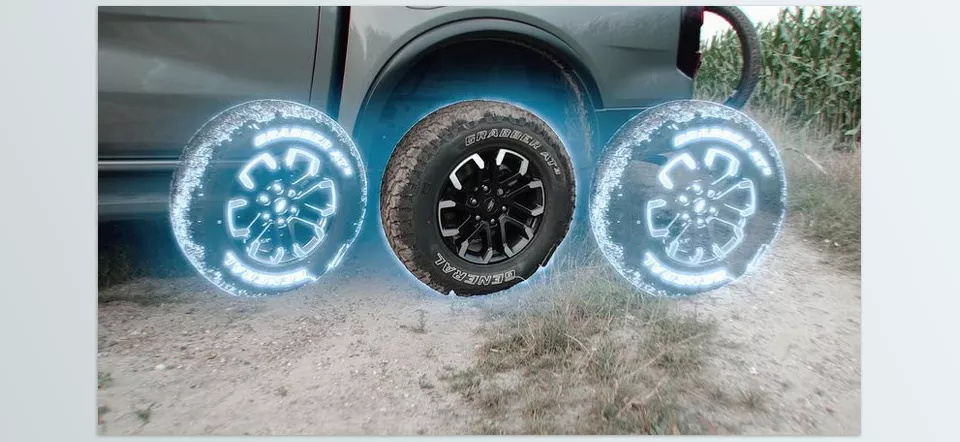
Replicator Effect is designed for creative duplication of elements such as videos, text, or logos, adding appeal to vertical and social media videos.
Features & Applications:
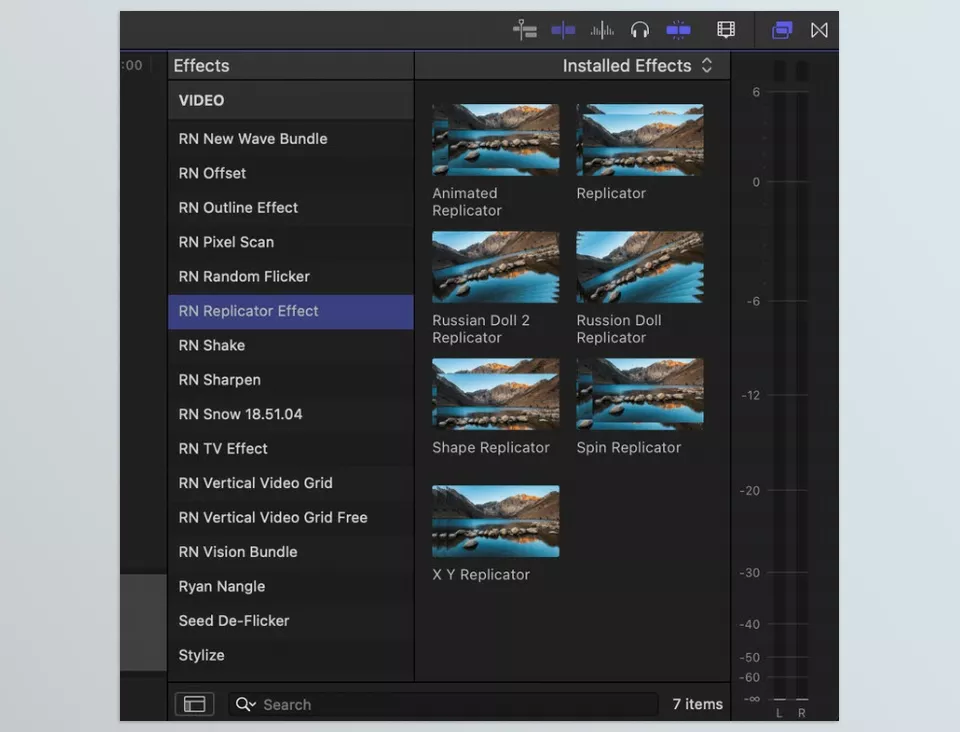
- 7 New Replicator Effects:
- Duplicate elements creatively within frames.
- Makes scenes dynamic and visually unique.
- Optimized for Vertical & Social Media Videos:
- Perfect for TikTok and Instagram content.
- Duplication enhances short video appeal.
- Full Customization:
- Adjust effects and elements to fit project needs.
- Change size, position, rotation, and repetition easily.
- Simple and Fast Installation:
- Move plugin file to
Motion Templates > Effects. - Ready to use without complex steps.
- Move plugin file to
- Integration with Text, Logos, and Videos:
- Import text, logos, or videos and apply Replicator effects.
- Ideal for promotional videos, product intros, or engaging social media clips.
Key Advantage over Manual FCP Methods:
- Build dynamic multi-element effects without multiple layers or complex effects.
- Significantly reduces time and effort for creative duplication.
- Even vertical videos achieve professional, cohesive results.
With these four plugins, you can transform Video Motion and Composition into a few simple clicks, achieving professional, dynamic results.
Comparison and Choosing the Best Option
Each plugin addresses a specific aspect of Video Motion and Composition, from zooms to split screens to creative replication. A simple comparison helps decide which fits your project best:
| Plugin | Main Function | Motion & Zoom | Split Screen / Multi-View | Element Replication | Social Media Friendly | Difficulty Level |
|---|---|---|---|---|---|---|
| LenoFX – Split Screen FX 2 | Display multiple videos/images simultaneously | ✅ (Zoom & Pan) | ✅ (Adjustable frames) | ❌ | ✅ | Easy |
| Pro Zooms | Precise subject zoom & movement | ✅ (Zoom, Pan, Multi Pan, Burns) | ❌ | ❌ | ✅ | Easy–Medium |
| Smart Split Screen | Frame division & smooth transitions | ✅ (Motion between frames) | ✅ (Two or three sections) | ❌ | ✅ | Easy |
| Ryan Nangle Replicator Effect | Creative duplication of elements | ✅ (Element motion) | ❌ | ✅ | ✅ | Easy–Medium |
Quick Table Overview:
- For displaying multiple videos/images simultaneously: LenoFX and Smart Split Screen are ideal.
- For precise subject focus and camera movements: Pro Zooms excels.
- For creative element duplication in social media videos: Replicator Effect is the best choice.
Smart Editing: When Simplification Leads to Professional Results
Video editing goes beyond cutting and pasting clips. At its core, Video Motion and Composition ensures that these clips flow naturally and attractively. When you want viewers to focus on important details, smooth and natural movements, or multiple videos/images displayed attractively in one frame, ordinary manual methods often fall short.
Achieving professional results without spending hours is nearly impossible. Even experienced editors may struggle with coordinating movements, creating smooth transitions, or crafting dynamic scenes.
For that purpose, if the aim is to create dynamic, contemporary, and professionally polished videos, then tools and techniques that ease and automate the control of video motion and composition are not just handy, they’re practically a necessity. This allows you to devote a greater portion of your time and energy to exceptional, original, and inspiring ideas. The result is nothing less than astounding.
Don’t miss out on our comprehensive Final Cut Pro article, where we cover every feature, tip, and trick you need to know.




