

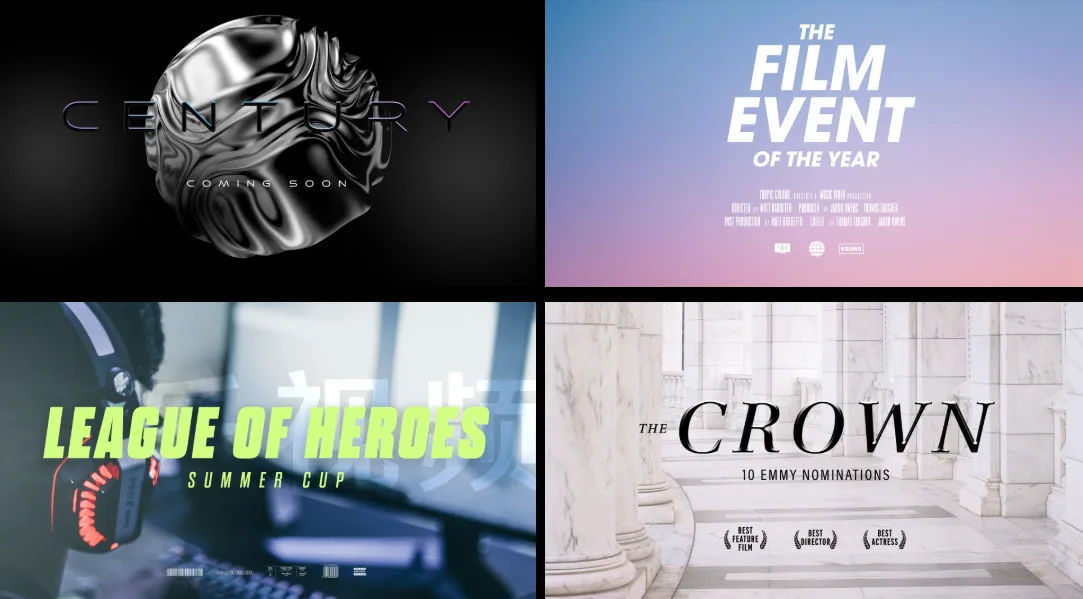
The First Impression of Any Project Starts Right Here
Do you know how the FILM TITLES Plugin by Tropic Colour works? Have you ever watched a video or trailer and found yourself drawn to the title and opening text before the story even began? In many cases, what transforms an ordinary project into a professional one is not just the editing or visuals—it’s those first few seconds and the way the titles are introduced.
Creating an engaging title draws people in, but creating a cinematic feel for the title can be challenging. Each element of the title has to be considered, from the font choice to the title animation, the video project’s pace, and the project’s visual style. All of these aspects require considerable time to perfect a title that will stand out from others in the same project category.
For many video editors and motion designers, the biggest challenge is not a lack of ideas—it’s that building every idea from scratch can take hours. This becomes even more difficult when you’re working on multiple projects and need to achieve a professional result quickly.

What Is a Cinematic Title and Why Does It Matter? 🎞️
A cinematic title, or animated title, is a combination of graphic design, typography, and animation used to introduce films, videos, music videos, advertisements, or social media content.
Unlike plain text that simply appears on the screen, a professionally designed title uses motion, timing, and visual design to convey a project’s mood and atmosphere. For example, a title with smooth animation, minimalist typography, and subtle effects can create the feeling of a luxurious drama film, while a fast-moving title with energetic animations is better suited for an action trailer or music video.
Cinematic titles can be used in a wide variety of projects:
- 🎬 Opening sequences for short films, documentaries, and narrative videos
- 🎵 Music videos and artistic clips
- 🔥 Promotional trailers and product showcases
- 📺 YouTube videos with a more professional appearance
- 🖼️ Cover designs, posters, and graphic content
A great title does more than present information—it tells the audience what kind of experience they are about to have.
Creating Titles Without Ready-Made Templates: What Are the Options?
If you want to create a cinematic title from scratch, software such as After Effects, Premiere Pro, Final Cut Pro, and Photoshop provides a wide range of tools.
In After Effects, you can use Text Layers, Keyframes, Blur effects, Glow, Tracking, and Motion Design techniques to build a complete text animation. You can also use the Graph Editor to create smoother and more professional-looking motion.
Premiere Pro offers the ability to create simpler titles through Essential Graphics, while Final Cut Pro allows you to work with Motion Templates.
However, the real challenge goes beyond the tools themselves. You need to know which font to choose, how the text should move, how fast the animation should run, and which effects to apply.
For an experienced motion designer, this may not be difficult, but for everyday projects, it can become very time-consuming. Sometimes, creating a title that lasts only a few seconds takes much longer than expected.
FILM TITLES VOL. 1: A Ready-Made Collection for Creating Cinematic Titles 🎬
FILM TITLES VOL. 1 is a complete collection of ready-made title designs and animation templates created to speed up the process of producing professional cinematic titles. Instead of designing fonts, layouts, animations, and visual details from scratch every time, this collection helps you achieve a cinematic look quickly and efficiently.
This package is designed for creators working on videos, trailers, music videos, short films, advertisements, or graphic content who want to give their projects a more professional appearance. Rather than spending hours creating a title animation from the ground up, you can simply use the ready-made designs, replace the text with your own, and adapt them to match your project’s style.
20 Ready-Made Cinematic Title Designs
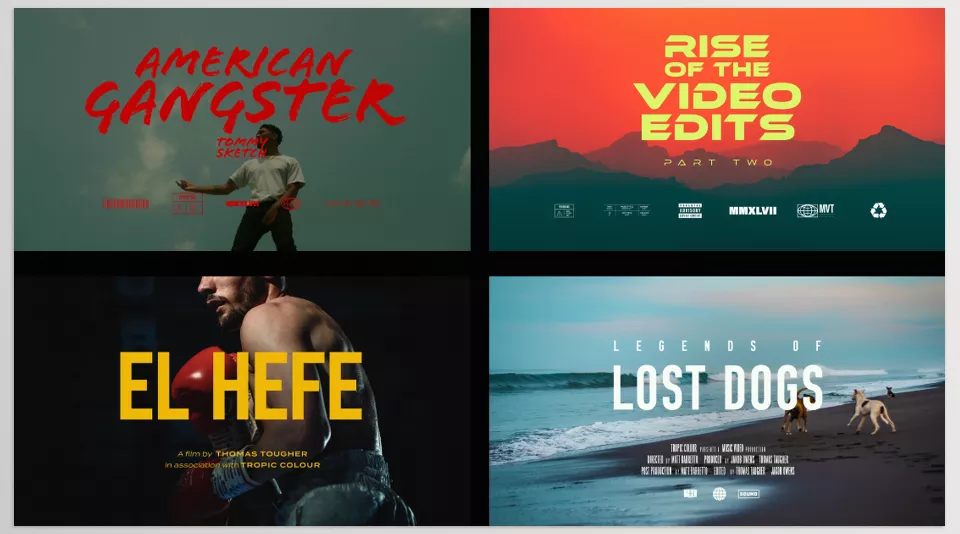
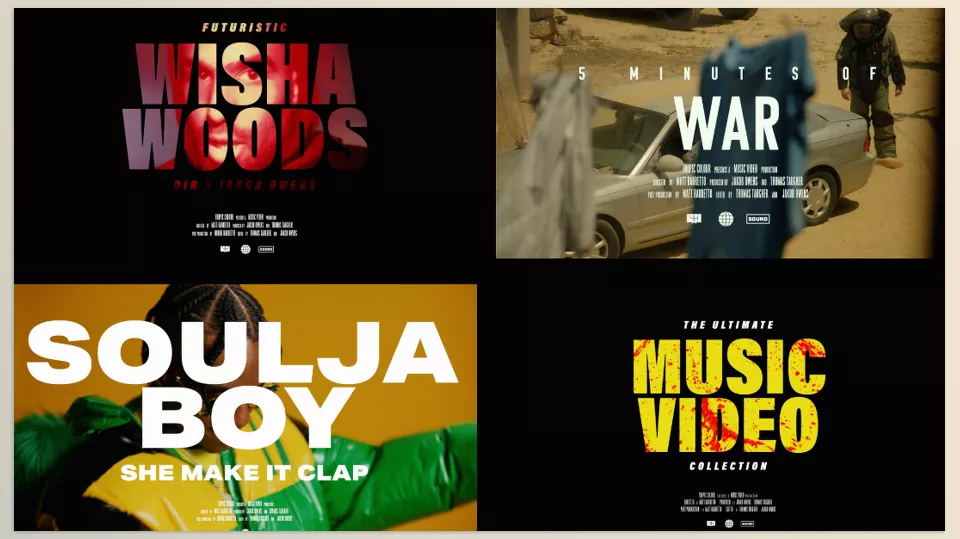
One of the main features of FILM TITLES VOL. 1 is its collection of 20 unique cinematic title templates. Each design has been created to deliver a professional and visually striking appearance while remaining suitable for a variety of project styles.
These titles can be used for many different purposes—from opening a short film and introducing characters to creating trailers, music videos, YouTube content, brand advertisements, or even graphic design projects.
The variety of styles ensures that you are not limited to a single aesthetic. Depending on the mood of your project, you can choose from modern, minimalist, dramatic, luxurious, or energetic designs to match the story and overall visual atmosphere.
Ready-to-Use MOGRT Templates for Premiere Pro and After Effects
One of the most practical parts of FILM TITLES is the inclusion of 20 MOGRT files designed for Premiere Pro and After Effects.
These templates can be imported directly into your project, allowing you to customise editable elements such as text, colours, and other settings. This means you no longer need to build text animations, movements, and visual effects from scratch for every title.
For editors who primarily work in Premiere Pro, this feature provides access to professional titles without requiring advanced motion design knowledge. After Effects users can also take advantage of greater control over customisation and seamlessly adapt the templates to their projects.
20 Ready-Made Motion Titles for Final Cut Pro X
Final Cut Pro X users also receive a dedicated version of the collection. The package includes 20 Motion Title templates that can be used directly in Final Cut Pro.
This allows editors working within Apple’s ecosystem to access a collection of professionally designed titles without having to recreate animations or rebuild everything from scratch.
4K PSD Files for Photoshop
In addition to the animated versions, the collection includes 20 PSD files at 3840 × 2160 (4K).
These files allow you to use the title designs as static graphics for projects such as video covers, posters, thumbnails, social media posts, or any other graphic design work.
Having the PSD files means you are not limited to video production—you can also modify the title designs in Photoshop or use them for high-quality graphics.
Video Tutorials for an Easier Workflow
The package also includes video tutorials to make working with the templates easier. These tutorials help you quickly learn how to install, use, and customise the files, allowing you to spend less time figuring out the workflow.
Designed with Professional Fonts and High-Quality Graphics
One of the main focuses during the development of the FILM TITLES collection was the use of high-quality typography and design elements to create a stronger cinematic feel. However, it’s important to note that the fonts themselves are not the primary product—they are simply part of the overall title designs.
In some cases, certain Premium fonts may need to be purchased separately. However, Film Titles Vol. 2 is also available with free fonts, giving users additional options.
Suitable for Which Types of Projects?
FILM TITLES VOL. 1 can be used in a wide range of projects, including:
- 🎬 Opening titles for short films, documentaries, and cinematic productions
- 🎵 Music video title sequences
- 🔥 Eye-catching typography for promotional trailers
- 📺 YouTube video intros
- 🏢 Professional brand and product presentations
- 🖼️ Cover designs, posters, and graphic content
Ultimately, what makes the FILM TITLES package valuable is not just the number of templates. The combination of professionally designed assets, multiple formats for popular creative software, and fast customisation makes it an excellent starting point for a wide variety of creative projects.
A Few Tips for Getting Better Results with Title Templates ✨
Ready-made templates like FILM TITLES VOL. 1 can significantly speed up the design process, but what truly makes the final result look professional is how you use them. With just a few simple adjustments, you can adapt a template to better match your project’s style and create a result that feels like a custom design.
- Match the font and style to your project’s atmosphere: Not every title works for every type of video. Before choosing a template, consider the overall mood, subject, and target audience. A bold, cinematic title may be perfect for a dramatic or professional production, but it might not suit a fast-paced or energetic video.
- Avoid overusing effects: An impressive title is not defined by the number of effects or complex animations. In many cases, a clean, simple, and well-executed animation creates a much stronger impact than an overly busy design.
- Synchronize the timing with the music and editing rhythm: Even the best title loses its impact if it doesn’t appear or disappear at the right moment. Matching text animations with the beat of the music or the pacing of the video edits creates a more polished and professional result.
- Customise the colours and visual details: Adjusting colours, contrast, text size, or other small design elements can make a ready-made template feel completely aligned with your project’s visual identity.
- Avoid mixing multiple title styles within the same project: Maintaining a consistent style across all titles helps the video feel more cohesive and professional. Using several completely different title styles can make the overall presentation appear cluttered and inconsistent.
Ultimately, the goal of using ready-made templates is not simply to save time. The real advantage is using them as a creative foundation and, with a bit of customisation, producing results that feel unique to your project.
When Every Project Can Start with a Stronger First Impression 🎯
In content creation, the difference between an average production and a professional one often comes down to details that require considerable time to create. A compelling title can capture the audience’s attention in the very first moments, establish the project’s visual identity, and make the entire video feel more cohesive and purposeful.
For creators who regularly work with videos, advertisements, or other visual content, time is always one of the biggest challenges. Starting from scratch every time—searching for ideas, testing multiple styles, refining animations, and building an effective title—requires a significant investment of time and energy. Having a ready-made collection allows you to spend less time on repetitive tasks and dedicate more attention to storytelling, editing, and creativity.
Ultimately, a good tool should do more than simply increase your workflow speed—it should help transform ideas into finished work more efficiently. When you have multiple design options available for different types of projects, it becomes easier to choose the right style, present more creative options to clients, and produce work that looks more polished and distinctive. For professionals who create videos as part of their daily workflow, having resources like these can be a practical investment in improving both the quality and efficiency of their work.
If you enjoyed this article and you work with Final Cut Pro and want to improve your editing, check out our article on Final Cut Pro tools, where we explain each one and how it can help you in different ways.




