

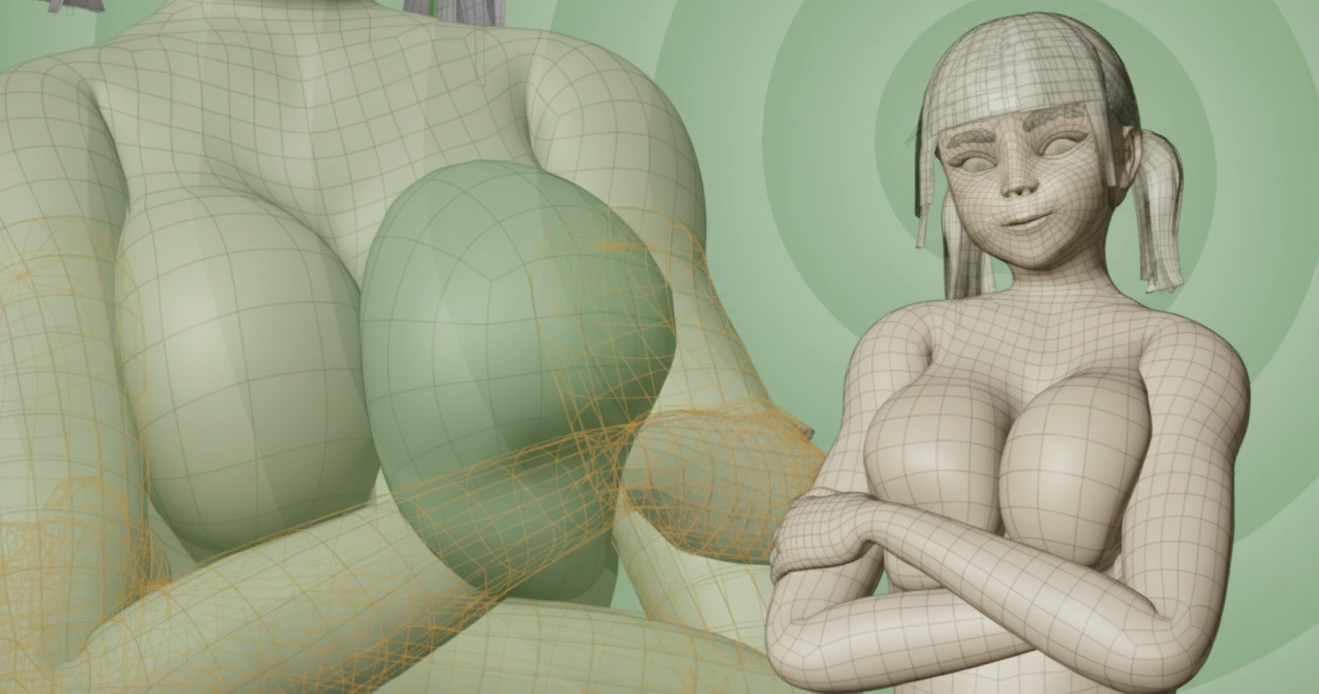
Real Movement, Not Stiff and Artificial!
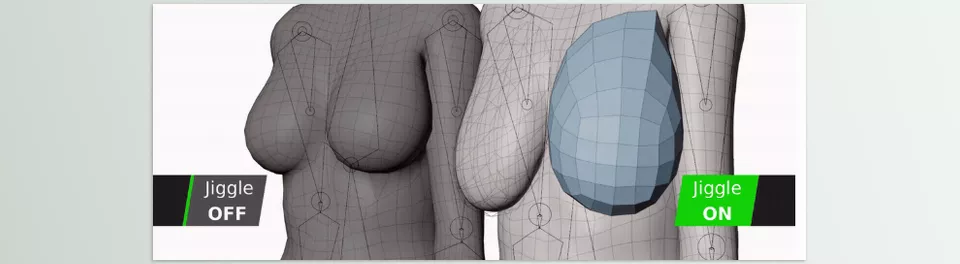
Have you seen the Jigglemaker in action? When animating characters, there are often subtle details that have a huge impact, yet we pay little attention to them: small belly jiggles while running, the sway of the chest or thighs, even minor movement of clothes or hair—these all make a character feel alive and real. Without these details, characters look stiff and artificial, like a moving puppet.
Now imagine you want to add these subtle movements to a short project or motion graphics. Without the right tools, you’d have to spend hours adjusting Modifiers, Weight Painting, and Pin Groups, then nervously check bakes and simulations, hoping everything works correctly. One small mistake? The mesh explodes or the motion looks unnatural, and all your effort goes to waste.
This is exactly where most animators become frustrated: natural, fluid motion takes ages, is always a gamble, and cumbersome. And let’s be honest, why spend hours on the nitty gritty when these characters could be bringing lives to art and true character modeling?

When We Work Manually…
Before specialized tools, if we wanted smooth, natural movements of a character’s body or clothes, everything had to be done manually and step by step:
- Cloth Modifier or Soft Body: To simulate soft parts of the body like the belly, chest, or thighs, or even clothes and hair.
- Surface Deform: To attach a soft proxy to the main model and transfer movements to the original body.
- Weight Painting and Pin Groups: To define which parts should stay fixed and which parts should move and be simulated.
Problems and Hassles:
- Time-consuming and sensitive: The slightest mistake in Weight Painting or Pin Groups can cause mesh explosions or unnatural motion.
- Bake and cache management is difficult and confusing: Finding Modifiers and caches in complex scenes is exhausting.
- Low repeatability: Every new character or project means starting all steps from scratch, wasting time and energy.
Simply put, the traditional method is like running through an obstacle course: the results can be great, but there’s always a risk of failure, and you have to repeat the process every time.
JiggleMaker: Natural Movements in Three Clicks
Character animation has always had one major challenge: creating smooth, natural movement of body and clothes without hours of trial and error. JiggleMaker eliminates this challenge, turning all the complex manual steps into a simple and reliable workflow. Just follow three steps: select the mesh, bind, and bake.
With JiggleMaker, even beginners can create natural secondary motion without struggling for hours with Modifiers, Weight Painting, and Pin Groups.
Key Features:
- Three Flexible Modes:
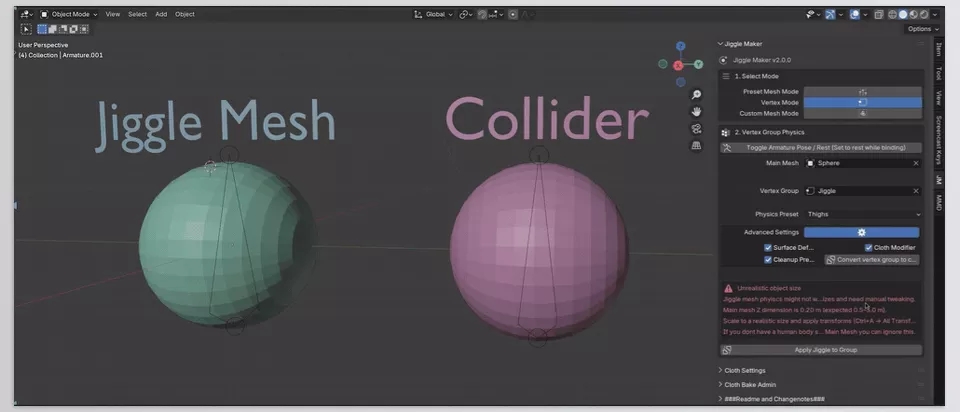
- Preset Mesh: Ready-made proxies for quick binding; just place and bind!
- Vertex Mode: Use the model’s own vertex groups for precise, localized motion.
- Custom Mesh: Your own proxy with custom Pin Groups; full freedom to design custom motion, even on unusual body parts or clothing.
- Simple and Professional Bake Management:
The Cloth Bake Admin tool allows you to:- See and enable/disable Cloth Modifiers across the scene
- Clear caches to keep the scene lightweight
- Bake only a specific frame range without checking every single Modifier
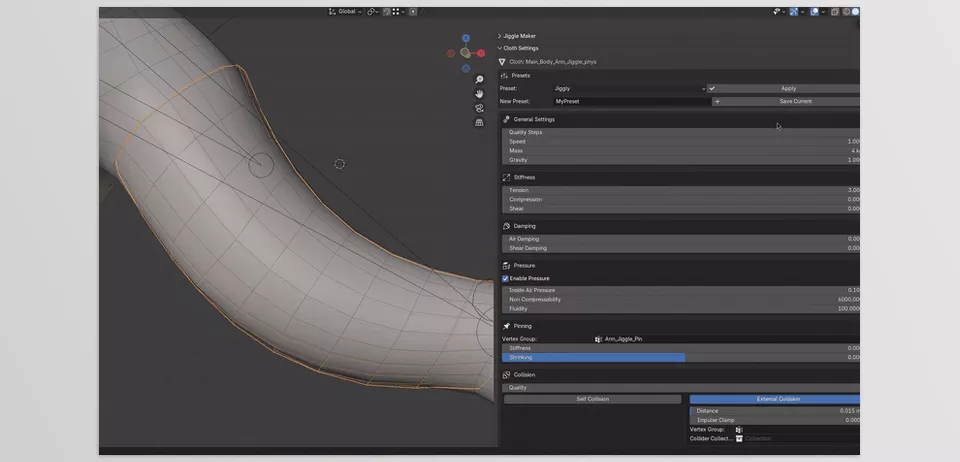
- Presets and Customization:
- A set of ready-made presets: Jiggly, Firm, Thighs, Inflated
- Save and reuse your own presets for other projects
- Safety and Convenience:
- Alerts for incorrect Transforms or unrealistic Scale that could cause simulation issues
- Automatic mirror for both sides of the body with precise alignment, no manual fixes needed
- Precise control over proxy influence on the main model using distance-based influence groups
Real Impact in Projects
Imagine a character running:
- Belly and thighs move softly and naturally
- Chest and hair react realistically
- Even swinging clothes look completely natural
All of this happens without hours of manual tweaking, trial and error, or worrying about mesh explosions or unnatural motion. With just a few clicks, your character feels alive and dynamic, freeing your time to focus on design and creativity.
Work Smarter with Simple Tips
Even with the best tools, a few small techniques can make motions smoother, more natural, and trouble-free. Here are some professional tips for using JiggleMaker effectively:
- Always apply Transforms and maintain correct scale
Before binding the proxy and main mesh, ensure all Scale, Rotation, and Location values are applied. Real model scale ensures accurate and error-free physics simulation. - Define sensitive body parts with precise Weight Painting
For natural, localized motion, vertex or influence groups should be correctly weighted. This determines which parts move more and which stay fixed, like belly, thighs, or chest. - Start with presets, then adjust details
Begin with ready-made presets like Jiggly, Firm, Thighs, Inflated, then tweak Mass, Structural/Shear Damping, and Time Scale for custom motion. - Use automatic mirror
For symmetrical models (e.g., arms or legs), automatic mirroring ensures both sides move symmetrically without manual fixes, increasing speed and precision. - Preview before final bake
Simulate a few short frames first to ensure the motion is natural and correct any issues. - Compatible with large projects
In complex scenes with multiple characters, use Cloth Bake Admin to manage Modifiers and caches, keeping the scene light and bakes easily controlled.
Movement, Now Real!
Secondary motion and subtle body details no longer require hours of complex tweaking and struggling with Modifiers. With JiggleMaker, you can create natural, realistic motion in minutes without worrying about mesh explosions or unrealistic simulations.
This tool lets you focus on creativity and main character design, not technical hassles. Whether for short animations, motion graphics, or video games, JiggleMaker makes characters appear alive, dynamic, and real.
With the professional tips mentioned, even regular users can elevate motions to a professional level, with full control over jiggle, weight, and motion detail.
Ultimately, JiggleMaker not only makes your workflow faster and easier, but also brings real life and energy to your projects. Natural movement is no longer a dream—it’s just a few clicks away!
Inspired by this article? If your goal is to become proficient in Blender and understand all its tools, our extensive Blender Tools guide will provide the knowledge and confidence you need.



