


When Time Is Short and Quality Matters!
Have you ever worked with the Sanctus Library? One thing that always bothers us is trying to create a complex material or effect and getting stuck in nodes and settings for hours, while still being unsure whether the result will look good.
Have you ever wanted your models to look professional, but either didn’t have enough time or didn’t yet have the skills to handle small details like scratches, stains, or realistic reflections? Yeah, I think we’ve all faced that problem!
Sometimes you have amazing ideas in your head, but when you try to execute them, everything slows down, and your creative energy drains. Even after spending hours on details, it still feels like something’s missing.
This is where having a ready-to-use, easy tool—like a good friend by your side—can save time and let your real creativity focus on design and rendering, not on complicated node setups.

When You Build Everything from Scratch
Imagine you want to create a professional model with all details realistic and precise. Without helpful tools, your workflow usually looks something like this:
Material Creation with Nodes
- You have to build all materials from scratch and connect different nodes.
- For each material, like metal, wood, or stone, you need to adjust color, roughness, normal, and displacement parameters separately.
- This takes a lot of time, and if you lack experience, the chance of mistakes is high.
Adding Details and Effects
- If you want scratches, stains, shadows, or custom textures, you need to use Texture Paint, Projection Map, or even hand-paint on UVs.
- Each method is time-consuming and can be confusing, especially with complex models or many UV maps.
Lighting and Emission Simulation
- Adding realistic lighting effects, reflections, or emission usually requires multiple layers and render tests.
- Without professional tools, achieving a natural and appealing result is really hard.
Baking Materials
- When preparing your project for another render engine or game, you must bake textures manually and ensure all details are preserved.
- Even a small mistake can ruin the model’s appearance.
Continuous Testing and Correction
- Throughout this process, you constantly have to run test renders, identify errors, adjust nodes and textures, and try again.
- This cycle may repeat many times, draining your creative energy.
💡 Main Challenge: All of this is time-consuming, prone to errors, and requires high skill. Even when done correctly, your model or scene might still not look professional or realistic enough.
Sanctus Library: When Everything Is Ready!
Now, imagine having a tool that eliminates all that hassle and allows you to complete your projects quickly, professionally, and effortlessly. This is where a complete library of materials and procedural tools comes in.
With Sanctus Library, you can:
Ready-Made and Procedural Materials
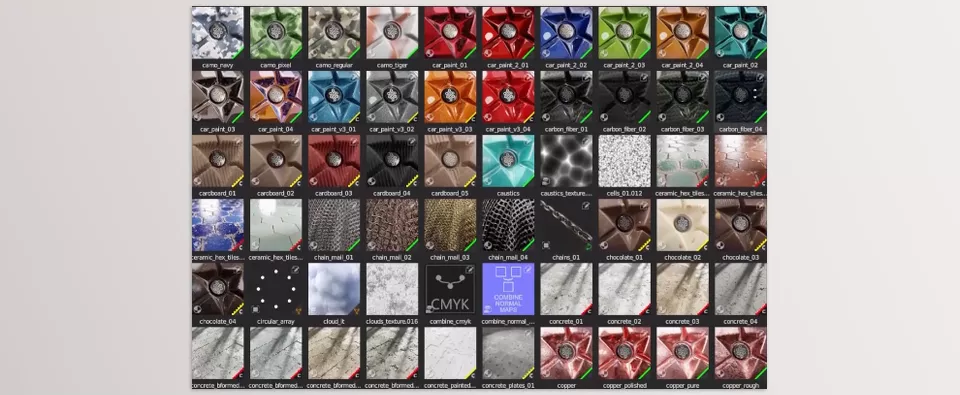
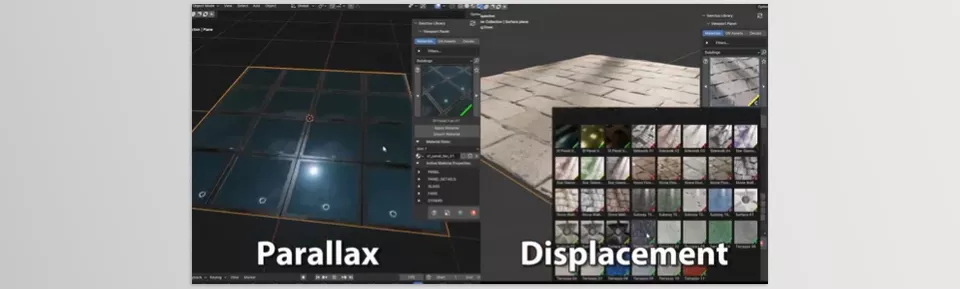
- Over 690 high-quality materials, from glossy metals and natural wood to cartoon effects and parallax textures.
- Applied to your model with a single click and fully editable.
- Example: A car model can be ready with glossy metal, detailed tires, and realistic glass—without hours of node work.
Geometry Nodes Generators
- Ready-to-use scatter, shaping, and effect generators that work in just a few clicks.
- Example: Want to create a forest with scattered trees and plants? The ready generator does it in minutes, without manual placement.
- Need complex effects like breaking objects, scattering items, or natural plant growth? All are ready—just tweak a little.
Non-Destructive Decal Tool
- Add scratches, stains, logos, or emission light to your model without altering the original mesh.
- Use over 350 ready-made images or import your own.
- Example: A game weapon with scratches and bullet marks is ready without touching the original model.
- You can even add emission to any decal for realistic glowing details.
Bake Tool
- Easily bake materials and decals for other engines like Unreal or Unity.
- Example: Want to transfer a Blender model to a game? Baking textures takes just a few clicks and preserves all details.
- No more spending hours on UV adjustments or render tests.
Built-In Material Editor
- Create or edit materials without leaving Blender.
- Customize ready-made materials or build from scratch.
- Makes even the most complex projects easily editable.
💡 Key Advantage:
With Sanctus Library, you no longer waste hours on nodes and manual detail work.
Your focus stays on creativity and real design, not on tedious technical tasks.
The final result is professional and realistic—even with limited experience.
Everything you add is non-destructive, so you can always adjust or revise it.
Small Tricks That Make a Big Difference
Now that you’re using professional tools, a few simple tricks can make your projects look even more natural and polished:
Use the Baked Version in Other Projects
- Once materials and decals are baked, you can easily use them in other software like Unreal Engine or Unity.
- Pro Tip: Before baking, ensure resolution and UV settings are correct so small details like scratches or emission lights are preserved.
Make Decals Look Natural
- Combining emission and opacity gives details a realistic and lively look.
- Pro Tip: Match emission intensity with scene lighting to avoid artificial appearance.
- Another trick: Adding slight variation in decal size and rotation makes models feel more realistic.
Make Generators Look Natural
- Random scale and rotation give scattered objects, plants, or effects a natural feel.
- Pro Tip: Not just scale and rotation—combining multiple generators can create complex, natural details.
- Example: A forest scene with multiple tree and bush generators looks artificial without random scaling and rotation.
Don’t Forget Render Settings
- Even the best materials won’t shine without proper lighting and rendering.
- Pro Tip: Always run test renders and adjust light and shadow strength for a more realistic material appearance.
Embrace Non-Destructive Editing
- One of the biggest advantages of professional tools is that they are non-destructive.
- Pro Tip: Always make changes non-destructively so you can easily revise or run new tests anytime.
These tricks may seem simple, but combined with ready-made materials and tools, they create results that are natural, realistic, and professional—without spending hours on them.
Speed, Quality, and Greater Freedom
Ultimately, what Sanctus Library gives you is time, freedom, and quality.
With this tool, you no longer waste hours tweaking nodes, creating textures, or adding small details. Your time goes where your creativity truly shines: designing, lighting, and building exciting, professional projects.
- Even if you’re a beginner, you can create projects that look like hours of professional work using these ready-made materials and generators.
- If you’re a professional, you can complete complex tasks multiple times faster and save your energy for creative innovations.
Another major advantage: everything is non-destructive and adjustable. You can modify details, change material appearances, or add new effects anytime without breaking the project.
Sanctus Library means: work faster, work professionally, and make the most of your time! Forget hours lost in nodes and textures. Ready-made details and materials are at your fingertips, and your creativity has full freedom. Projects become faster, more realistic, and more impressive—whether you’re a beginner or an expert.
It’s time to focus on creating exactly what you want, not on tedious technical work.
Want to become truly proficient in Blender? Our complete Blender Tools guide walks you through every tool step by step and helps you understand how to use them in real projects.



