


Why Is Creating Realistic Muscles and Skin Difficult?
Have you ever used the X-Muscle System? When you want to create a living, natural character, the biggest challenge is making the muscles and skin move in harmony. In the real world, when muscles contract or stretch, the skin and fat respond, changing the shape of the body. Achieving this coordination in animation is difficult because every small detail of movement needs to be simulated: muscle contractions, skin stretching, and fat shifting.
If this coordination is not done correctly, the character appears stiff and artificial, and the audience senses that something is missing. Even simple movements like bending an arm, walking, or smiling look unnatural without a realistic simulation of muscles and skin. For this reason, simulating muscles and soft tissue is one of the most challenging aspects of character design.
Now imagine having a tool that performs all these tasks quickly and automatically. Not only would you save a lot of time, but you could experiment more creatively, making your characters truly alive and dynamic. This illustrates why having specialized tools for muscle and skin simulation can have a significant impact on professional projects.

What Do Muscles and Soft Tissue Mean?
Muscle simulation refers to creating a system where muscles, fat, and skin deform naturally as the character moves. Imagine when your character bends their arm—the biceps contract, the skin stretches slightly, and the body fat shifts naturally. Even minor movements, like stretching the back of the hand or gathering skin over the shoulder, must be accurately simulated for everything to remain coordinated.
This coordination makes your characters look more realistic, lively, and believable, giving the impression that muscles and skin truly interact rather than just being a superficial layer over the skeleton. When all these small details are respected, movements appear natural and fluid, making the animation more professional.
What Do We Do Without an Add-on?
When an add-on like X-Muscle System is not available, muscle and skin simulation in Blender must be done entirely by hand, requiring patience and skill. Default tools can help, but each has limitations and complexities, making the workflow long and error-prone:
- Shape Keys: Allow you to change the shape of skin and muscles in different poses, like bending an arm or contracting muscles. The problem is that each pose must be created individually, and every small change requires separate edits, which is time-consuming and slows the process.
- Corrective Smooth Modifier: Smooths changes in skin and muscle shapes to make them appear natural, but precise adjustments are complex, time-consuming, and often require trial and error.
- Surface Deform: Attaches skin and soft tissue to the skeleton to maintain coordination. However, when movements are complex or multiple tissue layers are involved, precise adjustments are tricky and can result in unnatural outcomes.
- Soft Body or Cloth Simulation: Used to simulate soft tissue and fat movement. While this can create a natural sense of motion, precise control is difficult, and results are often unpredictable—especially when multiple muscles or layers move simultaneously.
With these methods, even a simple movement like bending an arm or contracting a muscle can take hours. Maintaining symmetry, coordination with the skeleton, and natural motion for each small movement is nearly impossible. And all this time is spent adjusting settings and making constant corrections just to achieve somewhat natural results. In fact, without an add-on, the workflow is long, stressful, and inefficient, making professional, lively results very hard to achieve.
How Does X-Muscle System Make Things Easier?
Simulating muscles and skin without a professional tool is a grueling task. Hours are spent creating Shape Keys, adjusting modifiers, and manually coordinating skin and fat movements… and the results are never fully predictable.
This is where the X-Muscle System comes in, making everything fast, precise, and natural.
Complete Control Over Muscles
- Precisely adjust muscle size, type, and Shape Keys.
- Even the smallest movements, like bending an arm or bicep contraction, are displayed naturally and harmoniously.
- No need to manually create each pose one by one.
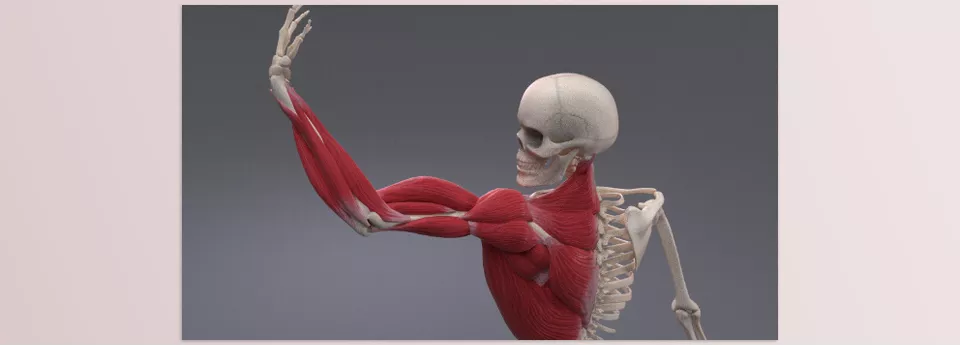
Real example: When your character raises an arm, the biceps contract, the skin stretches slightly, and fat shifts naturally. All this happens in just a few clicks, without hours of trial and error.
Compatible With Different Rigs
- Supports Rigify, Auto-Rig Pro, BlenRig, and more.
- Connect muscles and tissues without modifying the rig structure.
- High flexibility = convenience for multi-character or team projects.
X-Mirror: Symmetry With One Click
- Muscle and tissue symmetry is maintained automatically.
- No need to adjust the other side of the body manually.
Muscle Pinning and Bendy Muscles
- Muscles bend and stretch fully in sync with the skeleton.
- Complex movements, like bending arms or legs, appear natural and realistic.
Physical Simulation of Muscle, Fat, and Skin
- Realistic, coordinated movement of muscles, skin, and fat.
- No need for cumbersome Soft Body or Cloth Simulations.
- Result: a living, dynamic character without complicated settings.
Quick Management Tools
- Control multiple muscles simultaneously.
- See changes in real-time.
- Reviewing and adjusting movements is fast and easy.
In summary, X-Muscle System transforms muscle and skin simulation from a time-consuming, stressful task into a fast, precise, and controllable process. The result? Natural, dynamic, and believable characters whose movements harmonize with skin and tissues, making projects look more professional.

Professional Tips for Best Results
To maximize the X-Muscle System and make your characters move naturally and lifelike, follow these professional tips:
- Always Use X-Mirror
X-Mirror automatically maintains muscle and tissue symmetry on both sides of the body.
Why it matters: Without this feature, you would need to manually repeat every change on the other side, which is time-consuming and error-prone. - Pin Muscles to Bones
Pinning muscles to bones ensures movements stay fully synchronized with the skeleton, making bending or stretching appear natural.
Practical example: When your character bends an arm, the biceps and skin move in sync with the bones, avoiding any artificial appearance. - Use Fine Skin and Fat Controllers
Small controllers for skin and fat let you precisely adjust subtle movements. This makes delicate actions, like fat shifting on the arm or skin stretching during bending, look realistic. - Apply Changes to Multiple Muscles Simultaneously
X-Muscle System Plugin allows you to modify multiple muscles at once and see results in real-time. This speeds up workflow and helps create complex, coordinated movements without adjusting each muscle individually. - Real-Time Testing and Adjustment
Always observe changes alongside character movement and apply small corrections immediately. This ensures movements are not only more natural but also minimize design and simulation time.
💡 Golden Tip: Combining X-Mirror, Pinning, and fine controllers makes muscle and skin simulation accurate, fast, and natural—something nearly impossible to achieve manually.
Realistic Muscles and Skin in Minimal Time
Simulating muscles and skin with standard tools is possible, but it is always time-consuming, complex, and stressful. Creating each Shape Key, adjusting modifiers, and coordinating movements with the skeleton takes hours and often requires continuous corrections.
X-Muscle System dramatically simplifies this process. With this tool, you can quickly create muscles, skin, and fat, achieve natural and coordinated movements, and manage multiple muscles at once. This frees up your time for creativity and motion design, almost eliminating complex manual adjustments.
The end result: living, believable characters whose movements synchronize with muscles and skin. Projects look more professional and appealing, with even simple actions like bending an arm or running displayed with greater realism. X-Muscle System is not just a tool; it’s a companion for creating dynamic characters.
Whether you’re a beginner or looking to refine your Blender skills, our article about Blender Tools walks you through every tool with step-by-step instructions and practical examples that help you gain true mastery.



