

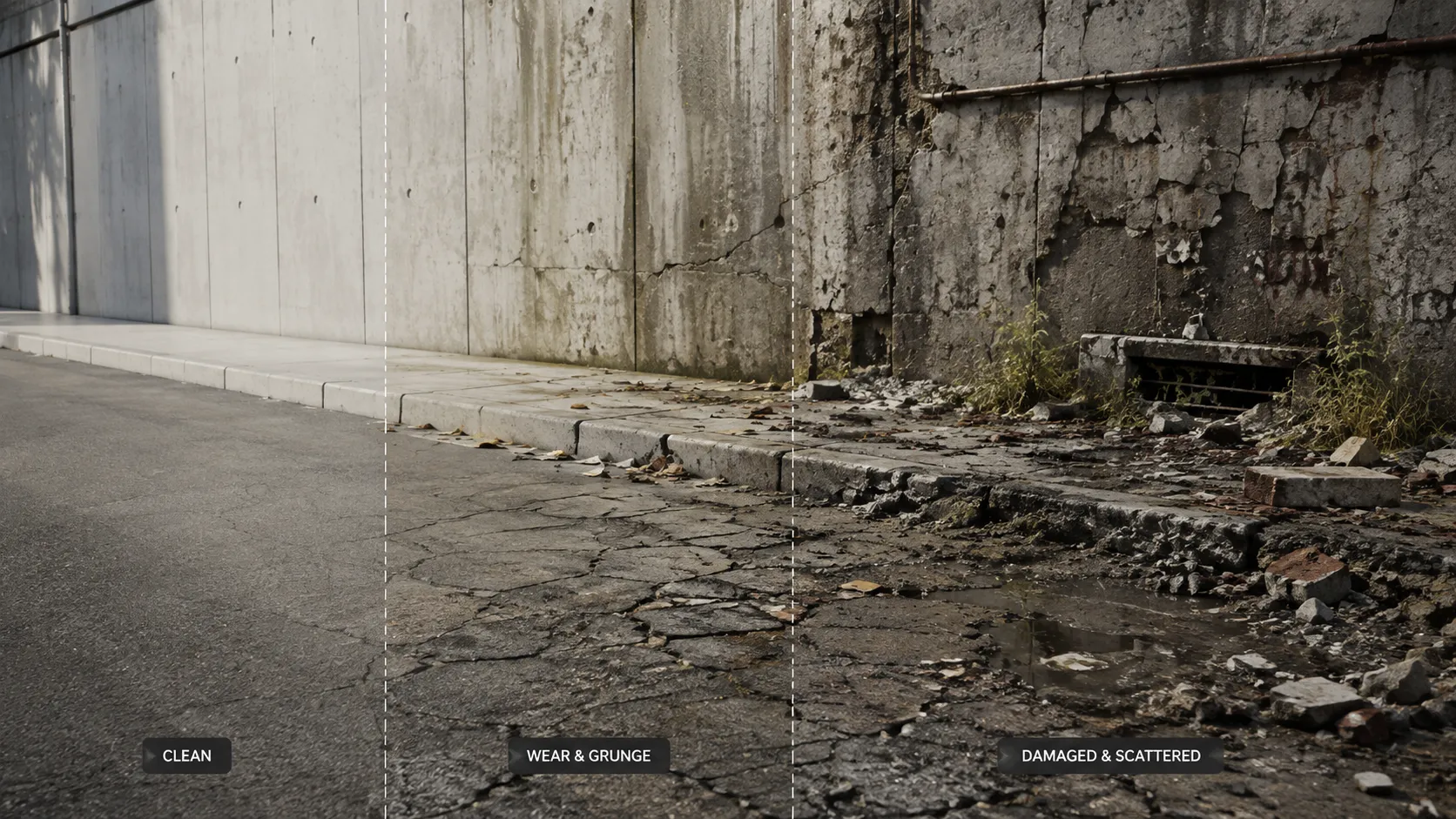
When Your Scene Looks Too Clean and Lifeless… 🏚️
Have you explored the features of the Damage Control Bundle by Superhivemarket? You’ve probably experienced that moment when you finish modeling a street, wall, or bridge and everything looks correct in terms of form, but the final render still doesn’t convey the realistic feeling you had in mind. Everything looks too clean and organized, as if the environment was just built and there’s no trace of time passing.
What makes a scene feel realistic doesn’t always involve complex modeling. However, small details can give an environment a sense of character. For example, cracks in the asphalt, stains on the concrete, and even debris can add the dimension your scene needs to make it feel like the location you built actually exists.
But creating these details can be quite time-consuming. You have to create masks, combine textures, scatter objects, and play with the settings until the result looks as realistic as possible. To speed up adding these details for projects, many artists are turning to tools and bundles that help with this process.

What Does Procedural Detail Mean and Why Is It So Important? 🎨
In Blender, Procedural Detail means that instead of designing everything manually, details are generated using nodes and parameters. This means you can edit asphalt cracks, wall dirt, or the distribution of small stones at any time without starting from scratch.
Imagine you’re designing an abandoned environment. Instead of creating multiple versions of the same material, you can simply use a few sliders to change the intensity of the grunge, the size of the stains, or the amount of damage, and each object can develop its own unique appearance.
This flexibility makes your workflow faster while also making your scenes look more natural and less repetitive; something that’s genuinely valuable for game art, visualization, and cinematic projects. ✨
How Can We Do All of This Without an Add-on? 🛠️
Fortunately, Blender has powerful tools for creating worn-out, highly detailed environments, and technically, you can do almost everything without add-ons. However, achieving a professional result usually means combining several different systems and building much of the workflow yourself from scratch.
Common Methods Inside Blender
The most common approach is to use Geometry Nodes and Procedural Materials to create details in a non-destructive way. Each of Blender’s built-in tools covers part of this process, and together they can form a complete system.
- Geometry Nodes: For creating parametric systems such as cracks, damage, and object scattering.
- Noise & Musgrave Textures: For creating random masks, grunge, and material wear.
- Instance on Points: For naturally distributing stones, bricks, leaves, and debris across different surfaces.
- Weight Paint and Vertex Groups: For precise control over where details appear on the model.
Why Aren’t These Methods Always Ideal?
The problem is that these tools aren’t ready-made solutions on their own; they’re more like puzzle pieces. For every project, you have to arrange the nodes again, configure the Scatter system, refine the masks, and sometimes even customize previous presets from scratch.
The result can still be good, but a lot of time ends up being spent preparing the workflow; time that could have been used for creative design and improving the scene itself. 😅
So, What Exactly Does Damage Control Bundle Help With? 🚀
This is where Damage Control Bundle comes in. This package gives you a collection of Procedural and Geometry Nodes-based tools that make creating environmental details, wear, scattering, and damage much faster.
The tools are available through the Asset Library, so instead of building a complex system from scratch for every project, you can bring the Asset you need into your scene and control its parameters through Modifiers.
The important thing is that these tools aren’t simply a collection of ready-made models; much of their power comes from being Procedural. This means you can change the parameters, adapt the result to your project, and, when needed, save your settings as Presets for future use.
As a result, a single tool can create completely different looks across different projects. 🧩
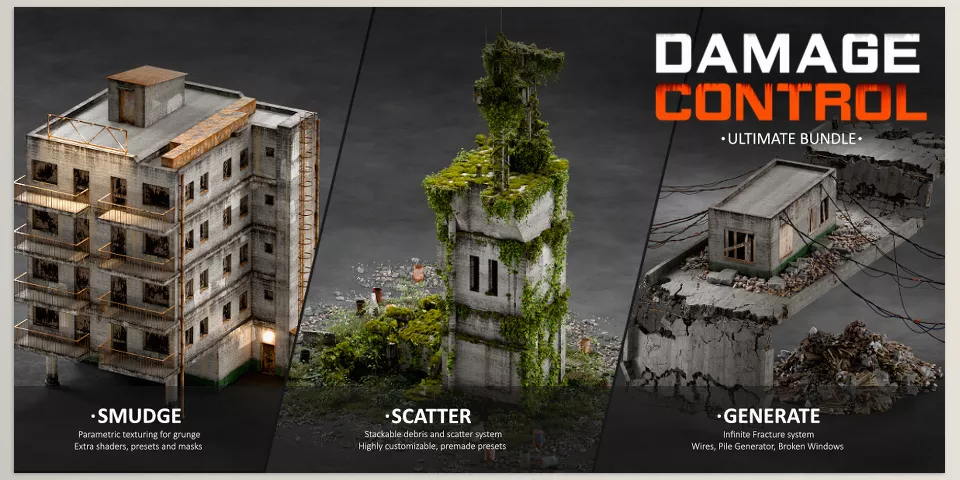
Smudge Mask Generator | Create Procedural Grunge and Wear 🧱
One of the main parts of Damage Control is the Smudge Mask Generator, a tool designed to create Procedural masks for stains, dirt, grunge, and wear.
The main goal of this tool in the Damage Control Bundle is to speed up the Texturing process and create variation across architectural and environmental Assets. Instead of manually creating masks for every model and repeatedly adjusting textures, you have a parametric system that lets you control and modify the result.
This feature is especially useful for surfaces such as concrete, metal, walls, floors, and building Assets, where a completely clean material can usually look very artificial.
You can use this system to add Variation and create a sense of wear, and even combine it intelligently with other tools in the package to achieve more complex results.
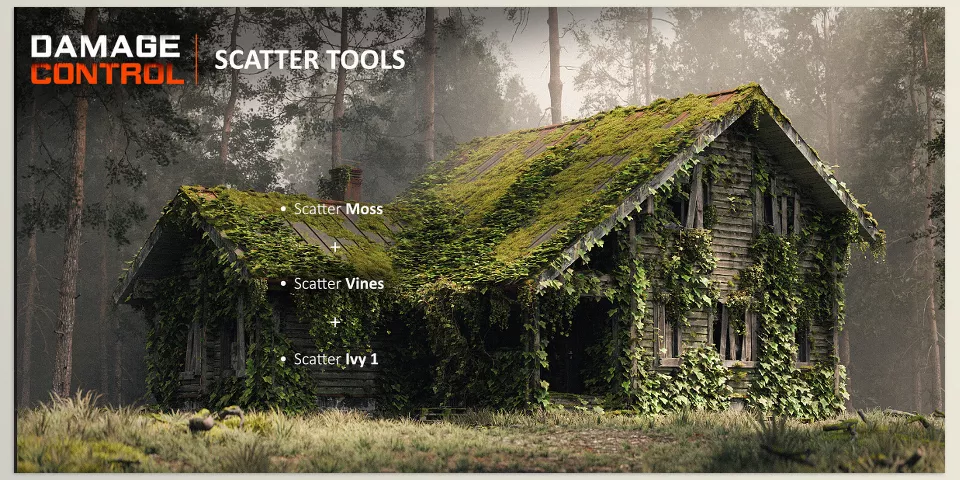
Scatter Tools | Fast and Controlled Environmental Detailing 🌿
Scatter Tools are a collection of scattering tools designed to add environmental details to Assets.
Instead of placing stones, debris, small pieces, or other environmental elements on a surface one by one, the Scatter system can distribute Instances procedurally throughout the environment.
But its appeal isn’t just speed; you also have a lot of control over how Assets are distributed and can adjust the result to match your project’s needs.
You can also create custom Presets, meaning that a Scatter setup that works well for you doesn’t have to remain limited to a single scene. You can copy and paste it across different parts of your project.
This feature of the Damage Control Bundle is especially useful for large projects with many similar Assets. ⚙️
Generative Tools | Small Details That Bring a Scene to Life ✨
The Generative Tools section is a collection of small and practical tools focused on adding final details to Assets and environments.
These tools help ensure that the Final Detailing stage isn’t limited to a few simple textures, allowing you to add more elements and Variations to your scene.
What’s interesting is that this section isn’t meant to remain static. According to the creator’s description, more tools will be added to the collection through Free Updates.
This means that this part of the Damage Control Bundle can become even more useful over time and provide you with more Assets for the final stage of design.
Infinite Fracture | Create Broken and Damaged Surfaces 💥
Infinite Fracture is one of the Generative tools in the Damage Control Bundle, designed to create broken surfaces and damaged environments.
Its system is based on Looping Instances, which makes it faster and more controllable to create large surfaces that need cracks and damage.
For example, imagine you need a long road with cracked asphalt, or you want to create a destroyed bridge filled with fractures.
Instead of manually modeling and fracturing different sections, you can use this system and control the parameters related to the cracks and surface structure yourself.
It can even create large, damaged Flat Areas while keeping overall control of the process in your hands. 🏗️
Extra Shaders | An Extra Layer of Wear for Your Materials 🎨
Alongside the Geometry Nodes tools, the package also includes several Extra Shaders you can use to add the final layers of Grunge and wear to Assets.
This section is especially useful when the model is geometrically ready, but the material still looks too clean and lifeless.
You can add these shaders during the final Texturing stage to give the Asset more Variation and character.
In other words, you can combine Geometry, Scatter, and Shading to create more than just a damaged model—you can create a complete and believable Asset.
Mega Presets | Combining Multiple Tools into a Ready-to-Use Workflow 🎁
Mega Presets are another part of Damage Control that combine Smudge Mask and Scatter Tools.
The idea is that you don’t have to configure several different tools separately just to achieve a ready-to-use result.
For example, you can use Presets that both wear down a material’s appearance and add environmental details such as Debris in a coordinated way.
This combination gives you a fast starting point for creating different Assets, from ready-made materials to environmental Scatter setups, while still letting you adjust the settings to your project when needed.
A Large Collection of Assets and Variations 🧩
One of the strengths of Damage Control isn’t just the number of tools; it’s the amount of Assets and Variations that come with it.
Damage Control Bundle includes 40+ Asset Collections and more than 1,000 Asset Variations, giving you plenty of freedom to create different combinations.
Alongside these, there are 8 Scatter Tools, numerous Presets, and a collection of Generative and Shader tools.
So instead of building a complete system for Scatter, Grunge, or wear from scratch for every project, you have a collection of ready-to-use tools and Assets that you can combine and customize.
Ultimately, what makes Damage Control useful is this combination of Geometry Nodes, Asset Library, Procedural Workflows, and ready-made Presets.
You can use a simple tool to add a little Grunge, or combine several systems to create a completely worn-out and highly detailed Asset, without losing control over the final result. 🚀
A Few Techniques That Make the Result Much More Natural 🎯
Ready-made tools definitely speed up the process, but to make the final output look truly natural, how you use them also matters. A few simple tips, if you follow them from the beginning, can make it much easier to move away from an artificial, repetitive look.
- Don’t keep the Grunge intensity uniform. Real surfaces always have different levels of wear; walls, concrete, and metal shouldn’t look exactly the same.
- Combine different types of Scatter. Rocks, dirt, bricks, and leaves together make the environment more believable and prevent the surface from looking too organized.
- Use random Scale. Small differences in object size help make repetitive Patterns less noticeable and make the Scatter look more natural.
- Keep the parametric workflow. Don’t apply anything unless you need to; this way, you can always go back and change the details and parameters whenever you want.
Ultimately, you don’t need to throw every detail into the scene at the highest possible intensity. Usually, a little Variation and controlled randomness create a much more natural result and let details help the environment feel more realistic instead of drawing attention to themselves. ✨
Details That Make a Scene Believable ✨
While the complexity of a scene’s model can make or break a project, it is often the cracks, stains, debris, and other details that make the scene believable for viewers 🏚️.
Damage Control Bundle is built specifically for this stage. Instead of spending hours building nodes, designing masks, and configuring Scatter, it gives you a collection of Procedural tools, ready-made Assets, and customizable Presets all in one place.
If creating cinematic, industrial, or abandoned environments is part of your work, this package can take many repetitive tasks off your shoulders and give you more time for the creative side of the project. So, if you want your scenes to be more than just clean and technically correct and actually have character, the Damage Control Bundle is worth trying. 🚀
If you want a friendly, easy-to-understand walkthrough of Blender tools and how to use them in your projects, our Blender tools article covers it all in detail from start to finish.



