

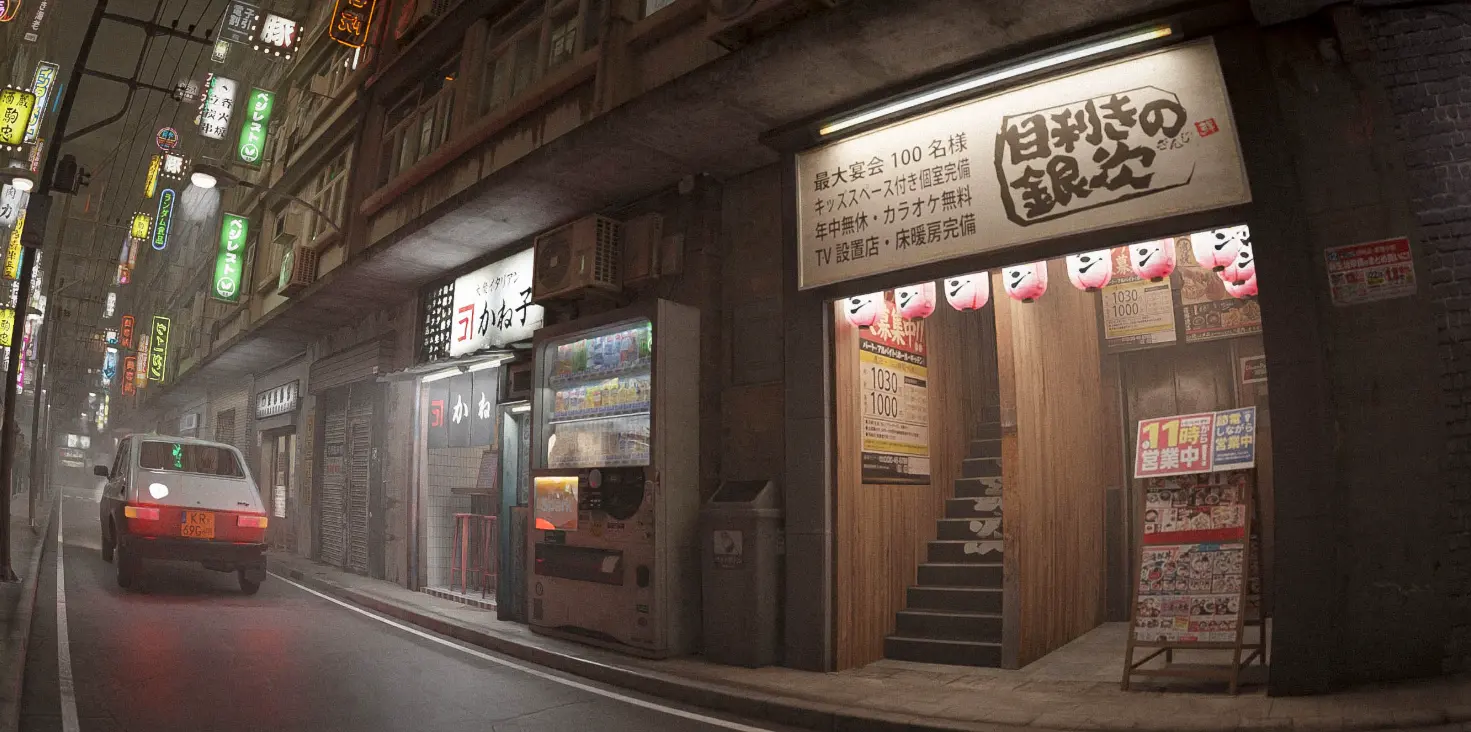
When Your Urban Scene Feels Empty…
Do you know much about the Procedural Alleys? Have you ever constructed an urban environment that’s perfectly accurate on paper, yet it’s just missing something when you look at it? Streets are too clean, no one ever dinged or marked up a wall, and the entire thing is dead space. There’s no livelihood. There’s no urban energy you anticipated.
Your first thought might be to add details—extra lights, cables, signs, stairs… But this is where it gets tricky. Manually creating and placing these details is time-consuming, frustrating, and often doesn’t produce the result you wanted.
Now, what if you could, with just a few clicks, create a busy, lively, and detailed alley? An alley that conveys the feeling of a city on its own, leaving you only to handle lighting and storytelling. This is exactly where smart procedural tools come into play, completely changing how you approach building urban environments.

Harder Without an Add-on
If you try to build a proper alley in Blender without a specialized tool, you usually have to do everything manually. From modeling to layout and detailing, everything falls on you, making the process quickly exhausting.
Typically, you’d need to:
- Model walls, stairs, containers, pipes, and cables separately
- Set up UVs and textures for each part
- Manually scatter details or use tools like Array, Mirror, and Boolean
- Handle lighting and placement completely on your own
The problem:
- Any small change (e.g., street width or crowding) requires extensive edits
- Maintaining full control over the scene is difficult
- Higher chance of errors
- Building a realistic alley can take hours or even days
These challenges turn urban environment creation from a creative, enjoyable task into a long and exhausting process.
Procedural Alleys: Create Streets in a Few Clicks
Procedural Alleys is a comprehensive Blender add-on that handles the entire process of building urban alleys in a fully procedural and intelligent way. Instead of time-consuming manual modeling and placement, this tool lets you add a fully detailed, adjustable alley to your scene with just a few clicks and then customize it exactly to your project’s needs.
Types of Alleys You Can Create
The add-on provides several ready-to-use alley types, each designed for different scenarios:
Front Alley
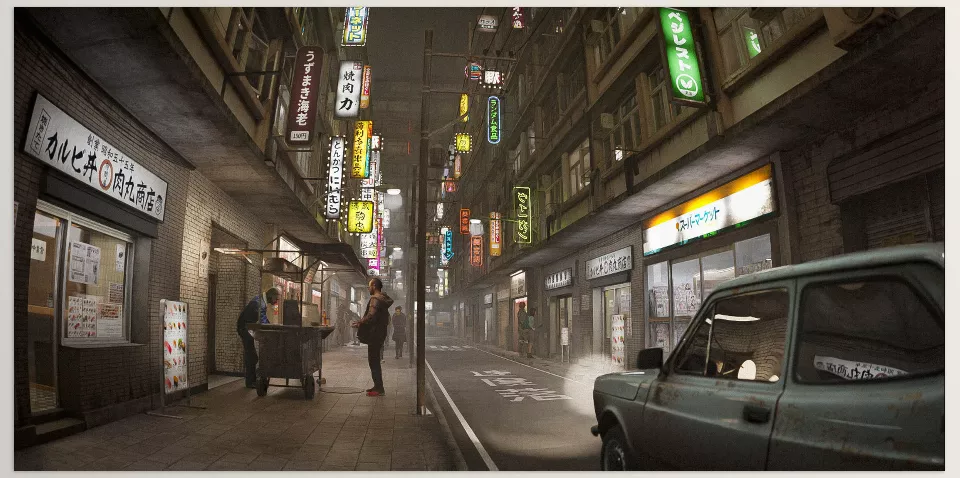
Ideal for front streets; vibrant spaces with options to add streetlights, signs, shops, and urban details. Perfect for daytime, sunset, or nighttime scenes.
Back Alley
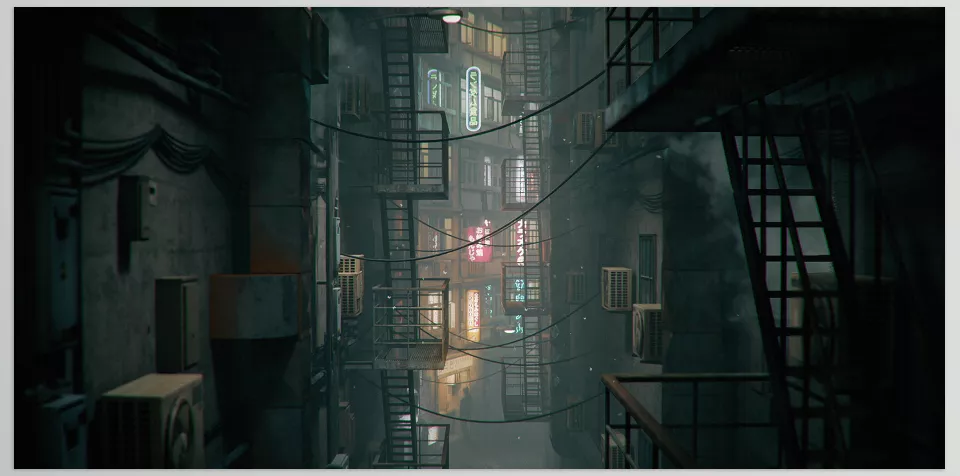
Narrow, dark alleys with a cinematic atmosphere; includes metal stairs, pipes, hanging cables, containers, and details that convey urban clutter and decay.
Curve Alley
A flexible alley version allowing you to bend, rotate, or twist the path. Perfect for cinematic shots, camera movement, and non-linear scenes.
Full Control Over Alley Structure
One of Procedural Alleys’ greatest strengths is the level of control it gives users:
- Adjust alley width and height
- Control wall distance and the sense of tightness or openness
- Manage the density of the environment
- Change the number and density of wall details
- Quick edits without breaking the structure
This means any change that used to require editing multiple objects can now be done with a few simple sliders.
Ready Assets and Details
The add-on doesn’t just provide an empty structure; it comes with a collection of high-quality ready-made assets:
- Street signs and neon lights
- Shops and storefronts
- Streetlights
- Cables, wires, and pipes
- Environmental details to make spaces feel alive
In version 2.0, 18 new signs and 4 complete shops have been added, helping you create professional-looking scenes faster.
Optimized Performance for Heavy Projects
Urban scenes often get heavy and increase render times. Procedural Alleys addresses this:
- Textures and images are optimized
- Balanced quality and performance
- Faster renders
- Reduced risk of crashing in dense scenes
This is especially important for animation, motion graphics, and long shots.
Simple User Experience as an Add-On
The new version of Procedural Alleys has evolved from a simple Geometry Nodes setup into a fully user-friendly add-on:
- Select the alley type with just a few clicks
- Organized and understandable settings
- No need for complex Geometry Nodes knowledge
- Suitable for both professional and intermediate users
In practice, Procedural Alleys lets you achieve results quickly. For example, in just a few minutes, you can create a dark cinematic alley for night shots or a busy, detailed urban environment for motion graphics—without overloading your scene. Even for animations where the alley is just a background, you can make the space feel alive without quality loss or extra hassle. Meanwhile, curve-friendly alleys allow for proper camera paths and dynamic, engaging shots—all without hours of manual modeling and repetitive detail work.
How Professionals Build Alleys
- Break up the alley path: Instead of perfectly straight alleys, use Curve Alley for twists and depth, especially for camera movement shots.
- Distribute details smartly: Avoid uniformly cluttering the scene. Vary cables, signs, and pipes to create contrast and a more natural look.
- Use ready-made assets as a base: Quickly build the space with assets, then adjust, scale, or remove some details to personalize the alley.
- Don’t underestimate lighting: Combine the main scene light with alley lights (streetlights, shop lights, signs) for cinematic realism. Playing with warm and cold lighting can completely change the mood.
- Control clutter, don’t remove it: Instead of removing details, adjust their density to keep the scene light while maintaining the sense of urban life.
Why This Tool is Worth Your Time
The first thing Procedural Alleys gives you is speed and convenience. Instead of spending hours manually modeling walls, stairs, cables, and environment details, you can build a fully adjustable alley in a few clicks. This frees up time and energy for creative design and lighting instead of repetitive, time-consuming tasks.
Next, this tool makes scenes alive and realistic. Ready-made alleys and assets, combined with full control over every element, give depth to your urban environment and a sense of realism to the viewer. Whether for animation, motion graphics, or background shots, the result is more professional and visually appealing.
Finally, Procedural Alleys lets you create detailed, engaging cities without stress or traditional hassles. You can instantly apply any change—from the alley path to the number and type of details—and see the results immediately. Try it and experience how fast and easy it is to create scenes that used to take hours, all without compromising quality or adding extra difficulties.
Want to go beyond basic Blender knowledge? Our guide about Blender Tools takes you through every tool systematically, providing practical insights, tips, and examples to help you work like a professional.



