


When Tree Creation Becomes Time-Consuming…
Are you someone who uses Anytree? Do you ever find yourself in the midst of branches and leaves while trying to render a natural scene? Do you ever think, “How long is it going to take me to get all these details?” Let’s be honest, although it’s great to consider modeling each branch and leaf, it can get tedious and make you want to stop working.
We all want our projects to be detailed and realistic, whether it’s for a short animation, a video game, or an architectural render. However, when we render every last detail for full control over the process, making changes afterwards becomes a hassle, and steering the ship gets increasingly complicated. Even if the end result is successful, the journey is tedious and arduous along the way.
This is where a smart, cool approach feels necessary—something that can handle repetitive and tedious tasks on its own and lets you focus only on creativity and the overall scene layout, without burning hours on tiny details. This way, your time is preserved, and your projects look more appealing and natural.

Traditional Methods: When Everything Was Manual
Before automated tools like Anytree entered the world of Blender and Maya, creating a realistic tree was both time-consuming and exhausting. If you wanted to build a natural scene with real trees, the usual workflow was:
Modeling Trunks and Branches
- Designing trunks and branches one by one and placing them at the correct angles
- Controlling branch thickness and shape to achieve a natural appearance
- Every minor change could disrupt the entire branch balance
Imagine trying to build a forest tree and having to place every branch precisely… without automated tools, this could take hours and drain a lot of energy.
Leaves with Particle Systems
- Leaves had to be scattered across branches manually
- Changing leaf density or angle meant hours of trial and error
- Leaves were usually individual objects, and even a small mistake made the tree look artificial
Even for a simple tree, controlling the natural look and density of leaves was extremely challenging.
Separate UVs and Materials
- Creating UVs for trunks and leaves separately
- Applying materials and testing lighting
- Correcting any mistake requires going back to the previous steps
Problems with Traditional Methods
- ⏳ Time-consuming and exhausting: Modeling, placing leaves, and UV mapping could take days
- ⚠️ Difficult and error-prone adjustments: Even a small change affected the overall tree shape
- 🌿 Achieving a natural look was hard: After hours of work, the result might still look artificial
💡 In simple terms: Before automated tools, producing a realistic and attractive tree was a mix of patience, skill, and trial and error. Hours were spent just to reach something that, today, could be achieved naturally with a single click.
Introducing Anytree: Magic at Your Fingertips
Once we realized how time-consuming and exhausting traditional tree creation is, it’s time to see how we can bypass all these hassles. This is where Anytree comes in—it acts like a professional assistant: you only define the overall tree shape, and the rest—branches, leaves, textures—is generated automatically, ready for rendering or use in your project.
Why Anytree Makes Your Work Easier
- Fast tree creation: Whether it’s a large forest or a small bonsai, everything is ready in a few clicks
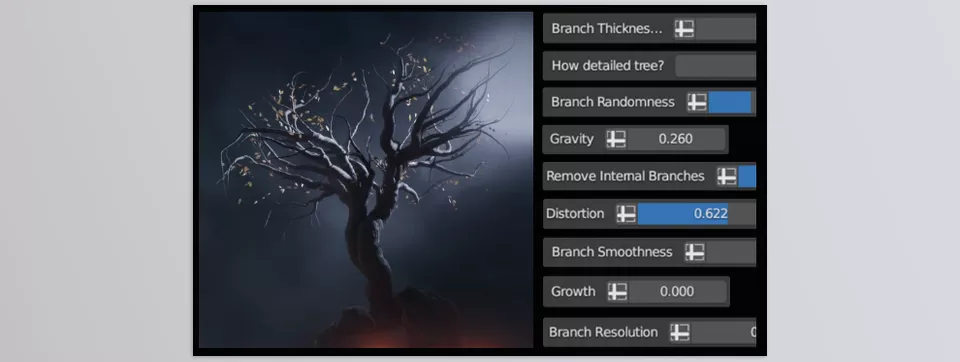
- Complete control: Trunk, branches, overall tree shape, leaf density, and angle… everything is adjustable to your vision
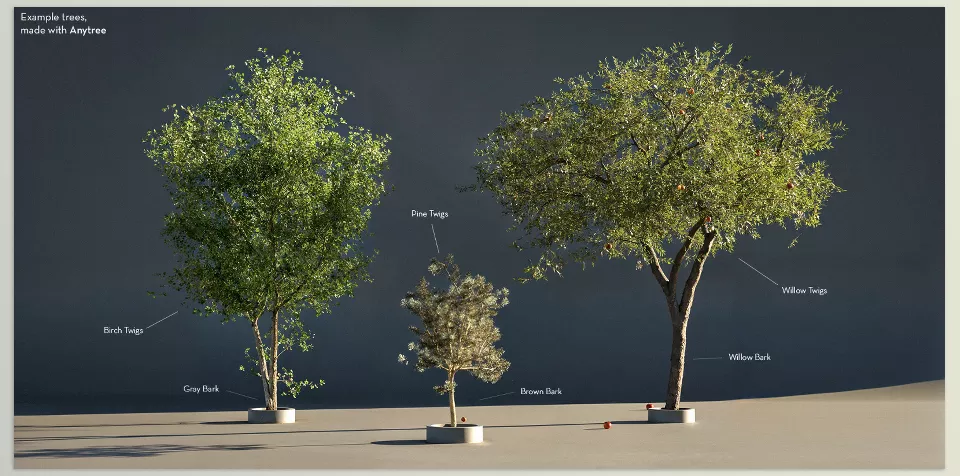
- One-click leaf addition: Over 40 types of branches and leaves modeled from real samples. Just click, and the tree is full of details
- Automatic materials and UVs: No more hours of UV mapping or material creation. The tree is ready to render or simulate immediately
- Rigging and simulation-ready output: Trunks and leaves are separate, allowing wind effects or animation movement
- Blender-specific addon: Tree management and parameter changes are simple and fast, no manual appending or duplicating required
A Real Example
Imagine you want to create a small forest for an animation scene. Previously, you’d have to spend hours on every branch and leaf, UVs, materials, and countless trial-and-error adjustments. With Anytree, you have a natural forest ready in minutes, letting you focus on lighting, camera movement, or overall scene composition.
Similarly, if you want to create a fantasy tree with unusual leaves, you no longer need hours of manual modeling and distribution. You design the general shape, and the rest is automatically generated, giving a natural, ready-to-use result.
Anytree is a professional assistant that handles the tedious part, letting you focus on creativity and scene composition. Projects become faster, more appealing, and realistic, without spending hours on details.
Pro Techniques and Tips for Natural Trees
When working with Anytree, a few simple tricks can make your trees look much more natural and attractive. These tips help you get the most out of the tool and achieve professional results.
1. Start with a Simple Shape
Begin by modeling only the general trunk and branch shapes. Don’t worry about excessive details; leaves and secondary branches come later. This approach makes controlling the overall tree shape easier, and if you need to change it, you won’t have to redo all the details.
2. Adjust Parameters
Anytree offers numerous parameters for branches and leaves. By adjusting branch angles, leaf density, and branch lengths, you can make the tree completely natural. Even small changes, like slightly bent branches or asymmetrical leaf distribution, make the tree look alive and realistic.
3. Use Materials
Anytree’s ready-made materials help trees reflect realistic light and color. Combining multiple materials for trunks and leaves adds variety and detail. You can also tweak colors or add textures to make each tree unique.
4. Combine Multiple Trees
For large scenes, like forests or gardens, use several tree models and slightly adjust each one’s parameters. This makes the scene look natural and lively, avoiding repetitive patterns.
5. Small but Important Tips
- Always place branches and leaves asymmetrically; nature is never perfectly symmetrical
- Add slight variations in leaf size and angle for a more realistic effect
- If animating or applying wind, keep trunks and leaves separate for easier control
💡 Following these simple tricks, even the simplest Anytree trees can look completely realistic and attractive without spending hours on details.
Your Time Is Valuable
Ultimately, the key point is that your time is valuable, and there’s no need to spend hours on tedious tree details. With Anytree, you can create trees and natural environments without draining your energy and motivation. Everything is quickly ready, yet you still have full control over the tree shape and details.
This tool also ensures your projects look lively and engaging. Branches, leaves, and overall tree shapes are natural and realistic, and even complex scenes can be executed with a few clicks. You can focus more on creativity, lighting, and scene movement, and spend less time on repetitive, time-consuming tasks.
In short, Anytree is your personal professional assistant: it speeds up your workload, enhances the quality and realism of your projects, and frees up valuable time and energy for creative and meaningful endeavors. With a little time to get used to it and basic suggestions, even the most complicated scenes can be done more easily and quickly.
Understanding Blender’s tools is the key to creating high-quality 3D projects. Our complete guide about Blender Tools provides comprehensive coverage of every tool and demonstrates how to use them efficiently in actual workflows.



