


🎛 When Your Model Still Looks “Low-Detail”
Ever heard of the Random Flow? After spending hours on a project, the final output comes out blank and basic, without any details or lines on the surface. Everything is smoothed over without any realism to the textures. It feels as though without some sort of intervention, it will never be truly realistic enough. What more could be done to turn your basic volume into an industrial sci-fi masterpiece?
Adding these details manually can take hours; you have to repeatedly extrude, boolean, or cut just to give the surface a bit of depth and variation. That’s why many designers look for a faster, smarter way to automatically generate mechanical and random details that bring their model to life.
But what if you could get all of that details to come up on it’s own? What if, with just a few button pushes, your perfectly modeled surface starts to “grow”: panels, wires, small indentations start appearing one by one like the model knows how to be realistic?

🧩 Random Details: The Secret to Realism in Industrial and Sci-Fi Design
In 3D design, especially in Hard Surface and Sci-Fi styles, what makes models feel alive and believable are the details. Tiny lines, panels, cables, and screws make a spaceship, robot, or industrial structure not only look precise but also convey a sense of function and scale. Without these details, even the most accurate designs can appear overly clean and artificial, failing to draw the viewer’s eye to the model’s surface.
Tangible Examples
These details appear in various places, each with its own function and story:
- Spaceships: Hulls with hundreds of small panels and uneven cuts that convey complexity and advanced technology.
- Futuristic Cities: Towers and buildings with scattered lights, antennas, and turrets protruding from surfaces, creating a sense of urban life and busyness.
- Machines and Robots: Lines, screws, and cables that suggest mechanical function, making the model more believable.
Principles of Random Design
The secret of realism in these details lies in Controlled Randomization. Designers allow disorder to occur within a logical framework, so details appear natural yet still follow design rules. This balance between order and randomness brings life and personality to the model, making the viewer subconsciously believe that the structure truly exists.
Ultimately, it’s these details that transform sci-fi and industrial models from simple, dry surfaces into worlds full of motion, function, and appeal. Without them, a model that took hours to create can still feel empty and lifeless; with them, even the smallest surface tells a story.
🔧 Traditional Methods in Blender: When You Have to Build Everything by Hand
Blender offers powerful 3D modeling tools capable of creating most details. Tools like Inset, Extrude, Bevel, Knife, and various Modifiers let you design simple surfaces with initial cuts and extrusions. Even Geometry Nodes provide flexible, parametric options for generating details and managing complex processes non-destructively.
Challenges of Traditional Methods
However, when it comes to industrial or highly detailed sci-fi models, limitations become clear:
- Every detail must be manually selected and extruded.
- Small combinations and cuts require repeated testing and adjustments.
- Creating variation and a sense of randomness without excessive repetition is nearly impossible.
- Even in Geometry Nodes, complex node setups and logic must be designed and fine-tuned to achieve the desired result.
In the end, traditional methods are often time-consuming and trial-and-error heavy. Achieving a highly detailed surface that feels fresh and naturally chaotic is challenging. Even for professional designers, generating variety and realism often requires hours or days of meticulous, repetitive work, and the final result may still lack the lifelike complexity that makes industrial and sci-fi models captivating.
⚙️ Professional Tools: When Details Appear on Their Own
In the world of industrial and sci-fi design, achieving highly detailed models with traditional methods is always challenging. This is where professional tools like Random Flow come in, making the design process faster and more creative. These tools not only speed up your workflow but also allow you to generate details that feel natural and random, without spending hours on manual extrusion and adjustment.
Main Uses and Features
Professional tools can include:
- Sci-Fi Panels and Cuts: Generate detailed surfaces with random but organized patterns.
- Pipes and Cables: Create natural, curved cables and complex paths without manual setup.
- Mechanical Components and Screws: Add screws, flanges, and connectors to convey industrial function.
- Non-Destructive, Parametric Control: Modify details after application and quickly test changes without harming the original model.
- Combining Multiple Effects Simultaneously: Add depth and complexity by layering panels, pipes, and cables in one step.
Tangible Examples
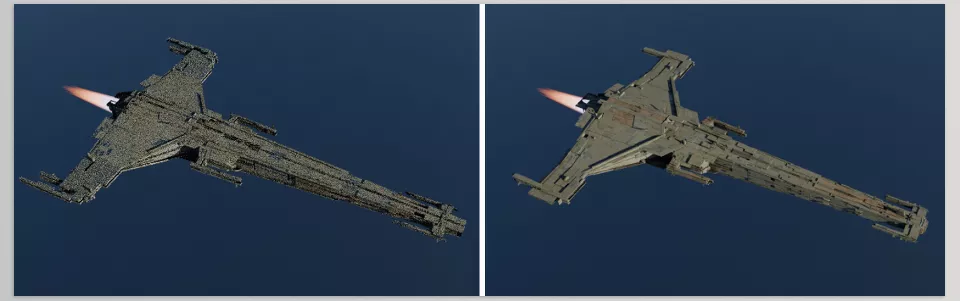
Imagine you have a simple spaceship hull. With these tools, you can:
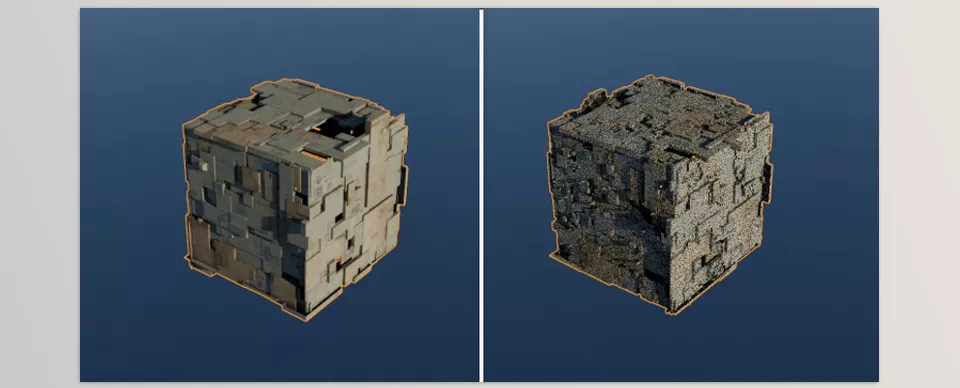
- Create random panels and cuts on the surface.
- Place internal and external cables and pipes along complex paths.
- Add screws and flanges to key areas of the hull.
All of this is done in just a few clicks, producing a model that looks both realistic and highly detailed.
Real Impact on Design
Professional tools like Random Flow allow designers to focus on creativity and the overall form of the model, rather than repetitive detail work. The result is a model that is not only beautiful and complex but also conveys function, scale, and story—ready for use in concept art, games, or films.
🛠 Techniques and Pro Tips: Creating Natural, Realistic Details
Even with professional tools like Random Flow, using details correctly requires following a few key techniques to achieve natural and believable results. These techniques ensure your model appears complex while maintaining realism and functional impression.
- Controlled Randomness
- Avoid placing identical details uniformly; small variations in size, angle, or position make the model appear more natural.
- Combining regular and random patterns creates an engineered yet lively feel.
- Detail Layering
- Layer panels, cables, and grooves on top of each other.
- Layering adds depth to the model’s surface and guides the viewer’s eye.
- Smart Use of Ready-Made Tools
- If the tool allows parametric changes, create multiple test versions and select the best arrangement.
- Combine scatter or random extrusion features to give each surface a fresh, unique appearance.
- Focus on Key Areas
- Concentrate details on sections that draw the viewer’s attention.
- Keep secondary areas simple to maintain focus and avoid overwhelming the eye.
- Combine with Lighting and Materials
- Details look more realistic when harmonized with lighting and materials.
- Lines and grooves cast shadows, making even a simple model appear detailed and deep.
By following these techniques, even intermediate users can create models that are fast to produce, visually appealing, and convincingly realistic. These techniques maximize the impact of professional tools like Random Flow, ensuring consistently impressive results.
✨ When Details Come to Life
Ultimately, it’s the realistic details that transform a primitive 3D model into something lively and engaging. Yes, panels, wires, grooves, and bolts—but these are the things that make spaceships, robots, and industrial factories believable and engaging to an observer.
Older methods of implementation work but can take forever—or not yield the naturally randomized aesthetic. Manual work can sometimes make things believable, but it can take forever. Professional applications like Random Flow allow you to spend less time on busy work while still creating diversified, interesting details on the fly while simultaneously rendering your focus and creativity on the main form.
Therefore, even the most basic of models can become well-detailed, believable, and engaging to watch as they catch the eye and tell stories of personality. Random Flow is a surefire way to integrate life into your models without wasting hours on tedious application.
If you’re ready to elevate your Blender skills and explore every tool the software has to offer, don’t miss our detailed guide about Blender Tools, packed with explanations, practical tips, and professional insights.



