


Why Do Backgrounds Always Look Dry and Lifeless?
Do you know much about the Cam Fx? You know, when we work on 3D scenes, we always want our subject to shine and capture all the attention. That’s why we usually blur the background a bit to keep the focus on the subject. But most of the time, this blur ends up looking uniform and lifeless, like a neutral photo with no particular mood.
Imagine you’re creating a night scene, with city lights behind your subject. But the blur behind them is flat and lifeless — no softness, no movement, no depth. Where does the viewer’s eye go? They feel that everything is artificial.
Fortunately, there are now tools that can solve this problem and give you full control over blur shapes and light effects. With them, you can make your scenes more cinematic, engaging, and alive without spending hours on fine details.

What is Bokeh and Why is it Useful?
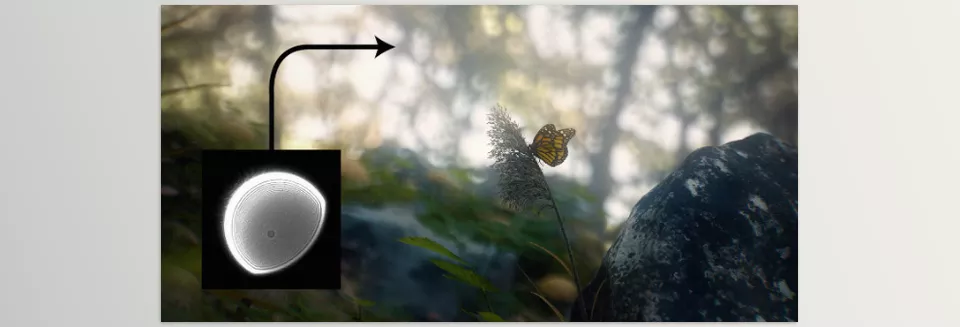
Bokeh is the attractive blur you see behind subjects in professional photos and films. When used correctly, it keeps the viewer’s eyes exactly on what matters while giving the whole scene a sense of depth and dimension.
A tangible example: Imagine a light in the background. When the bokeh is done right, that light appears as soft, dreamy circles, not as a dry, uniform glow. Even if the scene is busy, the viewer’s eye naturally stays on the main subject, and the scene feels realistic.
Why is it beneficial?
- Makes scenes cinematic and visually appealing, as if captured with a real camera.
- Moves your work out of a digital/artificial look, adding life and movement.
- Lets you play with lights and backgrounds to add a unique, distinct feel to your scene.
In simple terms: Bokeh is like a small visual magic trick that makes scenes look alive, attractive, and professional without complicated work.
How to Create Bokeh Without an Add-on
In Blender, you can create a bokeh effect using Depth of Field (DOF). This involves adjusting focal distance and f-stop to blur the background slightly. But in reality, using only the default tools has some noticeable problems:
- Uniform and characterless: Blender’s default bokeh often looks flat and uniform, with no creativity or personality.
- Limited shapes: You can’t give background lights a unique or creative shape. Circles or simple hexagons are all you get.
- Forget natural details: Adding dust, lens flares, or other realistic effects is time-consuming and usually requires manual masking and Photoshop.
- Hard to control: Any change requires trial and error, and precise control over bokeh is limited and tedious.
In short, Blender’s default tools get the job done, but the results often feel artificial and dry, lacking the cinematic, natural vibe you want.
Cam FX: When Bokeh Comes to Life
Here’s where things change: Cam FX. This professional add-on makes bokeh not just a dry effect, but a real personality in your scene. No more spending hours trying to create a simple, artificial blur with Blender’s default DOF.
What does it do?
Cam Fx offers a lot of features that bring your renders from flat to lively:
Ready-to-use and Customizable Bokeh:
- 120 presets for classic and fantasy bokeh.
- Create custom shapes: hearts, snowflakes, musical notes, or even your own logos and designs.
- Full control over size, shape, and distribution of bokeh.
Lens Dirt and Dust:
- Add natural details like dust on the lens or light streaks to make scenes look more realistic.
- Lights and bokeh no longer look uniform and artificial; it’s like a real camera was behind the scene.
Full Parameter Control:
- Adjust intensity, color, shape, distribution, and blur amount.
- Give each scene the mood you want, from dark and romantic to bright and vibrant.
Real Cinematic Feel:
- Bokeh appears non-uniform, natural, and lively.
- Each light and background glow has its own character, creating movement and depth.
- Even busy scenes remain readable, with the viewer’s eye naturally on the subject.
Unlimited Creative Freedom:
- Play with bokeh, create unique effects, and add artistic ideas to your scene.
- Anything in your mind can be implemented with a few clicks — no masks or Photoshop needed.
A tangible example:
Imagine a night scene with city lights behind your subject. With Blender’s default tools, the blur is flat and lifeless. But with Cam Fx:
- Lights blur softly and dreamily, each with its own character.
- The subject stands out, and the viewer’s eye stays exactly on it.
- The background breathes, giving the whole scene a real cinematic feel, as if captured with a professional camera.
With Cam Fx, bokeh is no longer just an effect — it’s a tool for control, creativity, and realism. Every project benefits, making even simple scenes cinematic and engaging without spending hours on details.

Pro Tips for Natural, Professional Results
Now that you know how Cam Fx brings bokeh to life, here are key tips to make your work look even more natural and professional:
- Choose the right lens and f-stop:
Use a lens with a long focal length (80mm or more) and a low f-stop (between 0.1 and 2). This makes bokeh soft, realistic, and gives a strong sense of depth. - Use custom bokeh for prominent lights:
Highlight lights, background glows, or special scene lights with custom bokeh. This keeps the background lively and keeps the viewer focused on the subject. - Combine bokeh with lens dirt:
Add some dust or smudges to the lens. This combination makes the scene look natural and non-uniform, creating a true cinematic feel without hours of tweaking. - Small details, big impact:
Adjust bokeh intensity, distribution, light angle, or color slightly — small changes can dramatically transform the scene. - Handle busy scenes effortlessly:
Cam Fx gives you control over every bokeh and light, even in complex, detailed scenes. The result? Clean, readable, fully cinematic shots without extra hassle.
Why This Tool is Worth It
Proper bokeh can take 3D scenes from dry and artificial to deep and realistic. When the background breathes and lights are natural, the viewer’s focus naturally stays on the subject, making the image much more engaging.
Cam Fx does this quickly and easily. No more struggling for hours with Blender’s default settings or hunting for masks and extra effects. With a few clicks, you can control bokeh shape, intensity, and color, and even add lens dust to make the scene feel alive.
With Cam Fx, ordinary renders become cinematic and engaging. Even simple projects can instantly feel professional. Try it now and see how every scene you create gains a lively, realistic vibe!
If your goal is to become a confident Blender user, our comprehensive Blender Tools guide covers all the tools, explains their practical applications, and gives you the insight you need to use them creatively and efficiently.



