


When Scenes Get Heavy, and Creativity Falls Behind
Are you familiar with using the Erindale Toolkit? Have you ever been animating or doing motion graphics, and everything is going well—at first—and then after a couple of objects and details, you start to experience lag? Each adjustment requires a delay measured in seconds, and each render distracts you from staying in the zone.
A scene that was initially simple and lightweight gradually fills up with repetitions, effects, and elements of all sizes. Instead of having the freedom to experiment with ideas, you constantly find yourself deciding which parts to disable or where to simplify things just to keep the scene manageable.
Little by little, you start censoring yourself. Ideas that could have made the scene more engaging are set aside, simply because you know adding them means a heavier project and more complications. This happens very quietly, but its impact is clearly visible in the final quality of the work.
In situations like this, many designers realize that the problem isn’t their creativity or skill. The problem lies in tools that were built for simple projects and stop keeping up once the scene becomes serious.

What Is the Core Idea Behind These Tools?
The idea is very simple: Instead of building everything manually, repetitively, and through trial and error, we let intelligent systems handle part of the decision-making process.
This allows the designer to focus on ideas, composition, and the overall feel of the scene, rather than getting stuck with tedious details.
These types of tools help by:
- Automatically creating large numbers of objects
Without manual duplication, hundreds or even thousands of objects can be distributed throughout a scene with controlled order, spacing, and variation—something that is both time-consuming and error-prone when done manually. - Using details only where they are actually visible
Objects close to the camera are shown at high quality, while those farther away are automatically simplified or completely excluded from calculations—without the viewer noticing. - Making major changes without breaking the entire scene
If you decide to change the layout, increase the number of objects, or modify the overall form of the scene, there’s no need to rebuild everything from scratch. Changes are applied in a controlled, chain-based way.
In practice, this approach turns the creation of scenes like large cities, dense forests, or complex motion graphics from something intimidating and heavy into a controllable, lightweight, and flexible process.
How Do We Work Without These Tools? (Traditional Methods)
When professional helper tools are not available, the workflow usually becomes manual and step-by-step. This means the designer has to control everything themselves and find temporary solutions for every problem.
Without these tools, we usually:
- Manually duplicate objects
To create large numbers of objects, we constantly copy, rotate, move, and scale them. This process is time-consuming, and every new change often requires starting over again. - Permanently simplify models
To keep the scene lighter, we reduce model details—but this is not reversible. If higher quality is needed later, rebuilding from scratch is often the only option. - Manually toggle objects on and off to keep scenes lightweight
Some objects are hidden, others are disabled, and we constantly switch between different states—breaking focus and interrupting the creative flow. - Manually manage distance and detail
Deciding which object should be shown at what quality is done entirely by hand. Camera distance, viewing angle, and visual importance must constantly be checked and adjusted.
These methods eventually work, but:
- They are time-consuming
A large portion of time is spent on repetitive tasks and manual fixes. - They lack flexibility
Every major change triggers a chain of new adjustments. - They become exhausting and error-prone for large projects
The bigger the scene gets, the harder it becomes to stay in control and avoid mistakes.
Introducing Erindale Toolkit | A Lifesaver for Crowded Scenes
Erindale Toolkit is a professional Blender add-on that helps you build complex and crowded scenes quickly, smoothly, and without performance issues.
Its goal is simple: let designers focus on creativity, not on managing thousands of objects and tiny details.
Why Does This Tool Make Work Easier?
1. Intelligent Scene Optimization
Only objects inside the camera’s view are processed. Distant or unnecessary objects are simplified or disabled without harming the final visual result.
This keeps heavy, detail-rich scenes responsive and fully editable.
2. Easy Creation of Massive Numbers of Objects
Need thousands of trees, lights, chairs, or people in a scene? Without manual duplication or hassle, everything is distributed automatically with order and variation.
This is especially powerful for city building, dense forests, crowds, and complex motion graphics.
3. Precise Control Over Shape and Movement
With tools for bending, twisting, and deforming objects, you can create natural and precise motion paths.
Features like moving along curves, rotation, and directional control give you full authority over form and trajectory.
4. Professional Helper Tools
Ready-made nodes for UVs, mesh fixes, masking, smart selection, and deformation make working on complex details fast and efficient.
For example, geometry issues can be fixed in just a few clicks, or motion paths can be adjusted without breaking the scene.
5. Advanced and Professional Features
Erindale Toolkit also includes powerful advanced tools:
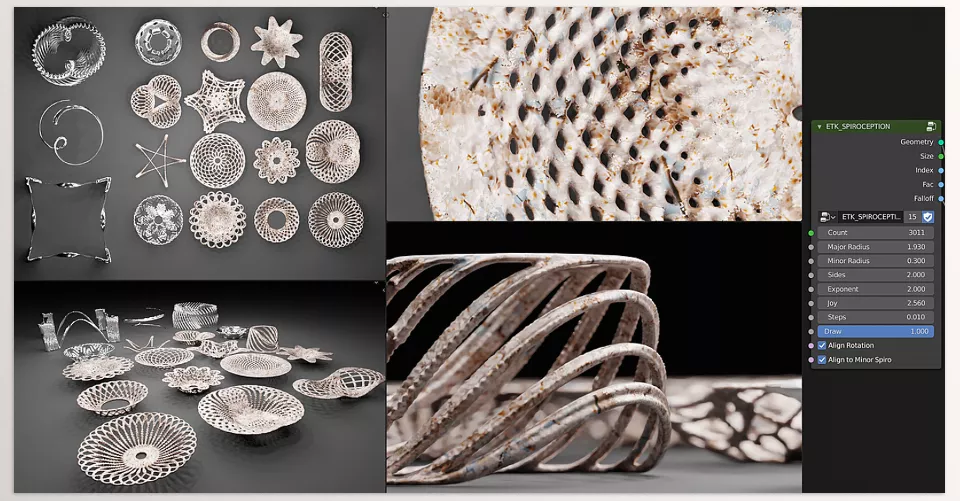
- Mesh-to-volume conversion, complex shape creation, volume-based object distribution, collision checks, and real-time field visualization
- Group and collection management, precise object placement and orientation, and tools similar to other specialized Blender add-ons
- Smart masks and selections for editing, material assignment, and detail adjustments—without spending hours
With the Erindale Toolkit, you can build heavy, detailed, and crowded scenes in a lightweight and fully controllable way.
Not only does your workflow become faster, but you can also dedicate all your energy and focus to creativity.
Whether for motion graphics, architectural visualization, or large animation projects, this tool can genuinely make your professional workflow easier and more efficient.
Practical Tips and Techniques for Getting the Most Out of Erindale Toolkit
Every professional tool shows its true value when you know when and how to use it. Erindale Toolkit works like a smart assistant that takes repetitive and difficult tasks off the designer’s shoulders.
1. Best Time to Use It
Erindale Toolkit has the greatest impact when scenes become crowded and complex. The more objects and details you have, the more valuable the tool becomes. Plan ahead before the scene gets too heavy to avoid performance issues later.
2. Optimizing the Camera for Cinematic Shots
One of the strongest features is camera view control and Camera Culling. Objects that are not visible are not processed, significantly lightening the scene.
For cinematic shots, careful camera distance and angle setup make a major difference in both performance and visual quality.
3. Managing Distant Details
LOD and detail reduction for distant objects should remain invisible to the viewer. Transitions must be subtle and natural so the scene stays realistic—especially in large environments like forests, cities, or crowd scenes.
4. Using Paths in Motion Graphics
Tools like Move Along Curve and Curve Deform allow animated objects to follow precise and natural paths.
This creates smoother, more appealing motion and removes stiffness, especially in motion graphics and complex animations.
5. Let Go of Repetitive Tasks
The greatest value of the Erindale Toolkit is removing repetitive and time-consuming work. Duplication, manual optimization, detail control, and object distribution are handled automatically—freeing you to focus on ideas and creativity.
Final Summary | A Tool for Power, Not for Starting Out
Erindale Toolkit is not a tool for learning Blender from scratch. It is built for artists whose projects have become larger, more serious, and more complex—and who need full control without slowing down the software.
With intelligent object processing, LOD, and Camera Culling, crowded scenes remain fast and controllable without sacrificing quality.
By automating repetitive tasks like duplication, mesh simplification, and distant detail management, Erindale Toolkit keeps your focus where it belongs: on ideas, composition, and motion.
If you work with crowded scenes, complex motion graphics, or large-scale projects, Erindale Toolkit can make a real difference—acting like a professional assistant that keeps your scenes beautiful, lightweight, and fully controllable without limiting your creativity.
Take your Blender expertise to the next level with our complete Blender Tools guide, where every tool is broken down in detail and accompanied by real project applications to help you learn both theory and practice.



