


Bring Nature to Life in Your Projects!
Have you ever utilized the Tree Vegetation Addon? Even the most professional animator acknowledges the severity of constructing a forest, garden, or even just a park as incredibly difficult and complicated. Each tree, each bush, each leaf must be properly sculpted, and textured—and then if you want it to move… well, that’s a whole different issue.
Then there are seasons. You want the fall foliage? The leaves have to be a different color, then there’s falling leaves, bare branches, light, and shadows reflecting through the environment. Or winter, where there are no leaves at all, but there’s snow on the branches, and the trunks come off as wet and muddy. We’re talking about details that take DAYS (if not weeks) of tedious work!
But why do that when you can have an entirely natural, animated forest/garden in no time at all? A realism that’s seemingly thrown together in a matter of no time?

Traditional Methods: More Work, More Limitations
Before professional tools and smart add-ons arrived, designers and animators had to build almost everything from scratch. That means:
- Manual modeling of trees and plants: Every tree, bush, and even each leaf had to be created individually. Building a forest meant repeating this process for dozens or hundreds of trees.
- Importing pre-made models: Even when you found ready-made models, you still had to manually adjust them in the scene, correct their scale, align their angles, and match them with the environment.
- Texturing and detailing: Textures, moss, soil, and details on trunks or leaves were often created separately, and adding them to the models was extra, time-consuming work.
- Animating branches and leaves: To achieve natural movement in the wind or seasonal changes, each branch and leaf had to be animated individually.
- Seasonal changes and forest variety: For autumn, winter, or spring, you had to create multiple versions of each tree or manually copy and adjust them to create diversity.
The result? Projects were time-consuming, tedious, full of repetitive details, and often appeared unnatural. Even ready-made models had limitations; all the trees and plants looked very similar, making forests feel repetitive rather than truly alive.
A Professional Add-on for Digital Forests
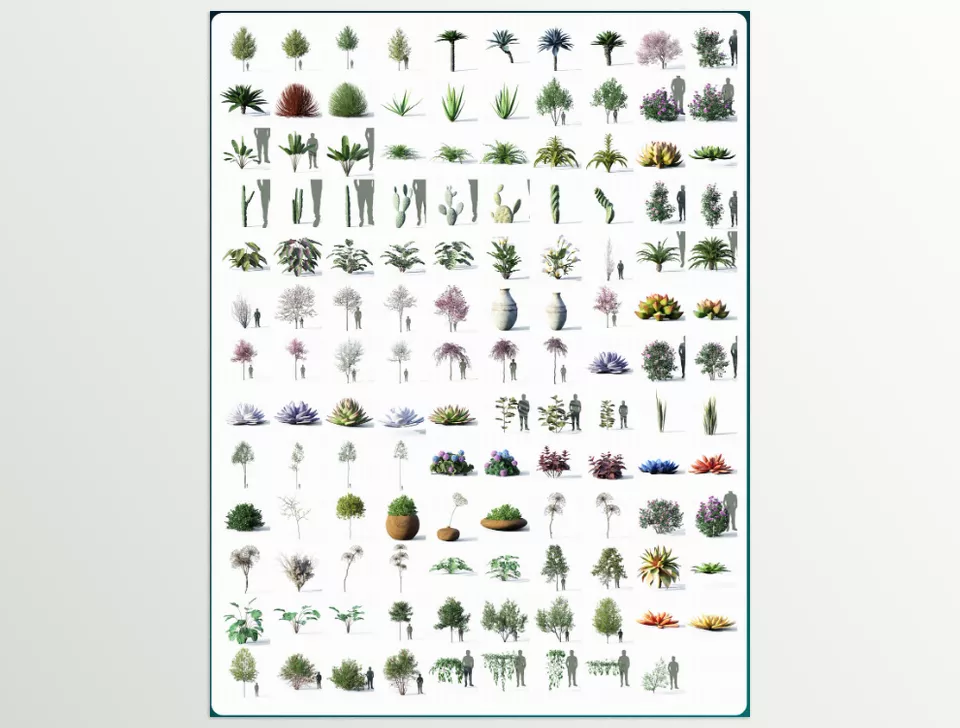
This is where Tree Vegetation comes in! This professional Blender add-on comes with a vast library of trees, bushes, ornamental plants, and even rocks, making it extremely easy and fast to work with.
With this add-on, you no longer need to spend hours modeling and manually adjusting every tree and plant. A few simple clicks, and your scene comes alive and looks realistic.

Why Tree Vegetation Is Exciting
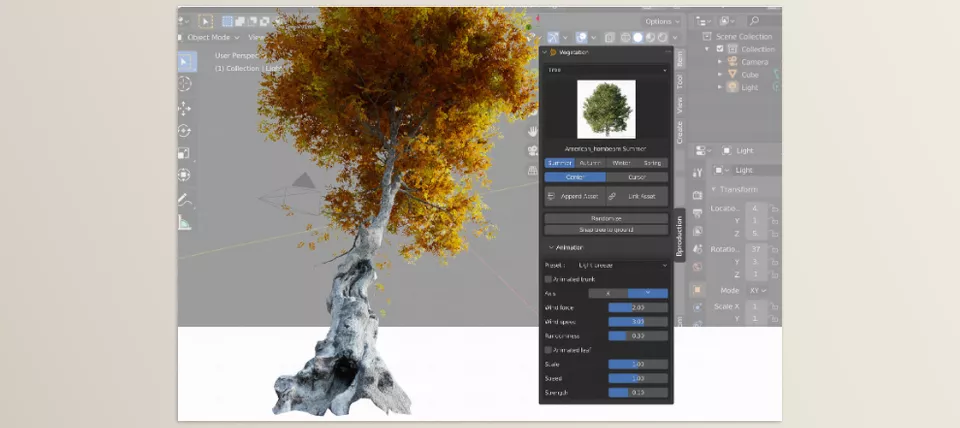
- Natural branch and leaf movement: Leaves and branches move with the wind easily, with just a few clicks.
- Four seasons of the year: See trees and plants lush in summer, colorful in autumn, snowy in winter, or fresh in spring.
- Unlimited variety: Each plant you add to the scene has a slightly different shape, color, and size. One tree model can create an entire realistic forest where no two trees are identical!
- Moss and soil on trees and rocks: Add natural details like moss, soil, or even snow to trunks and rocks for truly lively scenes.
- Compatible with GeoScatter and Asset Browser: Build large forests or environments without worrying about optimization.
A real example: With one tree model and this add-on, you can create a complete forest where:
- Every tree has a different color and shape.
- Leaves and branches move naturally in the wind.
- Seasonal changes are applied to each tree.
And the best part? All of this is ready in just a few minutes, not weeks of manual work! Tree Vegetation Addon is like a wizard that makes all the complex natural details of a living environment easy and accessible.
Professional Tips for More Natural Scenes
Want your scenes to look truly alive and realistic? A few simple but key tips can make all the difference:
- Use Random Season: This option gives immense freedom! Each tree has its own colors and appearance, so even in a forest, no two trees look identical. This ensures a natural and diverse look.
- Add moss and soil on trees and rocks: Applying a bit of moss or soil on trunks and rocks prevents the scene from appearing uniform or artificial. You can adjust their size, direction, and amount for a more natural effect. Even adding a little snow or moisture enhances realism.
- Adjust wind and leaf movement: In animations, you can easily control wind strength and the speed of leaf and branch movement. A few seconds of variation can make the scene look fully natural and alive.
- Small details, big impact: Simple touches like color variation in trees, moss on trunks, or natural leaf movement can be the difference between a good digital forest and a truly stunning professional one.
By following these tips, your scenes will not only look more natural and engaging but also convey a genuine sense of realism to viewers.
Why the Experience Is Worth It
With Tree Vegetation, natural settings are no longer tedious and exhaustingly time-consuming. Gone are the days when you manually model tree by tree, bush by bush, leaf by leaf. With a click, the forest, the garden, and the natural setting emerge.
In addition, even seasonal transitions and realistic wind and leaf textures are no longer frustrating. You can set your scenes in the summertime green, the autumnal reds and oranges, even the winter white, without having to create different iterations or manually adjusting for hours. Your settings will always look dynamic, diverse, and realistic.
Ultimately, the Tree Vegetation plug-in makes your work come alive and appear professional. All the little realistic details—from moss to trunk to the way leaves rustle in the wind to the cumulative and variegated growth between trees—make any project you work on appear as though an audience-ready quality was constructed with maximum effort for maximum audience appeal with minimal effort!
Take control of Blender and streamline your workflow with our comprehensive Blender Tools guide, which explains every feature, shares expert techniques, and shows how to apply them in real-world scenarios.



