


Nature, Life, Scenes!
Have you ever checked out what the Grassblade Addon can do? We all know how exhausting it can be to create a realistic, natural environment. Imagine a vast meadow with wildflowers, bushes, and scattered rocks—each bush must be in its place, every rock aligned with the ground and lighting, and even the grass should change color with the seasons. Just imagining it now makes you feel like you’ll need hours to get everything right!
Now, if the scene is large and you try to place all of this manually… the viewport slows down, every small change takes a lot of time, and sometimes it feels like everything is out of your control! Even when you just want to tweak the grass composition slightly, you might have to rearrange everything or adjust the shaders again.
But don’t worry! There’s always a simpler and faster way to bring nature to life in your projects, saving you time while making your scenes realistic and vibrant. A method that lets you place grass, flowers, and bushes with a single click and breathe life into your environment. I’ll introduce this magical solution later so you can see how much easier and more enjoyable your work can become.

Why Blender Alone Isn’t Enough
When building a natural environment, Blender provides tools like the Particle System and Geometry Nodes. These tools allow you to scatter grass, flowers, rocks, and bushes across surfaces and create a natural appearance. But in reality, using these tools—especially for large and complex scenes—can be very time-consuming and exhausting.
- Manual Scattering: You have to specify the exact position, density, and rotation of every plant or rock, ensuring everything looks natural. Even a small change in the grass or adding a few new bushes can take hours.
- Shader and Material Editing: If you want to change the season or add moss and soil, you need to adjust the shader of each plant or rock individually, which is extremely time-consuming and tedious.
- Heavy Scene Management: With thousands of plants and natural elements, the viewport slows down, and every small adjustment feels like a strain on your system.
You can create natural scenes with Blender alone, but the process is time-consuming, complex, and full of technical challenges. Achieving professional results requires extensive experience with Particle Systems and Geometry Nodes, which is why many look for a faster, easier solution.
Grassblade: Ready-Made, Photorealistic Nature with Just a Few Clicks
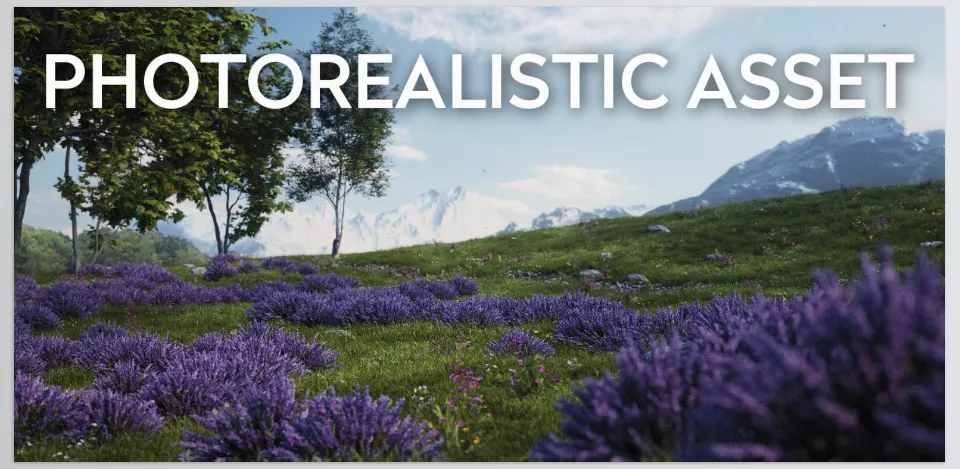
Grassblade is a professional add-on that lets you create nature quickly and realistically without spending hours on manual scattering or shader adjustments. It’s designed for those seeking high quality, speed, and full flexibility—perfect for Archviz, motion graphics, or animation projects.
Key Features:
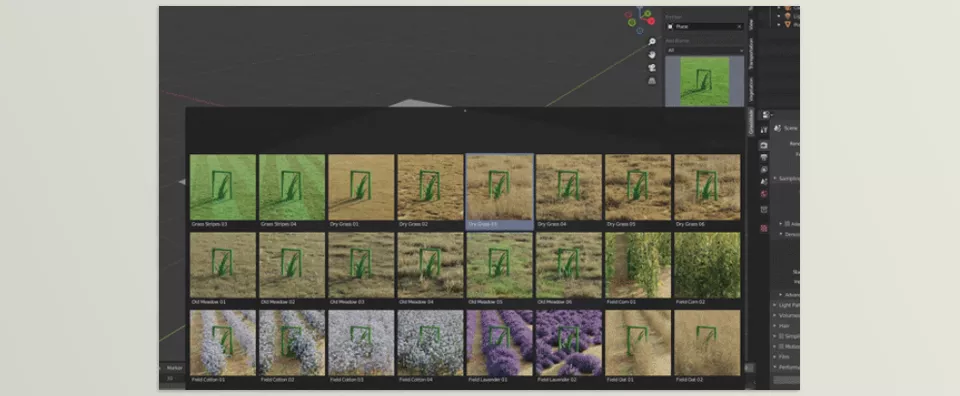
- 550+ Realistic Assets
Includes various grasses, wildflowers, bushes, rocks, dry leaves, mushrooms, and other natural elements. All assets are carefully created from photo-scans with PBR materials to look perfectly natural in any lighting condition. - 204 Adjustable Biomes
Each biome acts like a mini-ecosystem that you can fill with a single click and customize as needed. Density, size, rotation, height, and even element color are fully adjustable. - Proxy System for Heavy Scenes
When working with thousands of plants and natural elements, Grassblade uses a proxy system to keep the viewport smooth while delivering full-quality final renders. - Shader Customization & Seasonal Changes
Easily add soil and moss, match plant colors and textures to seasons, adjust grass height, or even create short/long grass for English lawns, wild meadows, or urban gardens. - Cycles & Eevee Compatible
All assets and materials are ready for use in both render engines, ensuring fully realistic and stunning results. - Vertex Paint for Quick Customization
Want parts of your scene to look different? Use vertex paint to color and customize regions effortlessly. - Ready for Asset Browser (Pro Version)
All assets are ready to install in the Asset Browser for quick, organized access, saving time for your creative work instead of searching.
Real-World Example:
Suppose you want to create a city park or a football field with English grass and decorative flowers. Without Grassblade, you’d have to scatter every blade of grass, flower, and bush manually, build shaders, and match lighting and colors—a process that could take hours.
With Grassblade, the same scene is ready in under 5 minutes! With just a few clicks, the entire natural environment is populated, allowing you to focus on lighting, composition, and artistic details.
Why Grassblade is a Professional Game-Changer
- Speed: Saves hours of work
- Quality: All assets and shaders are photorealistic
- Flexibility: Change season, height, color, and density without limits
- Ease: No manual scattering or complex node setups
Grassblade acts like a professional nature assistant, making natural scene creation fast, enjoyable, and realistic for both beginners and professionals.
Tips for a More Natural Environment
Now that you have Grassblade, here are some professional tips to make your environment not only realistic but also alive and natural. These tricks ensure every scene you create looks detailed and diverse, just like real nature:
- Use Random Seed Scattering
Changing the seed slightly moves the plants around to prevent uniformity, making grass, flowers, and bushes appear more natural and lively. - Adjust Biome Height and Density
By tweaking density and height, you can create environments from a short English lawn to a wild tall meadow. This simple technique makes scenes visually diverse and engaging. - Use Vertex Paint for Different Areas
If you want a path, road, or dry area to look different, vertex paint makes it easy to define regions, giving precise control over plant placement and colors without rearranging everything. - Adjust Shaders and Materials for Realism
Add moss, soil, or dry leaves to rocks and bushes, and match grass colors to the season. This multiplies realism and makes your scene look truly natural. - Keep Proxy Enabled for Heavy Scenes
When dealing with thousands of plants and natural elements, proxies keep the viewport smooth while showing all details in the final render. - Add Small Detail Variety
Use different bushes and flowers with varying sizes and angles. Even slight color or shadow changes in the grass enhance the sense of life. - Combine Biomes for Complex Environments
Combining several biomes (e.g., short grass + wild meadow + scattered rocks) makes scenes more like real nature, creating diverse, natural, and appealing environments with minimal effort.
Grassblade: Your New Best Friend for Natural Scenes
With Grassblade, you can create beautiful, realistic, and diverse natural environments in minutes—without spending hours on manual scattering, complex Geometry Nodes setups, or multiple shader builds. It acts as a professional nature assistant, making your scenes fast, precise, and visually stunning.
For anyone working in Archviz, motion graphics, animation, or nature-focused projects, Grassblade saves massive time and energy, letting you focus on creativity and artistic details rather than technical scattering issues.
With Grassblade, your scenes can become English lawns, wild meadows, lush fields, and even realistic urban gardens—delivering results that are both professional and enjoyable. This tool not only simplifies your workflow but also makes your scenes breathe and feel alive.
If you’re looking for a fast, fun, and photorealistic way to create natural environments in Blender, Grassblade is exactly what you need! Just try it and see the impact on your projects.
Understanding Blender’s tools is the key to creating high-quality 3D projects. Our complete guide provides comprehensive coverage of every tool and demonstrates how to use them efficiently in actual workflows. I highly recommend not missing it.



