

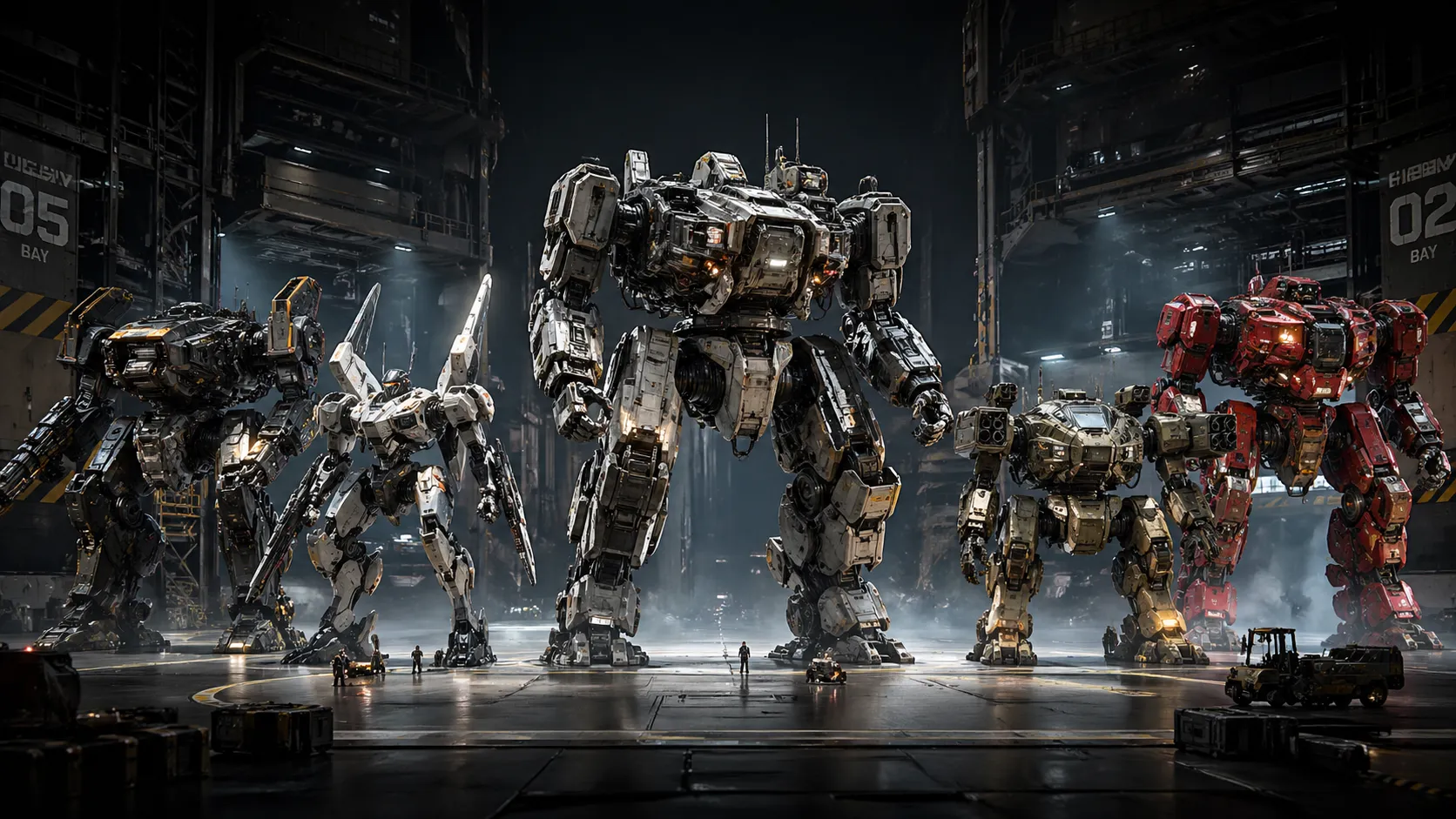
🤖 When You Have a Robot Idea, but Get Stuck in the Details…
Are you aware of the Mech Squad Collection? Have you ever wanted to design a combat robot or a professional Mech, but before even reaching its overall form, you got caught up in building its parts? From metal panels and armor to joints, cables, bolts, and countless tiny details that each need to be placed accurately and logically together. In practice, instead of focusing on creative design, most of your time goes into building these basic components.
The issue is that designing a Mech isn’t just a simple model; it’s a complex system made up of hundreds of mechanical parts that need to be both visually appealing and feel realistic. Especially when the work is meant for close-up renders, cinematic shots, or even games, you can’t just get away with simple models. Every part needs to be thoughtfully designed, and that means time, patience, and a high level of skill.
Now, if you want to test multiple designs or create different styles, it gets even harder. Because even a small change might mean redesigning a large portion of the model. This is where many ideas get stuck—before they even get a chance to be executed—right in this heavy stage of modeling and detailing.

⚙️ What Does Professional Robot Design Actually Mean?
When we talk about Mech or mechanical robot design, we’re not just referring to building a simple 3D model; we’re talking about a complex system of industrial parts that must be both visually convincing and technically functional. These models are usually made up of different components, each with a specific role, such as:
- Armor and metal panels
- Joints and moving connections
- Hydraulic and mechanical parts
- Cables and fine industrial details
All of these must be arranged logically and cohesively, not just for aesthetics.
Visually, this type of design must withstand close-up shots. That means when the camera gets very close, the details, quality, and cleanliness of the model must still hold up. This is where things like proper topology, high-quality textures, and precise surface design become important. In fact, these models aren’t just meant to be seen from a distance—they must be believable even in the details.
On the other hand, these models usually need to be poseable and capable of movement. That means joints must be properly defined, parts correctly connected, and the model should be able to change poses without breaking. This is especially important for projects like animation, games, or cinematic shots, because it allows you to reuse the same model in different situations and scenarios without rebuilding it from scratch.
🧰 How Far Can You Go Without Ready-Made Tools?
If you want to move forward using only default tools like Blender, it’s completely doable, but the path is a bit heavier. You’ll need to build the robot’s body yourself using Hard Surface Modeling, set up UVs, apply textures, and eventually rig it if needed. On top of that, if you want variation, you’ll have to manually combine different parts, which is time-consuming. This approach is very valuable for learning, but it usually takes a lot of time, and reaching cinematic quality—especially for close-up shots—requires a high level of experience.
🚀 Introducing a Faster Way: Mech Squad Collection
This is where ready-made tools really make sense. Mech Squad Collection is a professional package of 3D robot models that helps you skip building details from scratch and go straight to design and creativity. Rather than just being “ready-made models,” it’s actually a complete system for fast Mech design—something that can reduce your workflow from days to hours.
🤖 Ready-Made Robots (HERO Mechs)
One of the most important parts of this package is the HERO robots. These are highly detailed models that are essentially ready to use—you can even use them in your scenes without modification.
Their key features:
- Very fast posing (thanks to proper Pivot and Parenting)
- Can be separated into smaller parts
- Can be combined with each other
In practice, one robot becomes multiple new design resources.
🧩 Kitbash System (Build Unlimited Models)
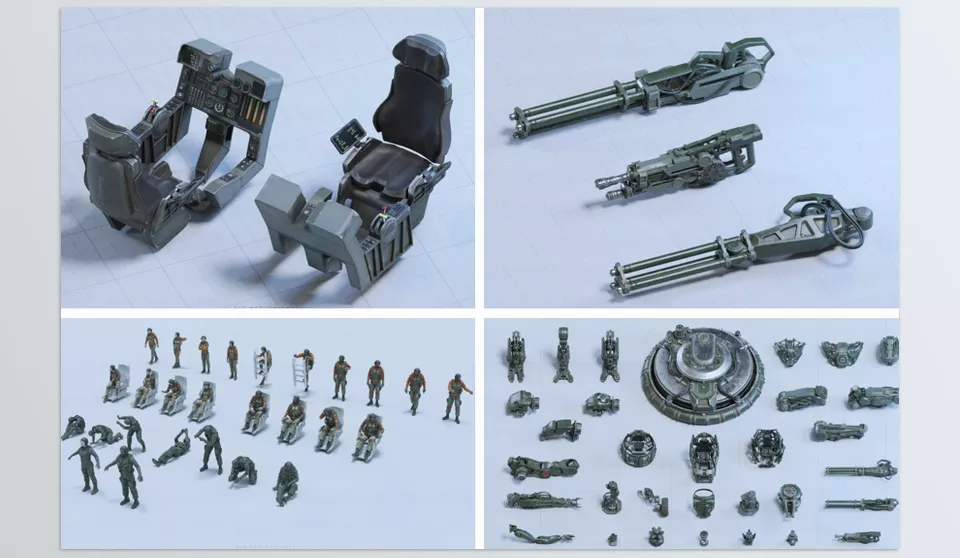
This package provides more than 170 modular parts designed for building new robots. These parts:
- Include small, medium, and large components
- All have standard UVs and textures
- Easily combine with each other
In addition, you also get 30+ Assembled Kits, which are pre-made combinations and can serve as a great starting point for fast design.
📌 Result?
You can quickly build anything from a small robot to a massive war machine.
👨🚀 Ready-Made Characters (Pilot)
This package isn’t just about robots—it also includes characters. These characters:
- Are fully rigged
- Include 25 ready-made poses
- Have high-quality textures (up to 4K)
- Are suitable for close-ups
They are also prepared for Mixamo, meaning you can easily bring them into animation.
🎨 Quick Color and Appearance Changes
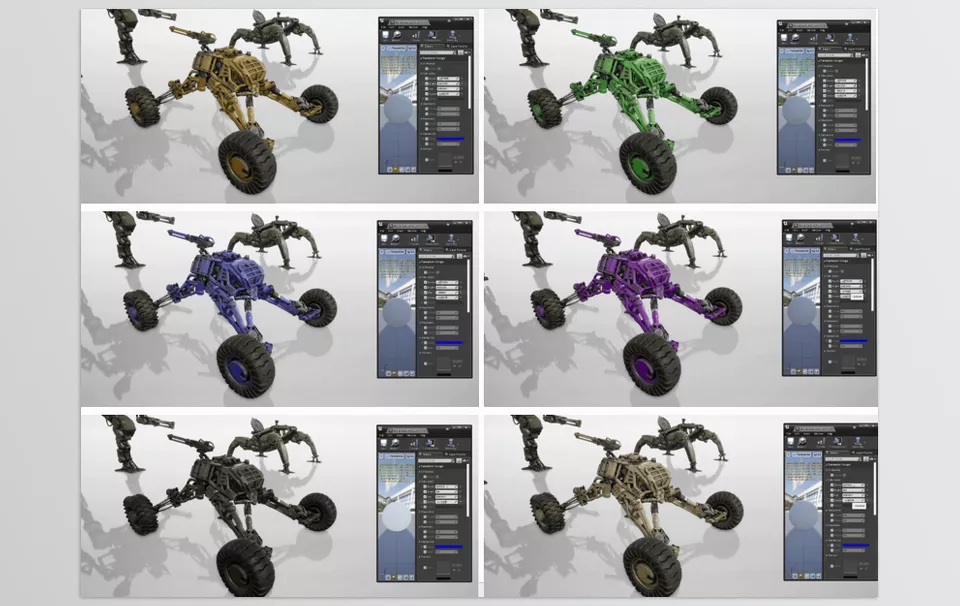
One of the most useful features of this collection is the Mask and Color Preset system. With this feature:
- You can quickly change a robot’s color
- Or change the entire style of the project
- Without dealing with complex material settings
This is especially helpful when you need multiple versions of a design.
🎮 Ready for Any Software
Technically, this package is fully ready to use and not limited to a single software:
- Blender (with Asset Library)
- Unreal Engine (ready project)
- FBX / OBJ for other software
In practice, you just drag and drop and start using it.
⚙️ Optimized and Production-Ready
These models are not just visually appealing—they’re built for real use:
- Clean and optimized topology
- Suitable for close-up rendering
- Textures in 1K, 2K, and 4K resolutions
- Ready for use in games and animation
🎬 What Does It Actually Help With?
Imagine you want to build a scene. Instead of:
- Spending days modeling
- Building details from scratch
Now you can:
- Import the model
- Adjust the pose
- Change the color
- And go straight to lighting and rendering
Mech Squad Collection is not just a model pack—it’s more like a complete toolbox for fast professional robot design. It helps you move away from repetitive tasks and focus on what really matters: design, style, and final output.
🎯 Tips to Make Your Results More Professional
If you’re using packages like Mech Squad Collection, these tips can help elevate your work from average to professional:
🔀 Don’t Just Use—Combine
Try mixing different parts (from Kitbash or even multiple Mechs). This makes your result unique and prevents it from looking like others using the same package.
🎨 Create a Custom Color Style
Don’t rely only on ready-made presets. Adjust Hue, Saturation, and color combinations to define a unique visual identity for your project.
💡 Take Lighting Seriously
A good model won’t shine without good lighting. Use HDRI for base lighting, then add Rim Light or Key Light for a cinematic feel. Lighting can completely change the mood.
🪨 Add Surface Imperfections
Overly clean models look unrealistic. Add:
- Scratches
- Dirt and dust
- Decals (logos or text)
To make the work feel more natural.
🧍 Natural Posing
Default poses often feel stiff. Slightly adjust body angles, arms, or head to add a sense of weight and motion.
🔧 Check Scale and Proportions
Make sure parts are logically sized. Mixing components can sometimes break scale consistency.
🎥 Use Smart Camera Angles
A simple model can look amazing with the right angle. Low-angle shots usually give Mechs a stronger, more powerful feel.
🌫 Depth of Field and Visual Effects
Using Depth of Field, Motion Blur, or even a bit of Fog can make your work much more cinematic.
⚙️ Go Beyond a Simple Render
Don’t just place the model in the scene. Add a simple environment, ground, ambient light, or even particles to complete the look.
🔁 Test Multiple Variations
Quickly try different variations of color, lighting, or pose. This helps you find the best result.
These tips are simple, but they’re exactly what turn an “average” piece into a professional result 👌
✨ Build or Use Ready-Made?
The decision to build your 3D model from scratch or to use ready-made tools and assets depends on your goals. If you’re looking to learn and improve your skills, then building your model from the ground up is the best choice. While it may take longer to create your project from start to finish, you’ll learn more and become more professional in the future.
However, if you have a real project in mind and have deadlines, using ready-made 3D modeling tools is the logical approach. Packages like Mech Squad Collection will save you time and help you produce your project faster. You can focus on the lighting and the visual components of your model instead of the details.
In reality, tools like Mech Squad Collection don’t replace creativity—they act as an accelerator. The smart choice is knowing when to build from scratch and when to use ready-made tools. Combining these two approaches can both increase your speed and improve your final quality.
As mentioned above, Mech Squad Collection is an asset designed for software like Blender. Assets are just one category of Blender’s supporting tools. If you’re interested in exploring other available tools, be sure to check out our Blender tools article.