


Why Doesn’t Your Character’s Face Feel “Alive”?
Are you aware of the Faceit Addon? Have you ever designed an awesome 3D character—with clean modeling, great lighting, and solid materials—but the moment you start animating the face, something feels off? The eyebrows don’t compress the way they should, the smile lacks warmth, and the lip-sync doesn’t quite sit on the audio. Everything moves correctly, yet it feels like the character is just moving—not living.
The truth is, the face is the most sensitive part of any character. As humans, we subconsciously detect the tiniest changes in the eyes and mouth. The smallest mistake in an eyelid movement or the corner of a lip can break the emotion and make the result look artificial. That’s why facial animation isn’t just about moving a few vertices; it’s a delicate combination of anatomy, precise control, and clean execution.
On the other hand, building expressions and setting up a facial rig is usually time-consuming and exhausting. You create dozens of Shape Keys, paint weights, tweak and fix—and still something feels off. Instead of focusing on emotion and performance, you get stuck dealing with technical issues. That’s when a serious question comes up: can’t this process be faster and smarter?

What Is a Facial Rig Anyway?
🎭 What Is a Rig?
A rig is a control system built for a 3D model so it can move. A raw model is just a static mesh; the rig—using bones, controllers, and motion settings—gives it the ability to be animated. Instead of moving vertices one by one, you can create complex movements with just a few simple controls.
🙂 What Is a Facial Rig?
A facial rig is a control system designed for facial parts like the lips, cheeks, eyelids, eyebrows, and jaw. These controls are usually created with bones, Shape Keys, or a combination of both, allowing you to generate different facial expressions.
Smiling, crying, surprise, frowning, speaking, and natural lip-sync all depend on a precise and well-built facial rig. The cleaner and more standardized this system is, the more natural and professional your facial animation will look.
How to Do It Without a Specific Add-on?
If you don’t use any add-ons, Blender itself provides the necessary tools to build a facial rig. Many animators still do it manually. Typically, you have two main paths: working with Shape Keys or using bones and Weight Paint.
The most common methods are:
- Manually creating a Shape Key for each facial expression (smile, frown, blink, etc.)
- Sculpting each expression separately in Sculpt Mode
- Using Rigify or a custom Armature to build facial bones
- Manually weight painting for precise control of lip and cheek movement
- Creating custom controllers to manage movements
These methods are completely standard and professional, and technically have no limitations. If you have enough time and patience, you can build a fully detailed and precise system.
So Where’s the Challenge?
The main issue is time and complexity. If you want to manually create, for example, the 52 standard ARKit expressions, the workload suddenly multiplies. Each Shape Key has to be designed, tested, and refined individually. Facial weight painting is extremely sensitive—especially around the lips, where even the smallest mistake causes unnatural motion. On top of that, if you need structural changes in the middle of a project, fixing everything can become time-consuming and exhausting. It’s doable—but it drains a lot of energy and pulls your focus away from the creative side of the work.
Faceit; When Hard Work Becomes More Logical
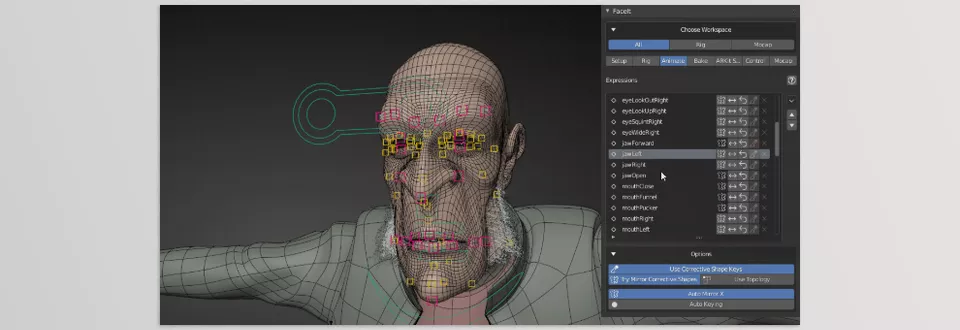
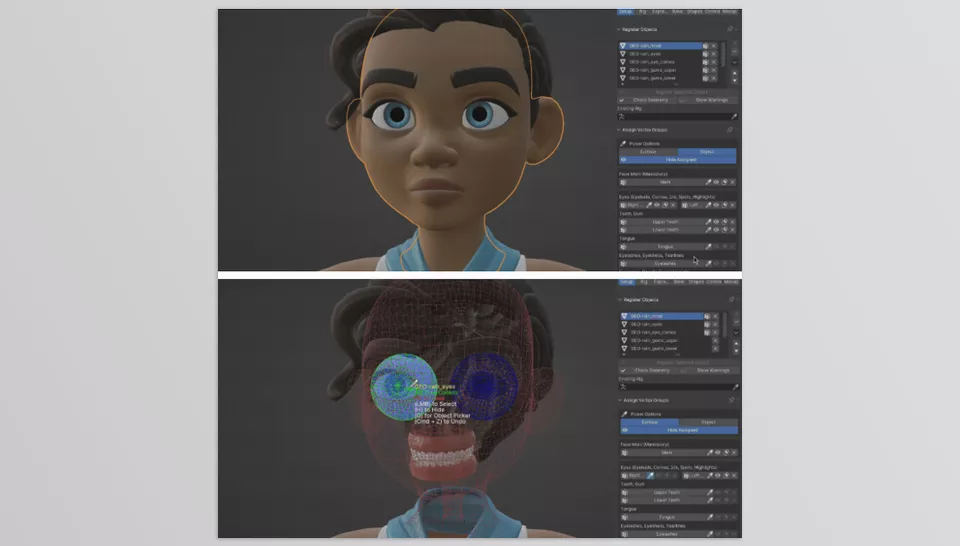
This is where Faceit comes in. A specialized Blender add-on focused on one thing: simplifying facial rigging and preparing characters for animation and motion capture. It’s not magic, and it won’t replace your skills—but it automates or semi-automates a large portion of repetitive, technical, and time-consuming tasks. The result? Instead of building 50 Shape Keys and fixing Weight Paint, you spend more time on emotion and performance.
What Exactly Do You Get with Faceit?
😄 Automatic ARKit Expression Creation
One of its most important features is the automatic generation of the 52 standard ARKit expressions—the same set used for iPhone Face Capture. This means your character quickly becomes ready to connect to:
- iPhone Face Capture
- Unreal Engine
- Unity
- MetaHuman workflow
Without manually designing each expression one by one.
🎯 Semi-Automatic Facial Rig
You simply define the main facial regions and place landmarks on the model. After that, the add-on generates the rig and performs the weight painting. In most cases, the result is clean and acceptable, without requiring heavy corrections. Instead of several days of technical work, you get a manageable and fast workflow.
🎥 Direct Motion Capture Integration
Faceit allows you to import ARKit files, connect to NVIDIA Audio2Face, and even receive and record facial data in real-time. Even more interesting, you can control different facial regions separately—for example, driving the mouth from one source while adjusting the eye movements independently.
🔁 Animation Transfer Between Characters
If you have multiple models, you don’t need to start from scratch for each one. Faceit’s retargeting system lets you transfer facial animation from one character to another. For game projects, series production, or continuous content creation, this feature truly saves time.
🧩 Completely Non-Destructive
One of its most important features is that the workflow is non-destructive. You can go back and modify any stage—even after animation. This flexibility allows you to test and iterate confidently without worrying about breaking the entire system.
Overall, Faceit is a smart shortcut. Not for laziness—but so your energy goes into creativity and better execution, not repetitive technical tasks.
A Few Tips to Make Your Work Look More Professional
Even with professional tools, there are subtle details that can raise the final quality of your work by several levels:
✅ Customize the Expressions
Automatic expressions provide a clean and standardized base—but they’re often too perfect and symmetrical. Add subtle sculpting, introduce slight asymmetry in the smile or eyebrows, and adjust the expressions according to your character’s personality. These small details make the character look more natural and alive.
✅ Control the Intensity of Movements
Not every slider needs to hit 100%. Over-exaggeration—especially in semi-realistic work—quickly looks artificial. Test different ranges and see where the motion appears most natural. Sometimes reducing the intensity of an expression makes the result more professional.
✅ Don’t Render Raw Motion Capture Data Directly
ARKit or other motion capture data usually contains some noise and jitter. Before rendering, make manual adjustments, smooth the curves, and refine the timing of certain movements. This polish is what separates an average result from a high-quality performance.
✅ Spend More Time on the Eyes
The eyes are the most important part of the face. Even if the mouth and eyebrows are perfect, unnatural eyelid motion or gaze direction makes the result look fake. Take look direction, blinking, and micro-movements seriously.
✅ Combine Movements
In real life, expressions don’t happen in isolation. When someone smiles, their cheeks lift, their eyes narrow slightly, and their eyebrows subtly change as well. Try combining expressions to achieve a more natural result.
These small refinements may not take much time, but their impact on the final quality is absolutely noticeable.
So What’s the Bottom Line?
If you work with facial animation—whether for personal projects, game development, professional work, or even if you want to enter the world of motion capture—having a fast and standardized system truly smooths your path. When your foundation is properly built, you don’t have to fight from scratch for every project or spend hours dealing with technical setup. More speed means more time to test, refine, and improve your output.
Faceit isn’t here to replace your skills or dull your creativity. On the contrary, it removes repetitive and time-consuming tasks from your shoulders so you can focus on what truly matters: emotion, performance, and character development. When your tools stop frustrating you, your mind becomes freer—and you can focus on what the character actually feels and how that feeling should be conveyed.
In the end, the audience doesn’t care about rigs, Shape Keys, or technical settings. What they see is a living, believable face. If a tool helps you reach that point faster and more confidently, then it’s doing its job right.
For a clear, step-by-step overview of every Blender tool and its practical applications, our Blender Tools article provides everything you need to master Blender tools confidently.



